Face Enhancer AI: Easiest Method to Enhance Face Features
Ever recorded a video only to realize later that the face looks blurry, washed out, or lacking detail? This often happens in low light, shaky shots, old recordings, or videos taken with front cameras and zoomed-in lenses. But worry no more because you don’t have to reshoot everything. With today’s tools, especially with the rise of artificial intelligence or AI, enhancing face features in videos is easier than ever.
In this article, we’ll show you the best way to enhance face features in videos, using AI-powered solutions that can sharpen details, improve clarity, and make faces look more natural and defined with minimal effort. So, what are you waiting for? Continue reading!

PAGE CONTENT
Part 1. Facial Problems You May Encounter in Videos
Before learning how to enhance face features, it’s important to understand the common facial issues that often appear in videos. These problems usually happen due to poor lighting, low-resolution cameras, movement, or compression, especially in casual or unplanned recordings. Below are some of the most common facial problems you may encounter in videos:
- • Blurry facial details caused by camera shake or poor focus.
- • Low-resolution faces that appear pixelated or unclear when zoomed in.
- • Poor lighting on the face, making features look flat or shadowed.
- • Washed-out or dull skin tones due to overexposure or bad color balance.
- • Facial noise or grain, especially in low-light recordings.
- • Loss of facial detail after compression, common in social media uploads.
But don’t worry if you encounter any of these, especially in your videos, as these problems can still be resolved using dedicated face enhancer AI tools. Moreover, other tools, such as video enhancers, can also help enhance facial features in videos.
Part 2. Best Solution to Enhance Facial Features in Videos
As discussed, enhancing facial features in videos requires a tool that can intelligently restore clarity, sharpen details, and improve overall visual quality without making faces look unnatural. One of the most reliable solutions you can use for this purpose is Vidmore Video Enhancer. Powered by AI technology, this tool is designed to automatically detect and improve facial details, making it ideal for fixing blurry faces, low-resolution footage, and videos affected by compression or poor lighting.
What makes Vidmore Video Enhancer stand out is its balance of power and simplicity. Even if you have no editing experience, you can enhance face features with just a few clicks. From improving old recordings and vlogs to refining social media videos and professional content, this tool delivers noticeable results while saving you time and effort.
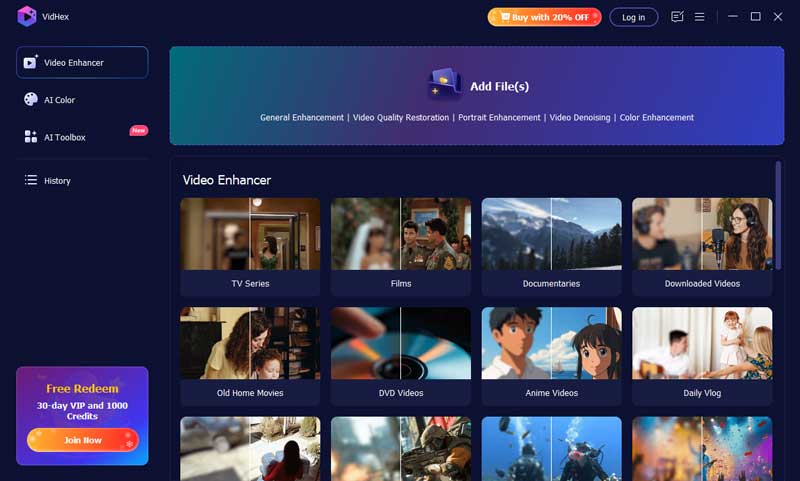
Other Features of Vidmore Video Enhancer
General Enhancement Model:
Reduces noise and improves overall sharpness to deliver clear, high-quality videos in any situation.
Anime Model:
Upscales low-quality anime footage into crisp high definition, bringing back fine lines and vibrant details.
Video Quality Repair Model
Repairs compression artifacts and damaged footage to recover lost video quality.
Detail Restoration Model:
Improves blurry videos by rebuilding missing details and textures for sharper frames.
Video Denoise Model:
Removes grain and visual noise to produce cleaner, smoother-looking videos.
Frame Interpolation Model:
Adds intelligence in-between frames to create smoother, more fluid motion during playback.
Colorize Model:
Adds realistic colors to black-and-white videos, making them look lively and engaging.
SDR to HDR Model:
Boosts color depth and brightness, turning standard footage into a richer, more dynamic viewing experience.
Color Enhancement Model:
Enhances color vibrancy, corrects balance, and improves contrast for more accurate and vivid visuals.
Low-Light Enhancement Model:
Designed for night or dark scenes, it increases brightness and reveals background details for clearer footage.
With these features, Vidmore Video Enhancer serves as a complete and efficient solution for enhancing facial features in videos. Moreover, its simplicity makes it a go-to video enhancer for everyone, especially those who aren’t familiar with using such a tool. Lastly, with its AI integration, it is guaranteed that the video quality is top-notch.
Part 3. How to Use Vidmore Video Enhancer to Enhance Face Features
Once you’ve chosen the right tool, the next step is knowing how to use it properly. The good news is that Vidmore Video Enhancer is designed to enhance face features quickly and hassle-free, even for beginners. With its simple interface and AI-powered processing, you can improve facial clarity, sharpness, and overall video quality in just a few steps
Now, let’s learn how to use Vidmore Video Enhancer exactly to enhance face features in videos.
Step 1. First, you need to download and install the tool on your computer device. Please take note that this is available on both Windows and macOS.
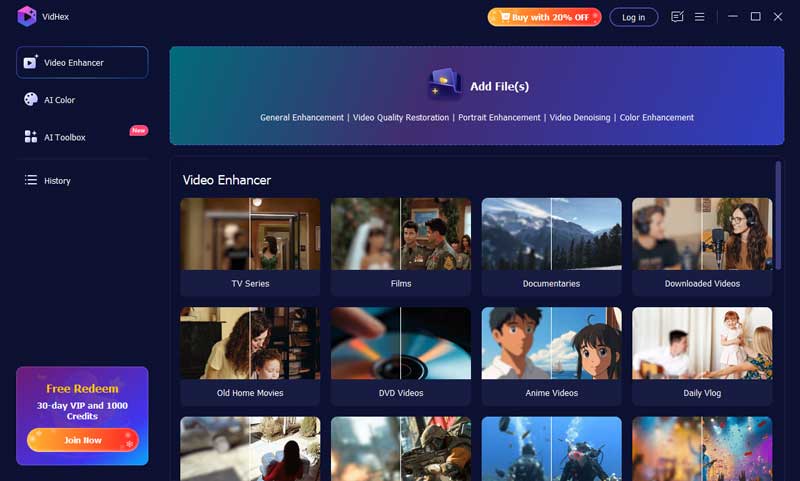
Step 2. Next, click on the Add Files above to import the video that you want to enhance the facial features.
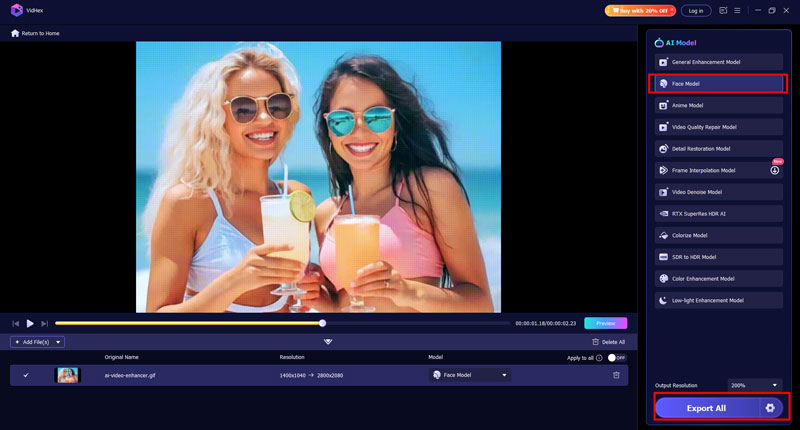
Step 3. Choose Face Model and wait for the processing. Lastly, once you are done, just click the Export button to download the newly enhanced facial feature of your video.
Quick and easy, right? You can also explore the other features that you can use to enhance your video. The steps are just the same. You just need to choose which feature you’re going to use.
Part 4. FAQs about Enhancing Face Features in Videos
Can AI enhance face features in low-light or blurry videos?
Yes. AI face enhancer tools are especially effective for low-light and blurry videos. They can reduce grain, brighten facial areas, restore lost details, and improve overall visibility, making faces clearer even when the original footage was poorly lit or shaky.
Is it possible to enhance face features in old or compressed videos?
Absolutely. AI video enhancers can repair compression artifacts, rebuild missing facial details, and improve resolution in old or heavily compressed videos. This is particularly useful for restoring archived footage, social media downloads, or older recordings with low visual quality.
Does enhancing face features also improve overall video quality?
Yes. When you enhance face features in videos using AI, the tool often improves the overall video quality as well. This includes better sharpness, reduced noise, improved resolution, and clearer details across the entire frame, not just the face.
Can I enhance multiple faces in one video at the same time?
Yes. AI video enhancers can detect and enhance multiple faces in a single video. This is useful for group videos, interviews, meetings, or family recordings where several faces appear and need improved clarity.
Is AI face enhancement safe for personal and private videos?
Yes, as long as you use offline desktop software like Vidmore Video Enhancer. Since the video is processed directly on your computer, your personal footage remains private and is not uploaded to external servers.
Conclusion
Now that you know how to enhance face features in videos, you no longer have to worry about blurry, dull, or low-quality footage. With the help of AI-powered tools like Vidmore Video Enhancer, you can easily restore facial details, improve clarity, and boost overall video quality in just a few simple steps. Whether you’re working with old recordings, low-light clips, or everyday videos, achieving clearer and more natural-looking results is now within reach. Try Vidmore Video Enhancer today and give your videos the facial clarity they need.