Upscaled 4K and Native 4K: Everything You Need to Know
When discussing modern displays and streaming platforms, the terms Native 4K and Upscaled 4K often come up. But little did you know, both of them represent different viewing experiences. The Upscaled 4K clip has a lower resolution, such as 1080p or 2K. It also uses algorithms to artificially stretch and enhance it to fit on a 4K screen, enhancing sharpness. On the other hand, Native 4K refers to video captured and delivered at the true resolution of 3840 x 2160, ensuring clarity and maximum detail. Now, do you want to know more about Upscaled 4k and Native 4K? In that case, you can read this post for more insights into the topic. We will also teach you how to upscale your videos up to 4K. Thus, come here and learn more.

PAGE CONTENT
Part 1. What is Upscaled 4K and Native 4K
Are you interested in learning about Upscaled 4K and Native 4K? Then, you can get the information you need in this section.
What is Upscaled 4K?
Upscaled 4K refers to video content that comes from a lower resolution, such as 1080p (Full HD) or 2K. It is also considered digitally enhanced to be compatible with a 4K display. This procedure uses algorithms to insert extra pixels and sharpen details, essentially stretching the image to match the 3840 x 2160 resolution of a 4K screen. While upscaling can improve clarity and reduce visible blur compared to simply displaying lower-resolution video, it cannot make new details that weren't captured in the source. It only means that the result often looks less crisp than a legitimate 4K.
What is Native 4K?
When talking about Native 4K, it is a video that has been captured, delivered, and processed at full 3840 x 21260 resolution from the start. It contains authentic pixel data, resulting in finer details, sharper textures, and more lifelike visuals that are incomparable to those of upscaled videos. The good thing about Native 4K is that it can offer the highest possible fidelity for movies, games, and streaming, since it doesn't rely on artificial enhancement.
Part 2. Differences Between Upscaled 4K and Native 4K
Want to learn more about Native 4K and Upscaled 4K? Then, you can check the simple table below. After that, we will provide a more detailed explanation to help you gain further insights.
| Upscaled 4K | vs. | Native 4K |
| Starts from lower resolutions (e.g., 1080p or 2K). | Source Resolution | Captured and rendered directly at 3840 × 2160 pixels. |
| Artificially enhanced; lacks true fine detail. | Image Detail | Contains authentic pixel-level detail. |
| Improved compared to the original lower resolution, but may look softer. | Sharpness | Crisp, clear, and highly defined. |
| Uses algorithms to stretch and interpolate pixels. | Processing | No interpolation; every pixel is natively recorded. |
| Better than standard High Definition, but not as immersive as native 4K. | Visual Quality | Superior realism, depth, and texture. |
| Noticeable improvement over HD, but may show artefacts or lack of fine detail. | Viewer Experience | True-to-life visuals with maximum accuracy and clarity. |
| Streaming services, DVDs, or games optimized for 4K displays. | Use Cases | High-end Blu-rays, native 4K streaming, professional video production. |
Summary
After looking at the table above, upscaling to 4K is a digital enhancement technique that converts lower-resolution videos to 4K to fit on a 4K screen. This type of algorithm can insert extra pixels and sharpen edges, making a video look clearer than the original version. On the other hand, the Native 4K is a naturally captured video, delivering genuine 3840 x 2160 resolution. Each pixel is authentic, providing a sharper, more detailed, and lifelike visual.
Part 3. How to Upscale Video to 4K
Want to learn how to upscale your video to 4K? Well, you must have an excellent tool to achieve your desired result. Thankfully, we can recommend Vidmore Video Enhancer. When it comes to upscaling your video to 4K, there is no doubt that this software is the best option. It can provide all the features you need. You can access its AI-powered technology to enhance videos accurately. The good part here is that it has a fast enhancement process, allowing you to obtain the result in just a second. What's more, you can also modify some of the video's parameters, like bitrate and video encoder. You can even save the video in various formats, such as MP4, MKV, WMV, AVI, and more. With that, we can tell that Vidmore Video Enhancer is the most reliable video upscaler.
More Features
- • It can upscale various video types.
- • The program can offer a video noise remover.
- • It supports AI-powered technology.
- • The Color Enhancement feature is available.
If you want to start upscaling your videos, follow the instructions below.
Step 1. Download Vidmore Video Enhancer on your computer. You can access it on your Mac or Windows. Then, start the video upscaling process.
Step 2. After launching the main UI, select the Add Files option to add the video you want to upscale.
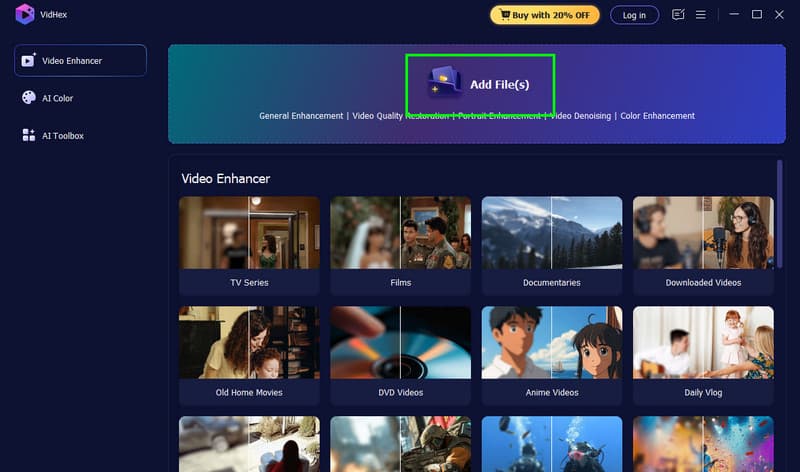
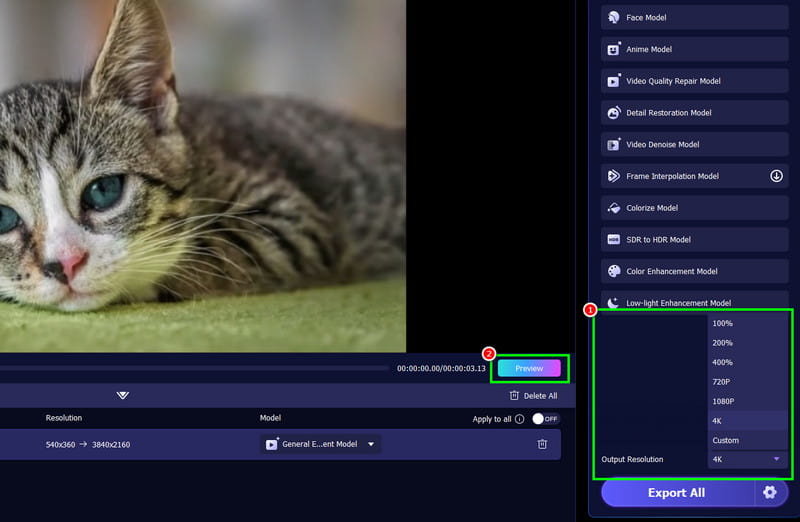
Step 3. From the right interface, go to Output Resolution, then tap 4K. Then, you can check the result from the Preview feature.
Step 4. Finally, hit the Export All button below to start saving the upscaled video on your computer.
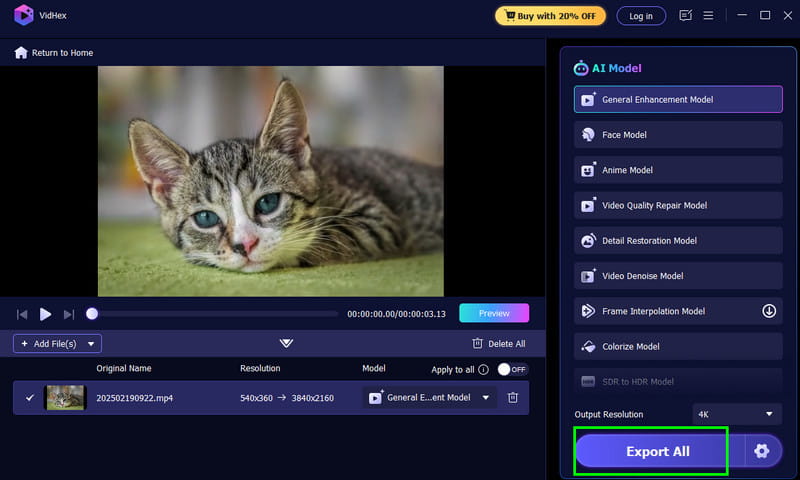
After following this method, you can see that Vidmore is among the best real-time video upscalers available to achieve your desired results. You can easily and smoothly upscale your video to 4k. Thus, rely on this tool and enhance your videos as you prefer.
Part 4. FAQs about Upscaled 54K and Native 4K
Does Upscaled 4K look good as Native 4K?
Definitely, no. The Upscaled 4K is just better than HD but appears less detailed than native 4K, which delivers sharper, lifelike visuals.
Where will I encounter Upscaled 4K?
You can see upscaled 4K in various streaming services, DVDs, and games for optimized 4K displays, especially when the original video was not produced in true 4K.
Is upscaled 4K worth it?
Absolutely. Yes. If you are watching your older video or HD sources on a 4K TV. Compared with lower-resolution videos, 4K can offer you a better viewing experience.
Conclusion
Now you have learned everything about Upscaled 4K and Native 4K. You even get enough insights about their differences. Plus, if you are looking for the best program to enhance your standard video to 4K, we suggest using Vidmore Video Enhancer. This video upscaler ensures you get the best possible video resolution for a better viewing experience.