Best and Free Methods to Record TV Live [2026 Updated]
Recording a TV live is a simple task when using Windows and Mac. With the right tools, you can capture your favorite movie, sports events, shows, or broadcast directly to your device for later viewing. In this guide, we will walk you through the best methods you can follow to effectively record live TV. You will also get more ideas on how to choose the most reliable TV recorder that can help you achieve your main objective. Thus, read everything in this guide and get more insights about the topic.

PAGE CONTENT
Part 1. How to Choose a TV Live Recorder
Do you want to learn how to choose the best TV live recorder? Then, you can proceed to this section.
Compatibility
When choosing the best recorder, always ensure that the software is compatible with various platforms, like Windows and Mac. This way, you don't need to look for a separate program when using another system.
Record Quality Options
Another thing you must consider is the program's quality option. Always look for a recorder that lets you adjust the bitrate and resolution. It is an ideal process if you want to balance the video quality with storage space. A high-definition recording is perfect for sports and movies, while low settings can save storage space.
File Format and Playback Support
Choose a recorder that can save captured TV in various formats, like MP4 and MKV. It is perfect if you want to play your video on various platforms and media players.
Ease of Use and Interface
One of the most important factors you must consider is the recorder's main layout. Ensure that the recording process is straightforward and smooth. This way, no matter if you are a beginner or a skilled user, operating the recorder will be a simple task.
Extra Editing Features
The TV live recorder could offer basic editing tools, such as croppers, trimmers, effects, and more. It is perfect if you want to give a simple touch to the captured video before the final saving process.
You can check the comparison table below and take a peek at the most reliable TV live recorder you can operate.
| TV Live Recorder | Vidmore Screen Recorder | OBS Studio | QuickTime Player |
| Best For | Beginners and skilled users | Advanced users and streamers | Mac users needing basic recording |
| Key Features | Record live TV, screen, audio, webcam Scheduled recording Flexible settings | Free & open-source Scene transitions, audio mixing, and plugins Live streaming integration | Pre-installed on macOS Simple screen and audio recording Lightweight and stable |
| Ease of Use | Very user-friendly with a clean interface; minimal setup required. | Steeper learning curve; powerful but requires configuration | Extremely easy to use; limited features compared to dedicated recorders. |
| Compatibility | Windows and Mac | Windows and Mac | Mac |
| Supported Format | MP4, WMV, MOV, AVI, GIF, MP3, AAC, M4A | MP4, MKV, FLV, TS, MOV | MOV (default), can export to MP4 via conversion |
Part 2. Best Method to Record TV Live on Mac/Windows
How do you record a live TV on your PC (Windows) and Mac? If you are looking for an exceptional recorder that can offer the best method, we suggest using Vidmore Screen Recorder. This recorder is perfect for recording live TV since it can give you all the necessary features. You can record the content with the best quality and save it to your preferred format, such as MP4, MKV, AVI, FLV, MOV, WMV, and more. It also has a simple user interface that is ideal for non-professional users. Plus, you can also record the audio from the TV Live. With that, you can record both video and sound, allowing you to obtain the full content without any problem. The best part here is that you can also insert and record your webcam while watching, allowing you to give comments during the process. Thus, if you need the best TV Live recorder, it would be better to use this program.
More Features
- • The recorder can record the screen smoothly.
- • It can record various content, such as gameplay, camera, window, tabs, and more.
- • The program can offer various editing functions, such as cropper, trimmer, converter, effects, etc.
- • It can offer its Snapshot feature for taking screenshots during playback.
To start recording your Live TV shows, see the detailed instructions below.
Step 1. Download Vidmore Screen Recorder on your Mac or Windows. After that, start launching the recorder to start the process.
Step 2. From the layout, proceed to the Screen Recorder feature and start setting up your recording. You can choose between the Full and Custom options, whether you want to record the whole screen or a specific screen area.
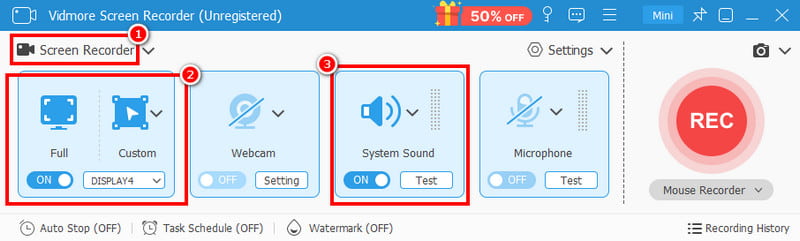
You can also turn on the System Sound option to record the audio from the TV live.
Step 3. Now, tap the REC button to start the recording process. After that 3-second countdown, the recording will begin. With that, you can proceed to the TV shows on your screen.
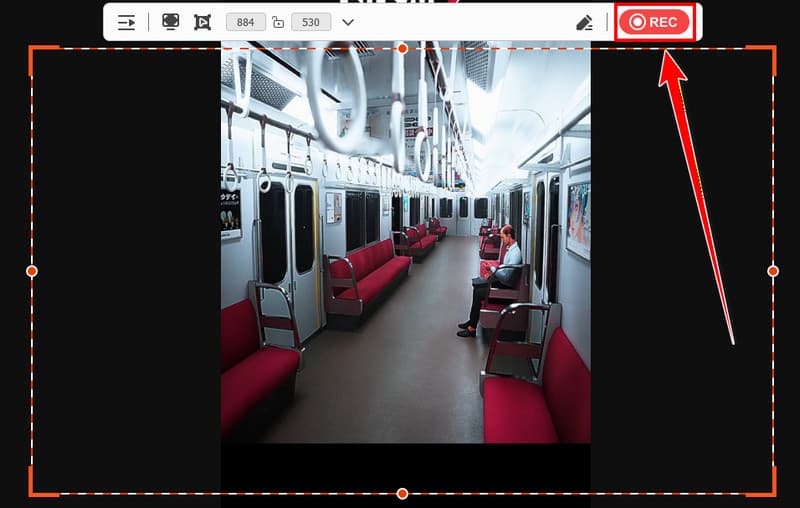
Tap Stop to finish the recording process.
Step 4. Once the preview shows up, you can tap the 'Play' button to check the recording. If you are satisfied with the result, hit the Export button below.
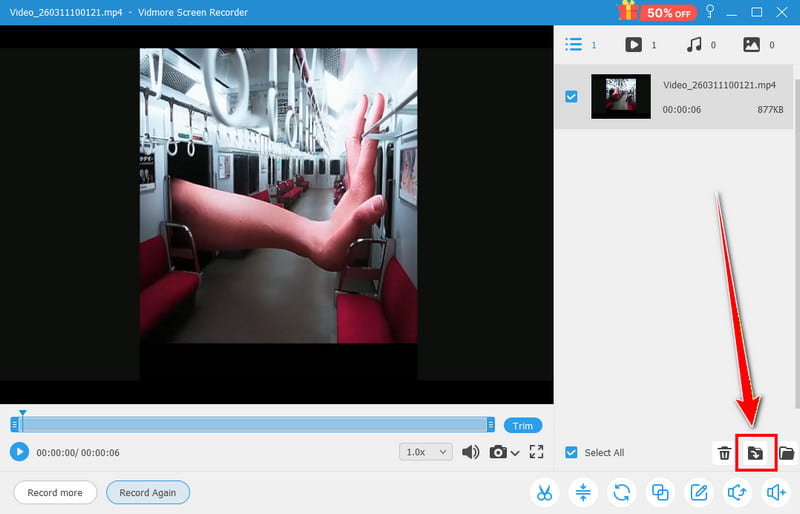
Part 3. Free Method to Record TV Live on Mac/Windows
How to record TV Live on YouTube TV? If you want to record your live TV shows or any content for free, we recommend using OBS Studio. This open-source screen recorder is ideal if you want to record any content on your Windows or Mac. Plus, the recorder has a comprehensive user interface, making it suitable for all users. The best part here is that you can beautify the video by using various effects from the platform. You can access chroma keys, render delay, color correction, and more. You can also record the audio and adjust the audio settings based on your preferred output. With that, OBS is perfect for capturing both your audio and video smoothly.
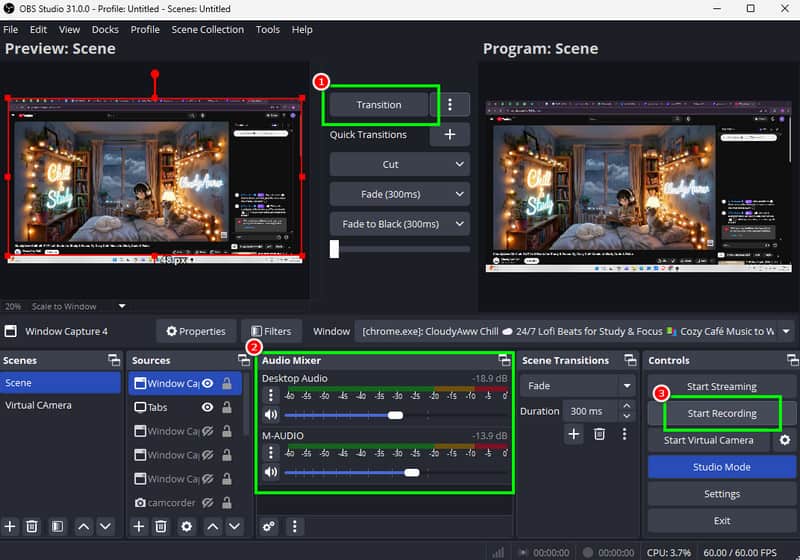
Pros:
- The program is 100% free, making it ideal for all users.
- It can offer various editing functions to improve the overall appearance of the video.
- The software lets users add various sources for an effective recording process.
- It can record various content, such as gameplay, webinars, videos, webcam, and more.
- It is simple to access.
Cons:
- Some of the editing features are hard to locate.
- The software is resource-intensive, so you must have enough storage space.
Part 4. Free Method to Record TV Live on Mac
Are you a Mac user and want to record live TV shows effectively? In that case, the ideal tool you can use is QuickTime Player. This media player is not only helpful for playing media files. It also has a recording feature, allowing you to capture and record various content from your screen, including live TV shows. Since this software is built in, there is no need for an installation process. What we like here is that the process of recording TV live is simple since its main interface is neat and comprehensive. Plus, it can also offer basic editing tools. You can trim, split, rotate, and combine captured content, allowing you to improve your videos.
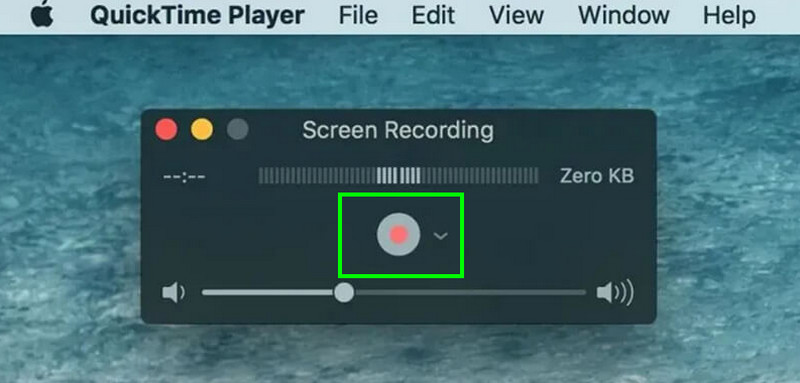
Pros:
- The main interface of the recorder is easy to understand.
- The recorder can run smoothly without heavy system resources.
- It is handy for instant capture for live streams and broadcasts.
Cons:
- The program can't offer a scheduling feature.
- It can only offer a few editing features for improving captured content.
- The recorder is only accessible to Mac computers.
Part 5. FAQs about Record Live TV
Can I schedule a recording automatically?
If you are using a recorder with scheduling features, then you can schedule your recording effectively. To schedule a record, you can access Vidmore Screen Recorder since it is among the recorders you can use to access the scheduling feature.
Is it illegal to record a live stream?
It depends on your purpose. If you only want to record a live stream to watch it repeatedly, it is okay. However, if you are going to post it without the consent of the owner, this will be considered illegal.
Which recorder is ideal for beginners?
If you want an easy-to-use recorder, we suggest using Vidmore Screen Recorder. With this software, you can access all the features easily. You can even record any content from your screen without any issue, making it ideal for non-professional users.
Conclusion
Well, there you go! If you want to record a live TV show, you can use this tutorial to get all the methods you need. You even discovered how to select the best recorder. Also, if you want an exceptional TV live recorder that can offer a simple recording process, feel free to access Vidmore Screen Recorder. This program allows you to record/capture your screen with the best video and audio quality, which makes it a powerful recorder for users.