What are 4K UHD and HDR, and How to Obtain 4K UHD Videos
In terms of modern displays, two terms often dominate the conversation. These are 4K UHD and HDR. While both promise a better viewing experience, they focus on different aspects of picture quality. 4K UHD refers to resolution, offering sharper detail with four times the pixels of Full HD. On the other hand, HDR enhances contrast and color, making images look more lifelike and dynamic. Knowing the difference between these technologies is key to selecting the right setup for your needs, whether you're streaming videos, gaming, or upgrading your home theater. In this article, we will give you a detailed explanation about 4K UHD and HDR. You will also get more insights into their differences and methods on how to get 4K UHD videos for better video playback. Without anything else, read this post as we discuss everything about the topic.

PAGE CONTENT
Part 1. What is 4K UHD
4K UHD (known as Ultra High Definition) is a display resolution that packs in 3,840 x 2,160 pixels, which is about four times the detail of standard Full HD (1080p). It only means sharper pictures, crisper text, and visuals that look much closer to real life. Whether you're watching videos, gaming, or working on creative projects, 4K UHD gives you a level of clarity that makes everything feel more immersive. Moreover, it has become the standard for most modern TVs, monitors, and even laptops, changing older resolutions like 720p and 1080p.
The good part here is that 4K UHD isn't just about more pixels. It is about the experience those pixels create. With higher resolution, you can go closer to the monitor without noticing and viewing blur, enjoy larger displays without losing sharpness, and view fine details that would otherwise be missed. For everyday users, this means richer visuals when streaming Netflix or YouTube, and for professionals, it means more workspace and precision in design or video editing.
You can also check: An honest review of MP4Fix Video Repair Tool.
Part 2. What is HDR
When it comes to HDR, or High Dynamic Range, it is a display technology that makes images look more lifelike. It is about expanding the range between the darkest blacks and the brightest whites, while also boosting color depth and vibrancy. You will see richer and better shadows, brighter highlights, and more nuanced details that standard displays often miss. Whether you're watching a certain video, gaming, or scrolling through photos, HDR helps the picture pop with realism, skin tones look natural, dark scenes reveal subtle textures instead of turning into flat black screens, and sunsets glow with intensity.
Part 3. Differences Between 4K UHD and HDR
HDR and 4K have differences. If you want to get more insights about the two, you can check the table we have provided below.
| 4K UHD | vs. | HDR |
| 3840 x 2160 pixels (around 8.3 million pixels). | Main Focus | Expands contrast and color range for more realistic images. |
| Improves sharpness, clarity, and fine detail. | What It Improves | Improves brightness, shadows, highlights, and color depth. |
| Resolution standard used in TVs, monitors, and streaming. | Technology Type | Display and content technology layered on top of HD or 4K. |
| Requires a 4K-capable display and 4K content. | Requirements | Requires HDR-capable display and HDR-mastered content. |
| Best for sharper text, detailed graphics, and large screens. | Best For | Best for cinematic visuals, realistic lighting, and vivid colors. |
| Can exist without HDR (4K SDR). | Independence | Can exist at different resolutions (1080p HDR, 4K HDR, etc.). |
After viewing the comparison table, we can tell that the 4K UHD is all about resolution. It can provide a sharper and more detailed output. On the other hand, the main focus of HDR is on the image's look by improving contrast, brightness, and colors. UHD ensures clarity while HDR adds realism. Thus, if your main goal is to have crisp details on your content, 4K UHD is the main key. If you want more immersive visuals with lifelike colors, then HDR can make a difference.
Part 4. How to Get 4K UHD Videos
Watching a video with a 4K UHD resolution will have a stunning viewing experience. If you want to get a higher resolution, you must have a professional tool to enhance your videos. Thankfully, we have a recommendation - VidHex Video Enhancer. With the help of this tool, you can get a 4K UHD video instantly.
VidHex adopts advanced AI-powered technology. It can help you enhance videos in color, resolution, face, frame and more with various AI models. Although the features are powerful, this video enhancer has an intuitive interface and simple operations. You can also enhance any type of video, like anime, vlogs, documentaries, and more. So, if you want to achieve a satisfying video playback, try this program.
More Features
• It can upscale video to 1X, 2X, 4X, 720p, 1080p, 4K and more.
• Support various video formats, such as MP4, MOV, MKV, WMV, and more.
• Work efficiently with fast upscaling speed and batch enhancement.
• Easy to use with AI automatic upscaling tech.
To get a 4K UHD video, you can follow the steps below.
Step 1. Download VidHex Video Enhancer on your desktop. After the process, launch it to begin the video enhancement.
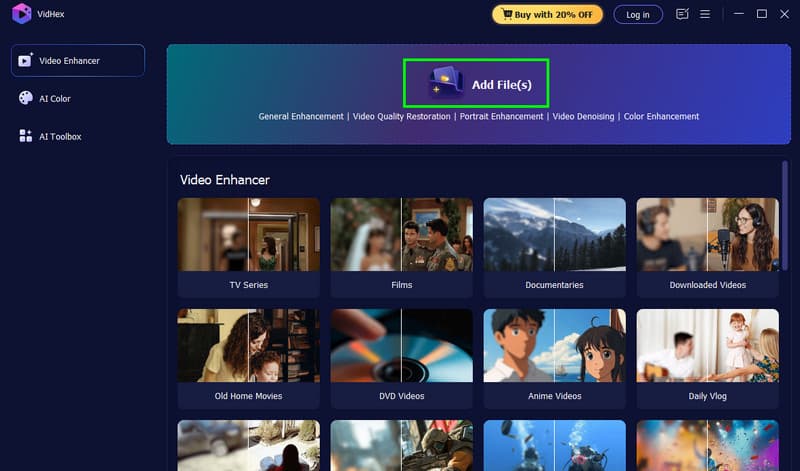
Step 2. After you run the software, hit the Add Files button above to insert the video you want to enhance.
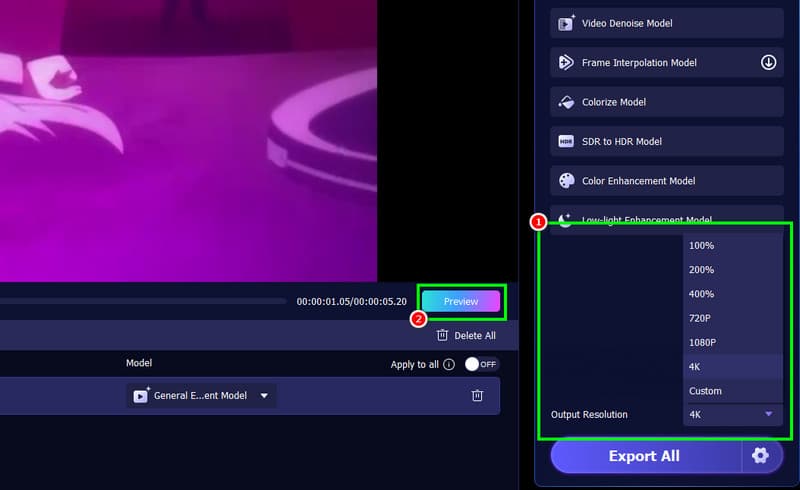
Step 3. You can now go to the Output Resolution section to select the 4K option. Then, to check your video, you can click the Preview button to compare the effect before and after the upscaling.
Step 4. Once satisfied with the result, hit the Export All button. After saving it, you can now enjoy the video.
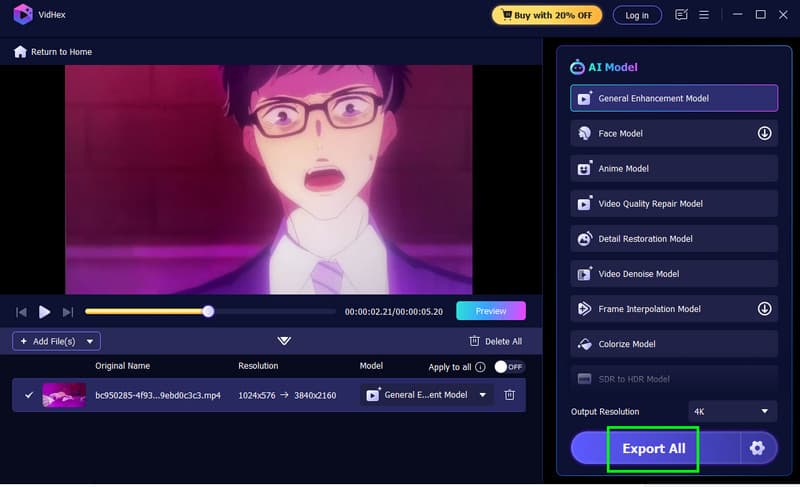
Thanks to this process, you can easily get a 4K UHD video for better video playback. The good thing about the software is that it can offer various features. It can support various video types, AI enhancement models, face enhancement features, supports numerous output formats, and more. With that, if you want the best video enhancer, look no further than VidHex Video Enhancer.
Part 5. FAQs about 4K UHD vs. HDR
Is 4K HDR?
Not exactly. HDR and 4K are two different technologies. It means that a monitor can be 4K without HDR or HDR without 4K. Modern displays often combine them for a better resolution and color.
Are HDR and 4K necessary for a better experience?
Absolutely, yes. If you want a satisfying video playback, you must have both 4K and HDR since they are responsible for giving you an excellent resolution, color, contrast, and various necessary elements.
Which is ideal for gaming, 4K or HDR?
It depends on your needs. If you want a better and sharper graphic, 4K is better. If you want a realistic color and lighting, HDR is perfect.
Conclusion
Now you have learned about 4K UHD and HDR. You also get to know more about their differences. Thus, read here and learn more about the two. In addition, if you want to get 4K UHD videos, we suggest using Vidmore Video Enhancer. With this program, you can get the best out of your video, ensuring a satisfying video playback.