
How to Fix a VHS Tape: Detailed Step-by-Step Guide
VHS tapes are the best way to preserve old videos. It can even hold priceless memories and irreplaceable recordings. However, over time, tapes can become damaged, dusty, tangled, or worn out, leaving you worried that their contents or memories might be lost forever. The good news here is that with a little care, you can easily repair common issues and bring your tapes back to life. If you are looking for an excellent way to fix VHS tapes, you are in the right place. In this guide, we will provide all the information on the best way to fix your tape, including common problems and tips to preserve it. Thus, check this post and learn more.

PAGE CONTENT
Part 1. Understanding the Common VHS Tapes Problems
Come to this section and view the clear breakdown of the most common VHS tape problems that you might encounter.
Broken or Snapped Tape - The magnetic tape inside can tear or snap, often near the beginning or end. This needs careful splicing to reconnect.
Creased or Wrinkled Tape - If the VHS tape is folded or crumpled, playback will display distorted images and audio. This problem occurs when the tape jams inside the VCR.
Gamaged Cassette Shell - The plastic housing can break, causing the reels to misalign or preventing smooth playback.
Fuzzy or Static Playback - Dirty heads, tracking issues, or worn tape can cause fuzzy images, jumping screens or static noise. Sometimes, the best solution to address this problem is to clean the VCR.
Sticky Tape - A VHS tape kept in humid environments may develop mold or sticky residue, which can damage both the VCR and the tape.
These are the common problems you might encounter when dealing with your VHS tapes. If you are looking for an excellent solution to repair your tapes, see the previous section.
You can also visit: Easiest method to convert VHS to DVD successfully.
Part 2. How to Repair Physically Damaged VHS Tapes
Do you wonder how to fix a broken VHS tape effectively? In that case, review the information in this section and proceed with your tapes.
Splice Broken Tape
When the magnetic tape inside a VHS tape snaps, carefully cut away the damaged section and reconnect the ends using a special splicing tape. Make sure the cut is straight and smooth to avoid playback issues. Note that this repair method may slightly shorten the recording, but it preserves the rest of the content. Plus, always avoid using regular household tape, since it can gum up the VCR.
Replace the Cassette Shell
If there is a crack in the plastic housing or it can't close properly, it's better to transfer the reels to a new VHS shell. It includes unscrewing the damaged case, carefully moving the reel, and securing it in the replacement shell. This method is the safest solution to restore the overall functionality without touching the tape itself. Plus, this solution is especially useful when the tape reels are intact, but the main housing is broken.
Untangling Jammed Tapes
Inside the housing, the tape can sometimes get twisted or jammed. To fix it easily, carefully untangle the tape and wind it back onto the reels. In addition, you must smooth out any wrinkles with gentle handling, as creases can cause playback distortion. Note that you must have patience to avoid tearing the tape.
Cleaning Mold or Debris
Since most old tapes are stored in damp areas, they can develop mold and sticky residue. To fix this issue, open the shell and carefully clean the tape surface. You can use a lint-free cloth (clean) and isopropyl alcohol. When cleaning, avoid soiling the tape, as excessive moisture can damage it. With this process, you can prevent the mold from spreading to your VCR.
Rewinding and Re-aligning Reels
The tape may not play properly if the cassette's reels are misaligned. Ensure both reels are correctly installed, open the shell, and manually rewind the tape. It prevents further jamming and helps restore fluid flow. This simple solution often fixes playback issues caused by unequal tension.
Part 3. How to Fix Poor Video Quality after Digitization
Did you digitize your video, but still got poor video quality? This happens when digitizing videos from various platforms, especially VHS tapes. The good news is that you can enhance video quality with a powerful video enhancer, such as Vidmore Video Enhancer. With this program, you can be sure that improving video quality is straightforward. The good part is that you can select the video quality you prefer, such as 1080p, 2K, or 4K. You can also choose your desired format, bitrate, and more.
What's more, the program can offer a range of AI enhancement models. It includes the face model, video noise model, colorize model, general enhancement model, and more. Thus, if you are looking for an ideal tool to enhance low-quality videos, Vidmore Video Enhancer is the best option.
More Features
- • The program can enhance video smoothly and quickly.
- • It supports numerous input and output video formats, including WMV, MP4, MKV, FLV, AVI, and more.
- • It offers AI-powered technology to deliver accurate results.
- • The software can include a Preview feature that shows the result.
To start improving your low-quality video, follow the instructions below.
Step 1. Download Vidmore Video Enhancer on your Mac or Windows computer. Then, install it to begin the video enhancement process.
Step 2. After launching the main interface, click the Plus button to add the video you want to enhance.
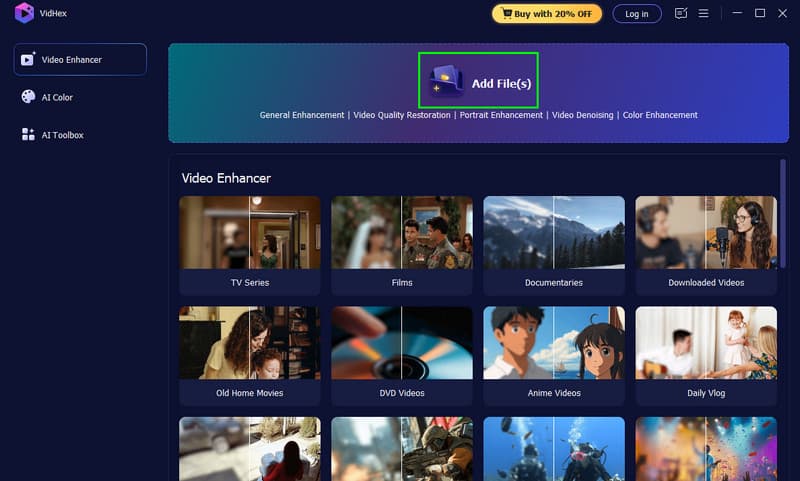
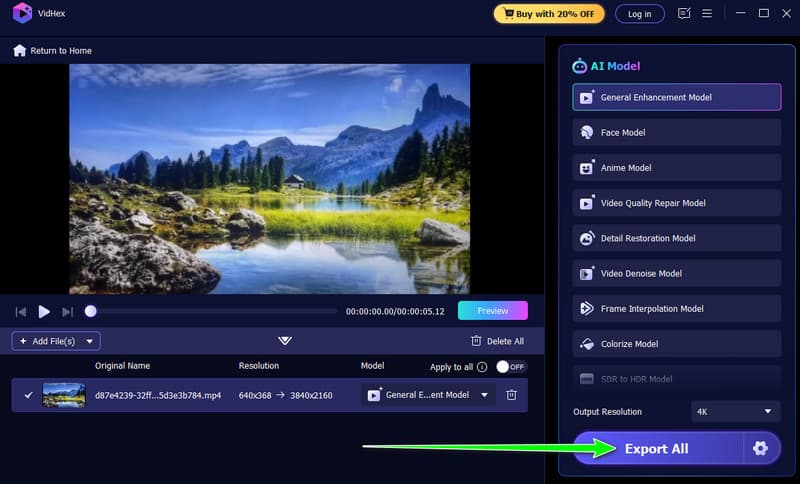
Step 3. From the right-hand interface, click General Enhancement Model. This feature can automatically enhance the overall appearance of your video.

You can also proceed to the Output Resolution section and choose your preferred quality.
Step 4. To complete the process, click the Export All button below.
Part 4. Tips for Long-Term VHS Tape Preservation
Read the tips below to learn how to preserve your VHS tape for long-term use.
- • Always store VHS tapes in a cool, dry area, as heat and humidity are their enemies.
- • You can also store the VHS tape vertically to reduce pressure on the reels.
- • It is suggested to avoid magnetic fields. Too much exposure can erase and distort recordings.
- • Always use a protective case to cover and secure the reels inside.
- • You also need to digitize your VHS content, as not all devices support this format. You can convert content to various formats, including MP4, MOV, AVI, M4V, and more.
Conclusion
To fix VHS tapes successfully, this tutorial offers all the solutions you need. This post also introduces common issues with your VHS tapes. With that, to learn everything, always read this article. Plus, if you want to enhance your poor-quality videos after digitization, you can rely on Vidmore Video Enhancer. This video enhancer lets you enhance your videos to the highest quality.