
Best Way on How to Increase Your FPS on Marvel Rivals
If you are playing Marvel Rivals and notice your gameplay stuttering or frames dropping during intense battles, you are not alone. Many players are seeking ways to boost their FPS and achieve smoother performance. Whether you are running on a mid-range setup or a high-end rig, optimizing your system settings, modifying in-game options, and making practical adjustments can enhance visual clarity. Do you want to learn how to increase your FPS on Marvel Rivals? Stay with us as we provide the best solutions you can apply. We will also offer the most recommended system requirements for better gameplay. Thus, read here and learn everything.

PAGE CONTENT
Part 1. What is FPS
Frame Per Second, also known as FPS, refers to the number of images that your computer or console can display and render every second while running a game. In gaming, FPS is a key performance metric because it directly affects gameplay responsiveness and smoothness. In addition, the higher frame rate means the game updates more frequently, resulting in fluid movement and faster reaction to player input. On the other hand, a low frame rate can cause stuttering, lag, or choppy visuals, negatively affecting both the experience and competitiveness in fast-paced titles.
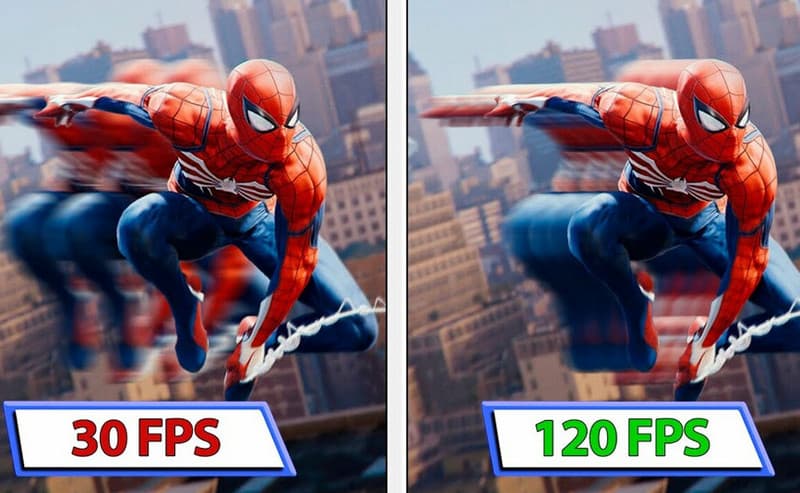
Furthermore, most gamers aim for at least 60 FPS, which is widely considered the standard for smooth gameplay. For a better and satisfying gaming experience, you must aim for 120 FPS or higher to gain an edge in precision and reaction time. Lastly, achievable FPS depends on your hardware, including the GPU, CPU, and RAM. It also includes game optimization and settings, such as resolution and graphics quality. By balancing these factors, gamers can maximize performance and enjoy a more responsive, immersive experience.
Part 2. Why Does FPS Matter on Marvel Rivals
An FPS can play a vital role in gaming. It can also offer benefits that enhance your gaming experience. To get more insights on why FPS matters, read all the information below.
Improve Gameplay Fluidity
A higher FPS ensures smoother, more natural movement and animation, making combat sequences more immersive. Plus, with a consistent frame rate, transitions between attacks, abilities, or character movements will feel seamless rather than laggy or choppy. The fluidity enhances the overall enjoyment while avoiding Marvel Rivals frame drops.
Reduced Input Lag
The FPS directly affects how quickly your actions are reflected on your screen. With a higher frame rate, the delays between your game's response and input are minimized, offering you a more immediate sense of control. In matches, reduced input lag can be the difference between landing an important ability and missing it completely.
Improved Reaction Time
In fast-paced gameplay, especially in battles, every millisecond counts, and higher FPS offers more visual updates per second. It lets players process in-game events more quickly, such as spotting an enemy's movement or reacting to sudden attacks. With that, you can respond more rapidly and effectively, giving you a competitive edge in intense encounters.
Better Visual Clarity
A higher frame rate makes movement appear clearer and crisper, reducing blurriness during rapid movement. This clarity makes it easier to track opponents, maintain situational awareness, and follow projectiles. With sharper visuals, you can make more accurate decisions and avoid mistakes that often occur when the screen feels cluttered or unclear.
You can also check: Detailed methods on how to fix blurry videos sent from iPhone.
Part 3. How to Adjust In-Game Settings to Avoid Marvel Rivals Frame Drops
Want to boost Marvel Rivals FPS and avoid frame drops? Then, the best thing you can do is to adjust the in-game settings. You can check all the details below to change your settings for a better experience.
For Marvel Graphic Setting
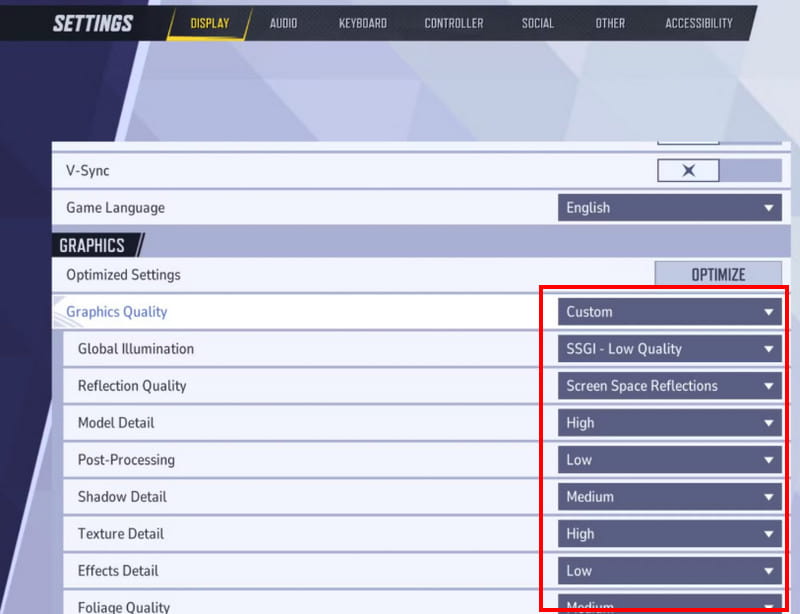
- • Graphics Quality: Custom
- • Global Illumination: SSGI – Low Quality
- • Reflection Quality: Screen Space Reflections
- • Model Detail: High
- • Effect Detail: Low
- • Post-Processing: Low
- • Shadow Detail: Low
- • Texture Detail: Low
- • Foliage Quality: Low
For Marvel Display Setting
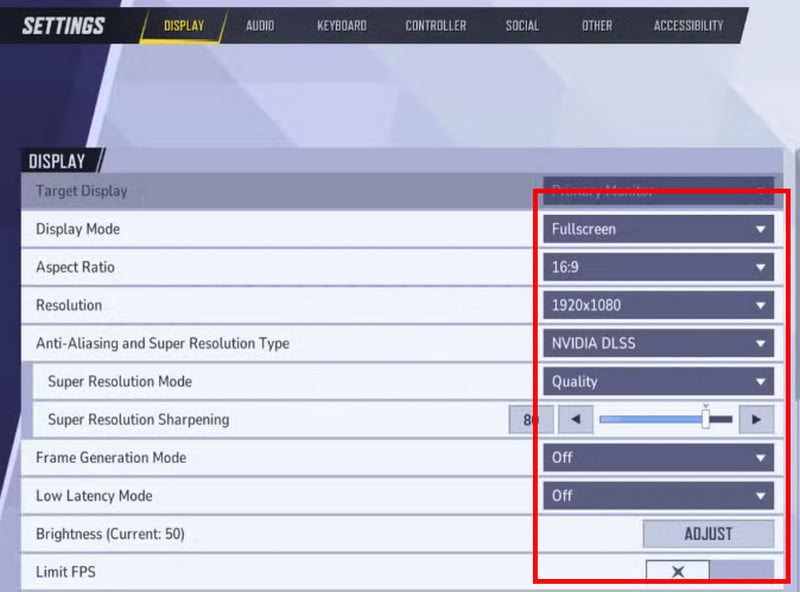
- • Target Display: Primary Monitor (for dual-monitor setups)
- • Display Mode: Fullscreen
- • Resolution: 1920 x 1080 (or the maximum resolution of your monitor)
- • Anti-Aliasing & Super Resolution: NVIDIA DLSS
- • Aspect Ratio: 16:9
- • Show FPS: On
- • Network Stats: On
- • NVIDIA Reflex: On
- • Limit FPS: Off
- • V-Sync: Off
For Marvel Audio Setting
- • Master Volume: 80
- • In-Game Voice Volume: 50
- • Playback Mode: Headphones
- • Lobby Music Volume: 30
- • 3D Enhancement: On (for satisfying spatial audio, enhancing awareness of enemy movements and positioning)
Adjusting in-game settings can help you achieve optimal performance during gameplay. Thus, you can follow the recommended settings above for a better experience.
You can also check: Best enhanced face feature to upscale video successfully.
Part 4. Best Marvel Rivals System Requirements
If you want to improve the frame rate, you must consider the hardware system requirements. For more details, read all the details below.
For Minimum Requirements
- • Operating System: Windows 10 64-bit (1909 or newer)
- • Processor: Intel Core i5-6600K or AMD Ryzen 5 1600X
- • Graphics: NVIDIA GeForce GTX 1060 / AMD RX 580 / Intel Arc A380
- • DirectX: Version 12
- • Network: Broadband Internet connection
- • Memory: 16 GB RAM
- • Storage: 70 GB.
- • Additional Notes: Inserting the game on an SSD is recommended for smoother performance.
Recommended Requirements
- • Operating System: Windows 10 64-bit (1909 or newer)
- • Graphics: NVIDIA GeForce RTX 2060 (Super) / Intel Arc A750 / AMD RX 5700-XT
- • Processor: Intel Core i5-10400 or AMD Ryzen 5 5600X
- • DirectX: Version 12
- • Network: Broadband Internet connection
- • Storage: 70 GB available space
- • Memory: 16 GB RAM
- • Additional Notes: Inserting the game on an SSD is strongly recommended for faster load times.
For better gameplay, it is advisable to meet the requirements. With that, you can play your games without encountering any difficulties.
Pay a visit: Discover the best MP4 fixer to deal with various video errors.
Part 5. FAQs about How to Increase Your FPS on Marvel Rivals
What is the most suggested FPS for Marvel Rivals?
Most players/gamers aim for at least 60 FPS for smooth gameplay. However, if you want better gameplay, then it is better to target 120 FPS. Still, you need to consider your hardware and personal preference.
Does resolution affect FPS in Marvel Rivals?
Definitely, yes. Higher resolutions require more from your GPU, which can lower FPS. Reducing resolution or using dynamic resolution scaling can improve performance while maintaining visual clarity.
Can internet speed affect FPS?
The internet speed doesn't affect FPS. It is because the frame rate is determined by your hardware and game settings. However, a poor internet connection can cause latency or lag, which is similar to low FPS.
Conclusion
To learn how to increase your FPS on Marvel Rivals, you must read all the solutions mentioned below. With that, you have enough knowledge, especially on adjusting your settings for better gameplay. Thus, read this article as your go-to guide to a satisfying gaming experience.