Upscale Video to 4K with the Best Video Upscalers [Solved]
Do you have a low-resolution video that gives you unsatisfying video playback? You are not alone! Some video enthusiasts can't enjoy low-resolution video, perhaps because of a lack of detail, blurry output, or shaky content. If that is the case, the best thing you can do is upscale the video to 4K. With that resolution, there is no doubt that you can watch your video satisfactorily. So, if you are looking for the best ways to upscale videos to 4K, you are in the right place. This article introduces numerous methods you can use to improve your videos. Read on to explore the most effective video-upscaling process.

PAGE CONTENT
Part 1. What is Video Upscaling
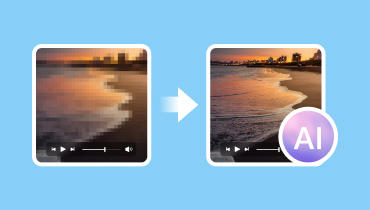
Video upscaling is the process of transforming a low-resolution video into a higher-resolution format. It allows you to make your video look sharper and more detailed on modern displays. In addition, instead of stretching the pixels in the video, upscaling relies on an algorithm that analyzes the original video and generates additional pixel data to improve clarity, reduce blur, and enhance overall viewing quality.
If you want to start upscaling your videos, explore all the methods in the next section.
Part 2. 4 Methods on How to Upscale Video to 4K
How to upscale video up to 4K? If you want to discover all the feasible methods, start reading everything in this section.
Method 1. Upscale Video to 4K Using Vidmore Video Enhancer
One of the most reliable programs for instantly upscaling your video to 4K is Vidmore Video Enhancer. This software provides a smooth video upscaling experience thanks to its simple user interface. The good thing about this program is that you can choose your preferred enhancement model. You can even rely on its AI-powered technology for an accurate result. Additionally, you can also enhance your video in various ways. You can improve the colour, stabilize a shaky video, and remove video noise. You can even save the video in multiple output formats, including MP4, MKV, MOV, WebM, and more. Therefore, if you need an astounding 4K video upscaler, look no further than Vidmore Video Enhancer.
More Features
- • The software has a smooth upscaling process.
- • It can offer various editing features, such as brightness and contrast optimizers.
- • The video upscaler supports a wide range of video formats, including anime, vlogs, documentaries, and more.
- • It can leverage AI to deliver accurate results.
To start upscaling your videos, use the instructions we have provided.
Step 1. Click the buttons below to access Vidmore Video Enhancer. Then, launch it to start the video upscaling process.
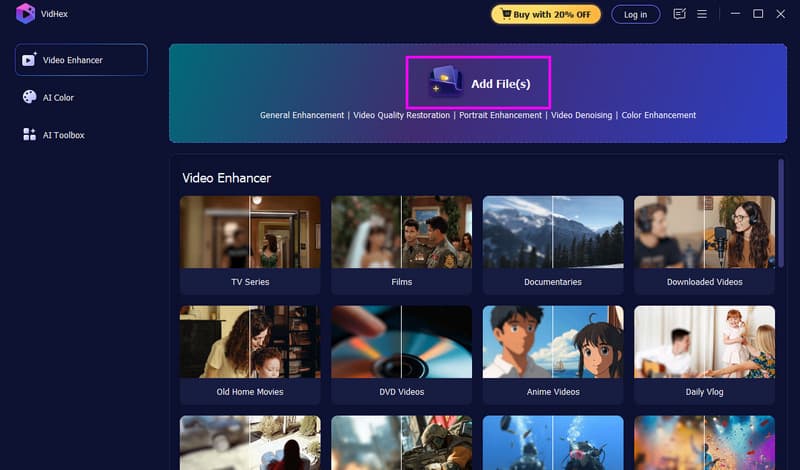
Step 2. Go to the Add Files option and start inserting the video you want to upscale. You can also add multiple video files, as the software supports batch processing.
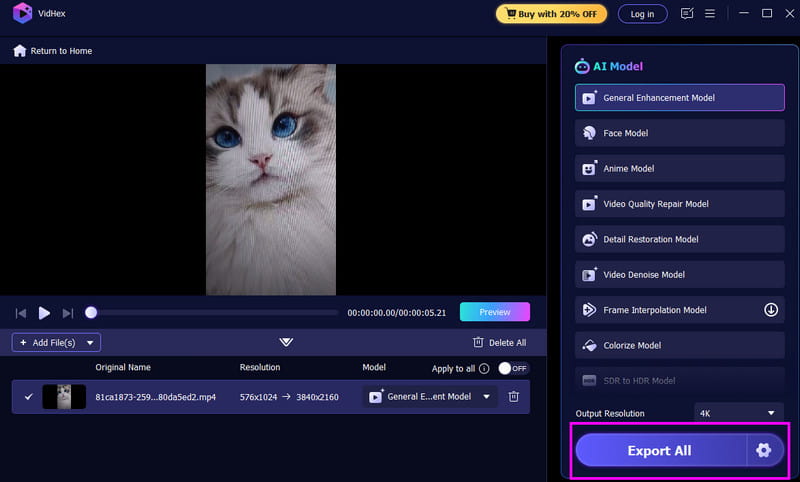
Step 3. Click the General Enhancement Model feature from the right interface. Then go to Output Resolution and select the '4K' option.

Step 4. For the final process, tap the Export All button below. Once done, you can now watch the video on your device.
Method 2. Upscale Video to 4K Using HitPaw
HitPaw VikPea is another program that can help you upscale your videos. The best part here is that you can navigate all the necessary functions easily, thanks to its comprehensive layout. We like that you can ensure accurate results, as this supports AI technology. What's more, the program can reduce video noise, enhance video colour, and ensure there is no watermark. It is also free to use, making it more accessible to all users. With that, this program is among the best video upscalers you can rely on to deliver the best version of your videos. If you want to start upscaling your videos, follow the instructions below.
Step 1. Download and install the HitPaw VikPea software on your computer. After that, launch it to begin the main process.
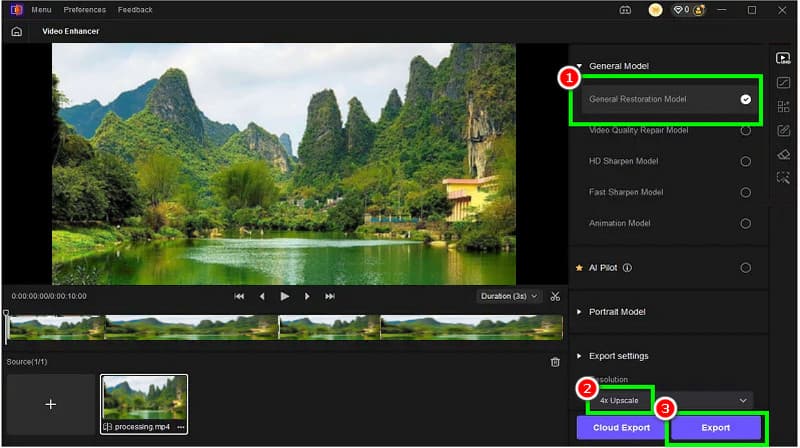
Step 2. Then, click the Video Enhancer feature to add the video you want to upscale from your device.
Step 3. For the next process, proceed to the General Restoration Model. This feature will start enhancing your videos. You also need to select the 4K resolution from the Resolution section.
Step 4. For the final procedure, hit the Export button to save the enhanced video.
Method 3. Upscale Video to 4K Using Vmake
Are you looking for an online method to upscale your video to 4K? You can try using Vmake. Compared with other web-based video upscalers, this tool is ideal because it offers a simple layout that is ideal for non-professional users. The good thing here is that you can choose from various resolution options. You can also upscale your videos up to 1080p and 2K. You can even upscale anime to 4K if you want to. Plus, during the process, there are no annoying ads on your screen, so that you can expect a smooth video upscaling experience.
To achieve effective AI 4K video upscaling, follow the instructions below.

Step 1. Open your primary browser and visit Vmake's main website. After that, click the Upload Files button to insert the video from your computer.
Step 2. Then, you can now start choosing the 4K option from the resolution section. You can also upscale your videos for up to 1080p and 2K.
Step 3. Then, tick the Apply button to start the video scaling process. Once done, tap the Download button.
Method 4. Upscale Video to 4K Using CapCut
If you are still looking for an excellent tool to upscale your video to 4K, use CapCut. This tool is among the best video editors you can use to get your desired result. When it comes to upscaling your videos, there is no doubt that this tool is ideal, as it offers a smooth upscaling process. You can even access additional video editing tools to improve your videos, including a cropper, splitter, filters, effects, transitions, templates, and more. What makes it powerful is that you can access this tool on various platforms. You can keep/download it to your mobile phone or desktop, or access it in your browser. Thus, no matter which device you use, you can use CapCut to upscale your videos.
To learn how to upscale a video up to 4K using CapCut, see the steps below.
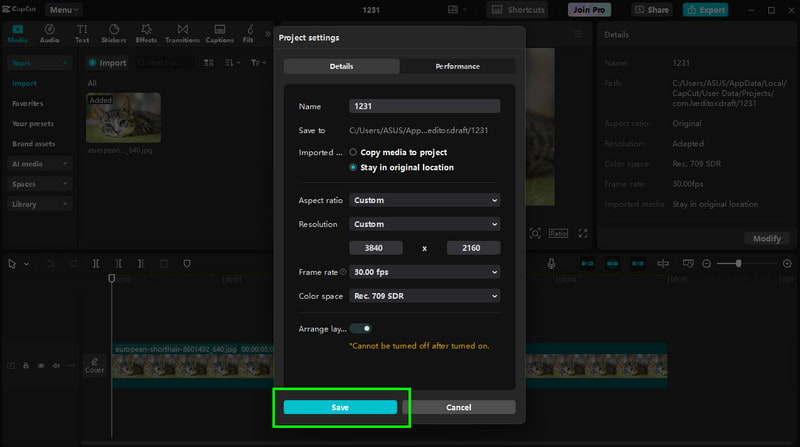
Step 1. Download CaptCut and run it to start the process. Then, tap the Create Project button to add the video you want to enhance. Note that you can also use the tool's online and mobile phone versions.
Step 2. From the main interface, click the Modify button under the Details section. Another mini interface will appear on your screen.
Step 3. When the Project Settings window opens, select the Resolution section and choose the Custom option to manually enter the 4K resolution (3840 × 2160 pixels).
Step 4. Tap the Save function to save the changes to your videos. Then hit Export to save the final video to your device.
Thanks to these methods, you can effectively upscale your videos to 4K. Feel free to use all the video upscalers to achieve your preferred output.
You can also check: The differences between 4K and 8K video resolution.
Part 3. Performance Comparison of the Best Video Upscalers
Looking for a comparison of the best video upscalers? Then, check the table provided below.
| Video Upscaler | Platform | AI Support | Output Resolution |
| Vidmore Video Enhancer | Desktop | Yes | Up to 4K |
| HitPaw VikPea | Desktop | Yes | Up to 4K |
| Vmake | Online | Yes | Up to 4K |
| CapCut | Desktop/Mobile/Online | Yes | Up to 4K |
Part 4. FAQs about Upscaling Video to 4K
Is upscaling video to 4K possible?
Definitely, yes. Enhancing and upscaling your video to 4K is possible with various video upscalers. Thus, always rely on the best video upscalers to get a 4K video for a satisfying video playback experience.
Can upscaling make a video truly 4K quality?
The answer is no. Upscaling improves the appearance of lower-resolution video. However, it cannot create new details that weren't in the original. AI-based upscalers can simulate greater detail, but it's still an enhancement, not native 4K.
What are the best tools for upscaling videos to 4K?
There are various reliable tools you can use to upscale your videos. Some of them are Vidmore Video Enhancer, Vmake, HitPaw, CapCut, and more. Rely on these tools and achieve your preferred result.
Conclusion
With this tutorial, you have now explored the best ways to successfully upscale video to 4K. You even gained more insights into the tool's performance. Thus, choose the tool that suits you to upscale your videos. Also, if you want the best video upscaler, you can access Vidmore Video Enhancer. This program can upscale your videos smoothly. It can even offer various editing features that can produce a better version of your file, making it a more powerful program to operate.