Save Evidence Using the Best Forensic Video Enhancer
Evidence in an investigation is crucial as it can determine the direction of a case, support claims, and uncover the truth. However, not all video evidence is captured in perfect conditions. Blurry footage, poor lighting, low resolution, or excessive noise can make important details hard to see or even unusable. This is where a reliable forensic video enhancer becomes essential.
With that, in this article, we have gathered the best forensic video enhancer tool to date and dug into each of their pros and cons to help you choose the most suitable solution for your needs. Continue reading to know them more!

PAGE CONTENT
Part 1. What is Forensic Video and Forensic Video Enhancement
Forensic video refers to any video footage used in legal or criminal investigations as evidence. This can come from various sources such as CCTV cameras, dashcams, smartphones, body cameras, or other recording devices. Since these videos are often captured unexpectedly or in less-than-ideal conditions, they may appear blurry, shaky, dark, or low in resolution, making it difficult to clearly identify important details related to an incident.
On the other hand, forensic video enhancement is the process of improving the visual and audio quality of a video to make critical details more visible and understandable. Using specialized software, investigators can reduce noise, stabilize shaky footage, adjust brightness and contrast, sharpen images, and enhance specific elements like faces, license plates, or objects within the frame. The goal is not to alter the original content, but to clarify what is already there.
In simple terms, forensic video enhancement transforms poor-quality footage into usable evidence. What was once hard to see or nearly unusable can become a valuable source of information, helping investigators analyze events more accurately and supporting the pursuit of truth in a case.
Part 2. Best Forensic Video Enhancer: VidHex Video Enhancer
Now, if you’re looking for the best forensic video enhancer to help bring clarity to your videos, VidHex Video Enhancer stands out as a top choice. Designed to improve video quality with precision and ease, Vidmore combines powerful enhancement features with a user-friendly interface, making it suitable for both professionals and beginners alike.
VidHex Video Enhancer uses advanced algorithms to automatically analyze your footage and apply the right enhancements. Regardless of whether you’re dealing with grainy surveillance clips, shaky recordings, or low-resolution videos, this tool can significantly improve visibility and detail. It offers features such as noise reduction, stabilization, upscaling to higher resolutions, color correction, and sharper focus on important elements. These capabilities enable you to extract meaningful information from footage that might otherwise be considered unusable.
Main Features:
- • AI-powered video enhancement.
- • Upscale videos by 100%, 200%, 400%, or even up to 4K resolution.
- • Helps repair old, damaged, or compressed videos.
- • Removes grain and visual noise, especially in low-light videos.
- • Supports multiple AI models
- • Supports popular video formats like MP4, MKV, MOV, WEBM, and more.
- • Allows you to adjust bitrate, video encoder, resolution, output format, and destination folder.
- • Enhance multiple videos at once.
How to Use Videmore Video Enhancer to Enhance Forensic Videos:
Step1. First, you need to download and install the tool on your computer device. Please take note that this is available on both Windows and macOS.
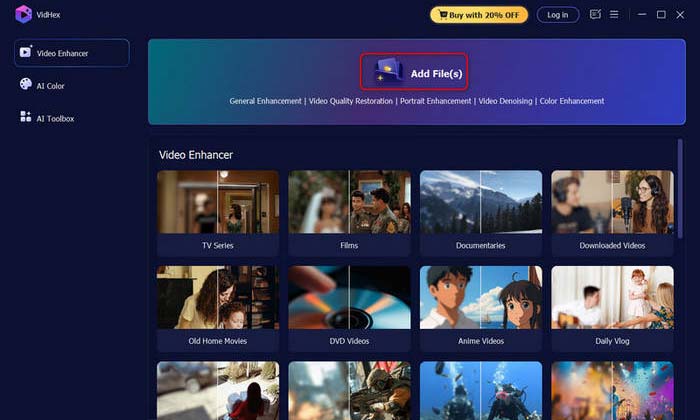
Step 2. Next, click on the Add Files above to import the video that you want to enhance the facial features.
Step 3. Lastly, once you are done, just click the Export button to download the newly enhanced facial feature of your video.
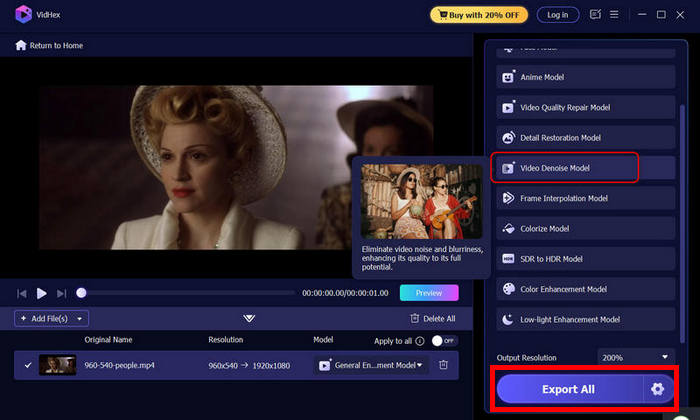
With VidHex Video Enhancer, you can also explore other features that can help you enhance forensic videos to ensure that every detail is clear and usable. It sharpens blurry footage, stabilizes shaky videos, reduces noise, and improves lighting and color. Even low-resolution clips can be upscaled, turning nearly unusable recordings into valuable evidence.
Part 3. 3 Top Forensic Video Enhancers
Now that you know the best forensic video enhancer and how to use it, there are also other video enhancer tools that you can check if they fit your needs and preferences.
Topaz Video AI
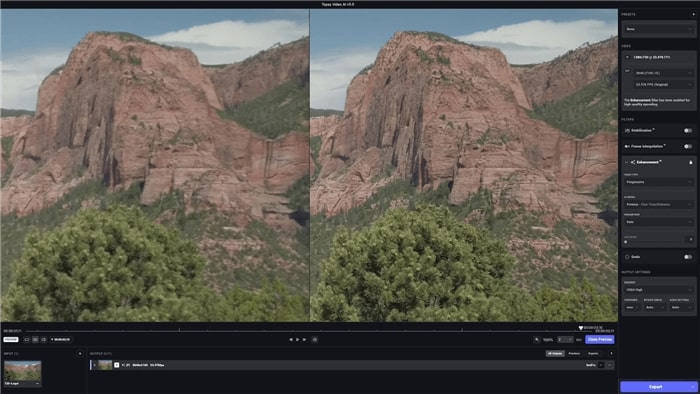
Topaz Video AI is a forensic video enhancement tool designed to improve video quality with remarkable precision. It’s ideal for forensic applications, as it can make footage extremely clear, even upscale resolutions of up to 8K. The software also supports batch processing, making it ideal for professionals who need to enhance multiple videos simultaneously. It reduces motion blur, sharpens details, and overall improves the clarity of videos, which is especially useful for detailed forensic analysis.
Pros:
- Works on both Mac and Windows.
- Enhances video using advanced AI neural networks.
- Supports multiple audio formats.
- Free trial available.
Cons:
- Customer support options are limited.
- Requires a high-performance computer for best results.
HitPaw Video Enhancer
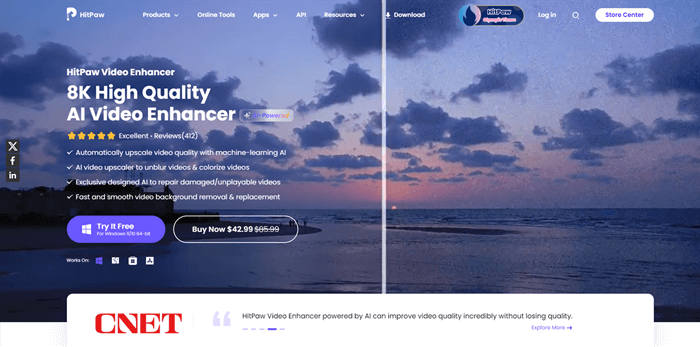
HitPaw Video Enhancer is a simple yet powerful AI-based tool that makes enhancing videos quick and easy. It’s ideal for forensic video enhancement, as it can upscale resolution, reduce noise, adjust brightness and contrast, and enhance overall clarity. With its user-friendly interface, anyone can effectively enhance their videos, even without advanced technical skills.
Pros:
- Easy to use, even for beginners.
- Enhances video resolution and clarity effectively.
- Reduces noise and corrects lighting issues.
- Quick processing for most standard videos.
- Affordable compared to professional-grade forensic tools.
Cons:
- Lacks advanced forensic-specific features like detailed frame analysis.
- May struggle with very low-quality or heavily corrupted videos.
- Some features may require a paid version.
Amped Five
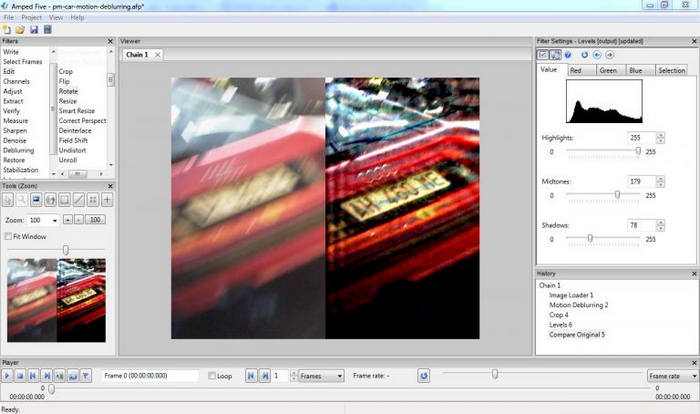
AMPED Five is a professional-grade tool designed specifically for forensic video and image enhancement. It offers over 140 filters and effects to improve low-quality footage, analyze unclear sections, and transform them into high-quality, usable evidence. The software also generates detailed, courtroom-ready reports that outline every step and algorithm used during the enhancement process, making it ideal for legal and investigative settings.
Pros:
- High degree of customization and control.
- Suitable for legal and investigative use.
- Produces courtroom-admissible reports for transparency.
- Handles both video and image enhancement in one tool.
- Strong support for analyzing low-quality or corrupted footage
Cons:
- Pricier than standard consumer tools.
- May require specialized training to use effectively.
- The interface can be complex for beginners.
Part 4. FAQs about Forensic Video Enhancer
Can I use forensic video enhancers on any type of video?
Most forensic video enhancers support a wide range of video formats, including MP4, MOV, MKV, and more. However, the quality of enhancement may vary depending on the original resolution and condition of the footage. Tools like Vidmore, Topaz, HitPaw, and AMPED Five offer flexibility, but professional-grade tools often perform better on low-quality or complex videos.
Do I need technical skills to enhance forensic videos?
It depends on the software. User-friendly tools like VidHex Video Enhancer and HitPaw allow beginners to enhance videos with just a few clicks, while professional tools like AMPED Five or Topaz Video AI offer advanced features that may require some training or experience. Even so, most tools provide step-by-step guides to make the process easier for users of all levels.
Can AI really improve low-quality forensic videos?
Absolutely. AI-powered tools like VidHex Video Enhancer, Topaz, and HitPaw analyze video frames and intelligently enhance details, reduce noise, stabilize shaky footage, and upscale resolution. This makes previously unclear footage much easier to interpret without altering the original content.
Conclusion
Forensic video enhancers play a vital role in turning unclear or low-quality footage into usable evidence. Tools like VidHex Video Enhancer, Topaz, HitPaw, and AMPED Five offer a range of features to suit different needs, from easy-to-use interfaces for beginners to advanced options for professional forensic work. By choosing the right video enhancer, you can ensure that every detail in your footage is clear, accurate, and ready to support the pursuit of truth.