Everything You Should Know About The SiriusXM Player
Turning on the SiriusXM player in your car and randomly switching to your favorite music, interviews, sports programs, or talk shows might not be an unfamiliar experience for you—after all, it sounds so much better than FM radio. But did you know this service has now moved beyond the car and can be used on your phone or tablet?
This guide delivers the latest and most comprehensive information about SiriusXM streaming: its features, pros and cons, compatibility, and subscription pricing. One article to lay the groundwork for your SiriusXM experience!

PAGE CONTENT
Part 1. What is SiriusXM Player
Evaluating a tool inevitably involves examining its core concept and primary functions. Therefore, we'll begin by thoroughly dissecting the SiriusXM web player to ensure you gain a comprehensive understanding of it.
In most people's perception, the SiriusXM Player is a platform that uses satellite technology, primarily through car audio systems, to deliver music, talk shows, news, sports broadcasts, and other services. This was indeed its primary function in the past. Its prominence stemmed not only from its vast content library but also because contemporary AM and FM radio offerings had declined in comparison.
Recently, SiriusXM Player has launched a mobile application (featuring nearly all satellite services). It functions seamlessly with a smartphone connected to cellular data or WiFi.
However, despite being called a Player, it differs from traditional streaming services like Apple Music or Spotify. It does not allow users to specify tracks or create personal playlists. To adjust its recommendation algorithm and train it to match your preferences, you can only like or dislike its real-time song suggestions.
We've summarized the platform's essence and operational model above. To help you quickly assess it, we've compiled its strengths and weaknesses across various aspects:
Pros
- Offers a vast library of radio stations, videos, music, and streaming content.
- Supports pausing content and rewinding playback at any time.
- Enables ad-free viewing of sports events or music livestreams.
Cons
- Does not support high-resolution playback.
- Does not allow selection of specific tracks for playback.
- May experience repeated playback of the same songs.
Part 2. Pricing and Subscription
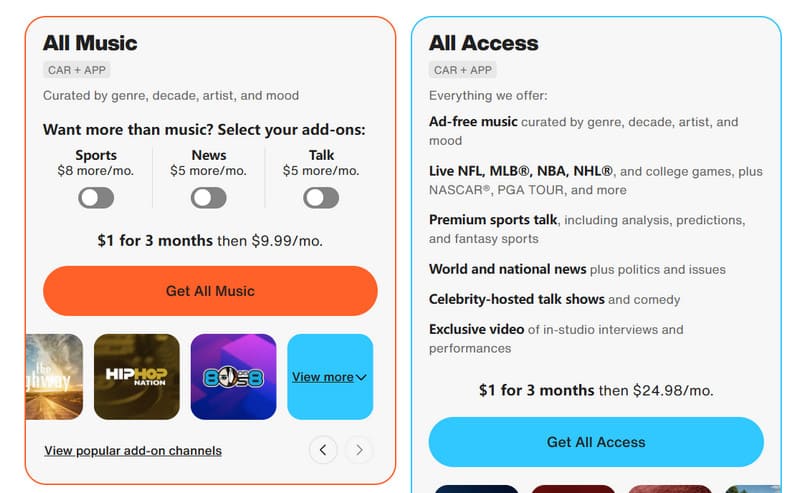
You might be a bit surprised: why is pricing highlighted as a separate section here? This is mainly because SiriusXM Player's subscription plans vary depending on the content you listen to.
First, kudos to the fact that no matter which plan you choose, SiriusXM Player charges just $1 per month during the first three-month trial period—a highly attractive offer for new users to try it out.
The detailed plans are as follows:
- All Music: $9.99 per month
This plan unlocks access to all genres, artists, eras, and styles across the platform via car and mobile apps.
However:
- Sports content: Add $8 or more per month
- News content: Add $5 per month
- Talk content: Add $5 per month
- All Access: $24.98 per month
Subscribe to this plan to unlock all platform content, including:
- Music (completely ad-free)
- Live sports events and analysis
- Domestic and international news programs
- Talk shows and comedy
- Exclusive videos
Part 3. Streaming Quality
After reviewing the pricing, you might be wondering whether the service quality offered by SiriusXM Player delivers value for money. Let's start by discussing the quality of its audio and video resources.
SiriusXM Player provides users with three audio quality options: Normal, High, and Maximum. However, the platform does not publicly specify the compression formats, bitrates, or other parameters associated with each setting.
We tested it by playing music from different eras and genres. Results show it performs exceptionally well with older tracks, delivering well-reproduced bass. However, we found no high-resolution audio options or features like Atmos or spatial audio.
Overall, the three quality levels don't differ significantly in actual listening experience. While adequate for general use, it falls short compared to the lossless audio quality offered by Apple Music and other platforms.
Part 4. Apps and Compatibility
As we mentioned earlier, SiriusXM Player has been working hard to break free from the confines of the car, and their efforts have paid off handsomely. Through continuous refinement, they've gradually rolled out mobile apps for iOS and Android devices, expanding further to support streaming devices like Apple, Roku, Amazon, and Google, and even smart TVs.
Let's examine the user experience of the SiriusXM Player App:
Upon opening the home screen, you'll see three main tabs.
- Search
Use keywords to find channels within the app. Results include exact matches and related trending content. - Discover
This is an area for exploration. All content is categorized by type, allowing you to tap on topics that interest you. It also tracks your SiriusXM recently played content. - Library
This section will feel familiar. Your saved and downloaded shows are stored here. Additionally, channels or accounts you follow will appear in this section.
But we must reiterate: you cannot search for specific songs or create your own playlists. However, you can find related stations by searching for artists.
What if you dislike what's currently playing? Simply skip it. Just remember—on music and comedy channels, you only get 6 skips per hour.
Part 5. Bonus: Best Offline Video/Audio Player
If you dislike the feeling of not being in control of what you're listening to, we recommend switching to a different way of enjoying music and videos: download your favorite content and choose a player that offers lossless playback quality—like the excellent Vidmore Player.
Vidmore Player acts like a universal key, unlocking any audio or video file—whether MP4, MKV, AVI, MPEG, WMV, MP3, or other formats from your device or the web; various folders or ISO files; or even Blu-ray and DVD discs. No compatibility worries—just click, wait, and watch.
- Play any popular video, audio, or disc format.
- Switch audio tracks to stereo, reverse stereo, left channel, or right channel.
- Adjust video brightness, hue, contrast, saturation, and more.
- Capture quick screenshots during playback.
- Create content navigation menus for Blu-ray and DVD.
Now let's show you how to use this MP4 and MP3 player.
Step 1. Download and install Vidmore Player on your computer. Ensure your desired content is saved in a designated local folder on your device.
Step 2. After launching Vidmore Player, you'll see the Open File button on the home page. Click it, then locate your video or audio file. Playback will begin immediately.
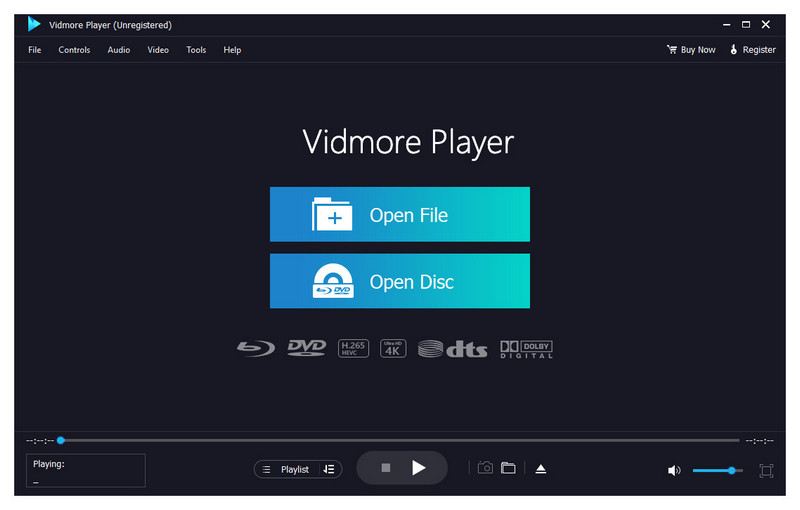
Step 3. On the playback page, you'll find tools to control playback progress, adjust volume, and manage audio/video effects. Use these to achieve your desired playback experience.

Part 6. FAQs of SiriusXM Player
How to watch SiriusXM video on TV?
Simply search for SiriusXM in your TV's app store and download the app to your TV. Some TV models may require you to access Google Play on your TV or download it from the app menu.
Can I listen to SiriusXM without the app?
Absolutely. As long as you have an internet-connected radio or media player at home, you can tune in to SiriusXM content. However, you must have an active subscription to the platform.
Does SiriusXM have a web player?
Yes. You can visit the SiriusXM official website on your computer (set the link as nofollow). Enter your username and password to access the service.
Conclusion
This guide compiles information about the SiriusXM Player, including its definition, primary services, available platforms, subscription pricing, performance, and pros and cons.
Overall, it's a platform well worth trying. It offers vast resources spanning audio, video, and live streams, plus a three-month promotional trial for every user. The only potential drawbacks are its lack of support for searching and playing specific tracks, along with no significant breakthroughs in audio quality.