5 Best PS2 Upscalers for Crystal Clear Videos [2025]
The PlayStation 2, also known as PS2, is home to one of the most excellent libraries in gaming history. However, connecting it to a modern 4K TV often results in a blurry image. The console's native output isn't designed for today's high-resolution displays. It even shows a soft, jagged image that can tarnish your nostalgic memories. It is where a PS2 upscaler becomes essential. Rather than relying on your TV's often-poor built-in processing, a dedicated upscaler transforms the PS2's classic signal into a crisp, clean picture worthy of your modern setup. With this tool, you can expect to have an excellent gaming experience. Are you looking for a reliable PS2 upscaler? If so, you can visit this post, where we introduce various tools you can use to improve output quality. We will even give you the best software you can operate to upscale your recorded game video. Without anything else, read here and learn more about the discussion.

PAGE CONTENT
Part 1. What is PS2 Upscaler
A PS2 upscaler is an essential gaming tool that converts the PlayStation 2's visual output for use with modern monitors and HDTVs. The upscaler directly addresses the core problem of playing classic PS2 games on modern displays, where the console's original, low-resolution signal often appears as a blurry, jagged mess. In addition, the upscaler intercepts the PS2's analog video signal, transforms it to a crisp digital signal, and intelligently reconstructs it for a high-definition screen. This process cleans up the image, reduces flicker, and sharpens details, faithfully preserving the game's original artistic intent while making it look as good as possible on your modern setup.
Part 2. 4 Excellent PS2 Upscaler for Video Quality
Are you looking for the best PS2 Upscaler? In that case, you can check this section, as we offer the best devices for upscaling PS2.
1.RetroTINK 2X
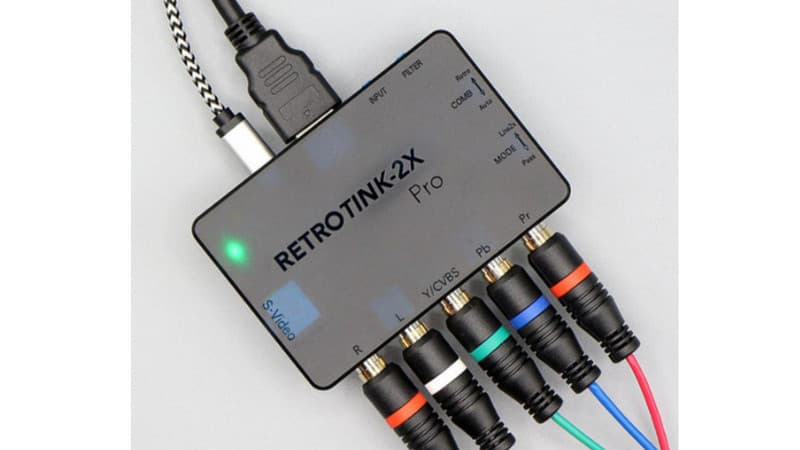
If you want an excellent PS2 HDMI upscaler, we recommend using RetroTINK 2X. With this device, you can be sure to get the best possible gaming experience. It can even seamlessly bridge the gap between modern HDTVs and gaming consoles by transforming RGB SCART signals from vintage systems into an excellent output (480p/576p). This device lets gamers relive their favorite games/classics with improved clarity on the modern screen.
Features
• Input: RGB SCART with 75 ohm 1V sync.
• Formats Supported: 240p, 288p, 480i, 576i.
• Output: Digital video to HDTVs.
• Filters: Blocky (for pixel-based sprite art), Scanlines (to mimic CRTs), and Smoothed (for 3D games).
• Power Source: MicroUSB (cord included).
2.Kaico OSSC
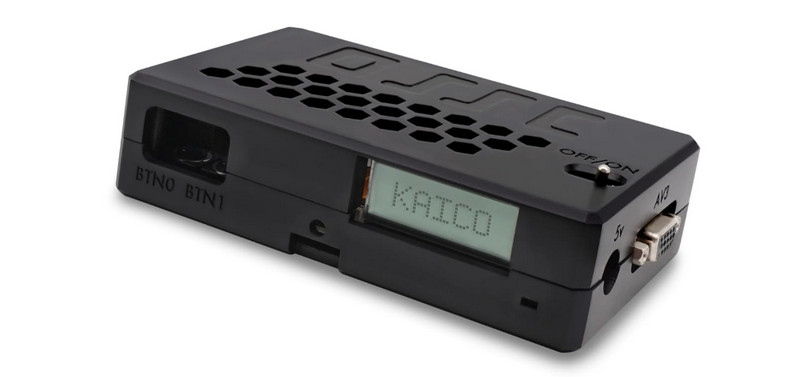
The Kaico OSSC, or Open Source Scan Converter, is an excellent upscaling solution for the PlayStation 2. It was designed to upscale video, which is perfect for gamers who value image fidelity above all else. Additionally, this PS2 upscaler operates with incredibly low latency of less than one scanline. For a better understanding, it means that button presses are reflected on-screen instantaneously. What we like here is that the device can deliver excellent resolution up to 1440p. It can even preserve 3D models and original pixels with astounding sharpness, resulting in better output. While the device requires some manual configuration to navigate the PS2's varied, often interlaced signal output, the lag-free, unparalleled clarity it delivers makes the Kaico OSSC the best PS2 upscaler.
Features
• High-Quality Conversion: Transforms VGA, SCART, and Component signals to HDMI, presrving the original quality.
• Zero Lag: Experience gaming without encountering any delay.
• Versatile Compatibility: The device with a wide range of retro consoles, from Spectrum, Saturn, Megadrive, Amiga, SNES, Gamecube (PAL), to PlayStation, and many more
• Advanced Settings: Users can adjust scanlines, enhance the image, change HDMI output settings, and adjust frame rates for a better gaming experience.
3.mClassis
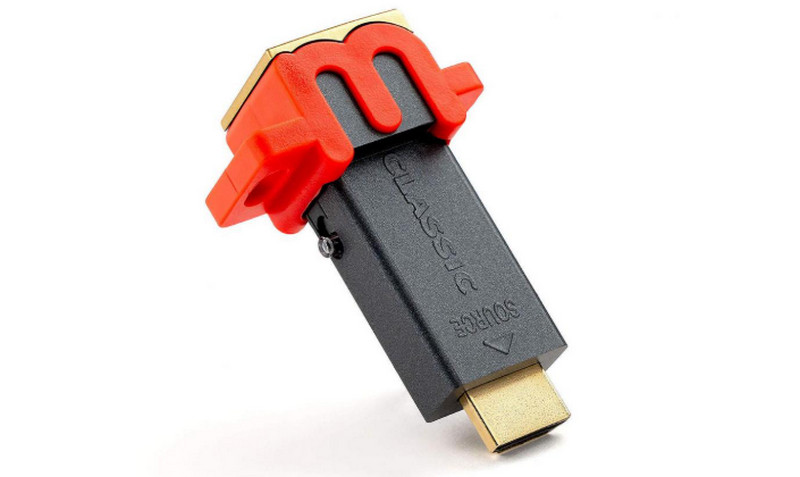
Are you looking for an easy-to-use PS2 upscaler? In that case, you can use mClassic. This device is a plug-and-play PS2 upscaler, particularly when partnered with a high-quality Component-to-HDMI converter. What makes it ideal is its simplicity. It doesn't even have any configuration settings. There is no menu to navigate or settings to adjust. It just works. After plugging it into your console, the device will act as a real-time, past-processing and upscaling chip. The best part here is that you can get the best video and image quality for up to 4K resolution. Thus, if you want an outstanding yet simple PS2 upscaler, consider using mClassic.
Features
• Lag-free Processing: The device can enhance images and videos without lag, preserving original quality during gameplay.
• Plug-and-Play Operation: It doesn't require drivers, software, or a complicated setup. After plugging it into your device, it will automatically work.
• Dynamic Upscaling: It can enhance the video for up to 4K resolution, ensuring a satisfying experience.
4.Micomsoft XRGB-Mini Framemeister
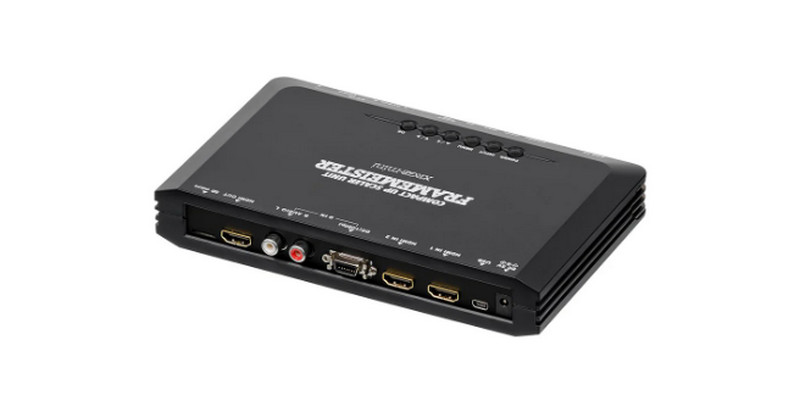
Another excellent best upscaler for PS2 is Micomsoft XRGB-Mini Framemeister. It is a high-end device that focuses on making your games fantastic, especially on modern TVs. What makes it ideal is its ability to handle the PS2's wobblier image signals. Various converters struggle with this, resulting in a shaky, flickering output. Plus, the device can eliminate flicker and jitter from game menus and gameplay, ensuring the game runs well on modern screens.
Features
• Simple to Use: The device is easy to operate, ideal for all types of users.
• CRT-Style Scanline Filters: These filters offer highly customizable options that can mimic the look of an old CRT or arcade monitor.
• Extensive Customization: It can offer a deep menu of options. It lets you adjust sharpness, color, reduce noise, and more.
Part 3. Best PS2 Upscaler for Recorded Game Video
Do you have a recorded gameplay and want to enhance it for better video playback? If so, you must use excellent software such as Vidmore Video Enhancer. With this program, you can improve the video to your preferred quality. You can even upscale the video to 4K, making it even more powerful. Additionally, you can enhance the video easily, thanks to its simple user interface. You can also improve any type of video. You can upscale documentary videos, vlogs, instructional videos, anime, and more. Plus, you can select your preferred format, like MP4, MKV, WMV, MOV, AVI, etc. The best part here is that you can deal with multiple files. You can insert various recorded game videos and enhance them in a single go. With that, if you are looking for the best video upscaler to improve your recorded gameplay, consider using Vidmore Video Enhancer.
More Features
The software can offer a fast upscaling process.
It can provide various upscaling options for an effective upscaling procedure.
The program can offer a comprehensive layout for more straightforward navigation.
It can upscale different types of videos.
It supports the batch upscaling feature.
Step 1. Download Vidmore Video Enhancer on your computer. After that, open it to begin the upscaling process.
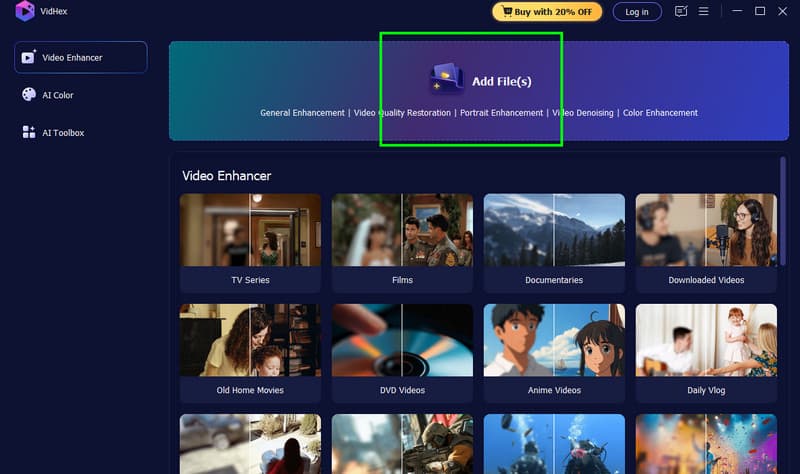
Step 2. After you launch the software, click the Add Files to insert the recorded game video you want to upscale.
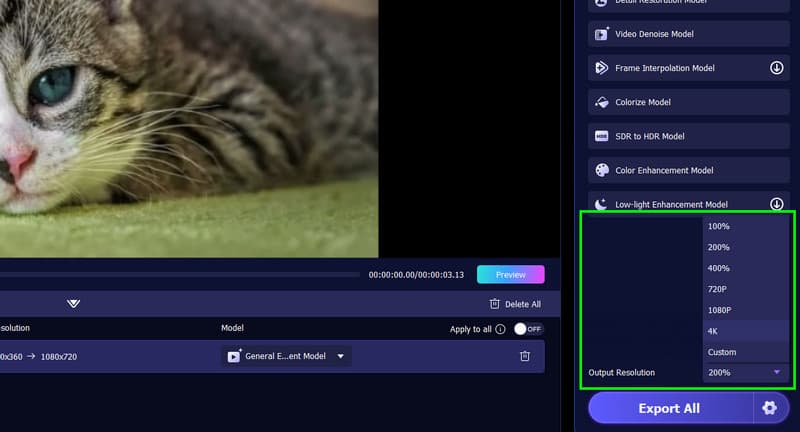
Step 3. Proceed to the Output Resolution section and select your preferred resolution. You can enhance your video for up to 4K.
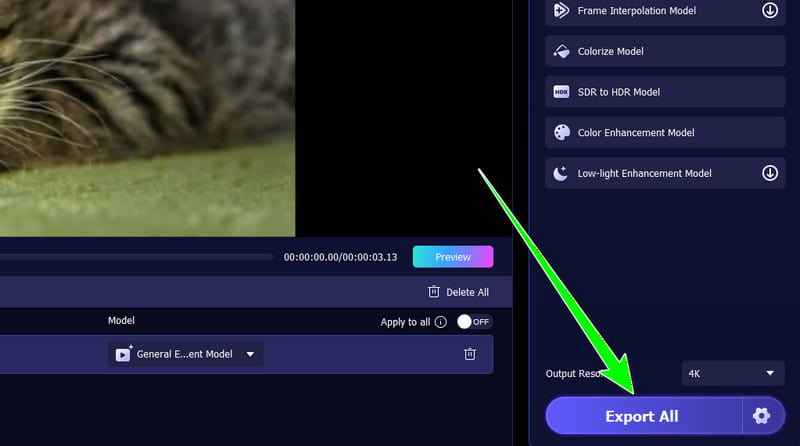
Step 4. Finally, tap the Export All button below to begin upscaling and saving the final video output on your device.
Pros:
- The program has a simple-to-operate layout, making it accessible to all users.
- It can instantly upscale videos, helping you save more time.
- The upscaler is free to use.
- It can enhance various types of videos.
Cons:
- If you want to get the program's overall features, access its subscription plan.
Part 4. FAQs about PS2 Upscaler
How to get a better resolution with PS2?
The best solution you can do is to use an excellent PS2 upscaler. It is a device that can help you improve the video quality on your screen for better playback.
What resolution is PS2 supported?
The standard resolution for PS2 is 480i and 480p. With that, if you want to enjoy its resolution, ensure you use a compatible monitor.
What screen size is ideal for PS2?
The best aspect ratio for PS2 gaming is 4:3. This is because most games were designed for this format. Plus, monitors with aspect-ratio adjustment can handle 4:3 and other widescreen modes.
Conclusion
Looking for the best PS2 upscalers? You can now scan all the information from this article to get all the devices you need for an effective upscaling process. In addition, if you have recorded your gameplay and want to enhance it for a satisfying viewing experience, we suggest using Vidmore Video Enhancer. This program can improve your video to 4K resolution, making it a powerful upscaler for users.