How to Enhance Face in Surveillance Videos
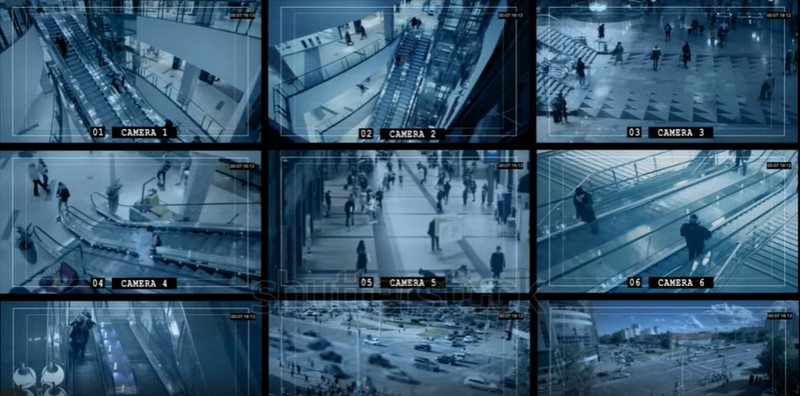
We install these security cameras around our residential or commercial areas as protection and rely on them as the final eyewitness in case of any crime. But there is this usual and very nagging situation that most security system owners find themselves in: something happens, and we quickly grab the playback to see the critical part when the offender's face is just a blur of pixels.
Whether it's a porch pirate, vandal, or suspicious vehicle, pixelated footage can leave your security system ineffective when it's needed most. The divide between what we see in films and what becomes possible far exceeds itself. This doesn't mean your footage is, however, no longer salvageable.
Advances in technology have made it possible to extract details in an image or a video that is not as clear to the human eye. This article will walk you through the reasons why faces in CCTV are not recorded clearly and give a comprehensive process on how to use technology to enhance Face in Surveillance Videos.

PAGE CONTENT
Part 1. Why Is Security Camera Footage So Blurry?
To solve the problem of blurry faces, we must first understand why security cameras - even those labeled as "HD" - often produce low-quality video. It usually boils down to a combination of compression, hardware limitations, and environmental factors.
1. Aggressive Data Compression This is the most common culprit. Security systems run 24/7. To store weeks of footage without requiring massive hard drives, the system compresses the video files aggressively. This lowers the bitrate, which removes "non-essential" data. Unfortunately, fine details like facial features are often the first to be smoothed out or pixelated by this compression.
2. Low Resolution vs. Wide Angle Many cameras boast 1080p resolution, which sounds high. However, security cameras typically use wide-angle lenses (fisheye) to cover a large area (e.g., a whole backyard). When you spread 1080p pixels across a wide 130-degree field of view, the pixel density drops significantly. If a person is standing 20 feet away, their face might only be represented by 20 or 30 pixels, making it look blocky.
3. Poor Lighting and Infrared (IR) Noise At night, cameras switch to IR mode (night vision). While this allows the camera to "see" in the dark, it often introduces "digital noise" or grain. This graininess obscures the sharp lines of a nose, eyes, or mouth, resulting in a fuzzy image.
Part 2. What Is Surveillance Video Enhancement?
Surveillance video enhancement is the forensic and technical process of improving the visual quality of video footage to extract specific information, such as license plates or facial characteristics.
It is important to distinguish enhancement from "fabrication." Legitimate video enhancement does not "draw" a face that isn't there. Instead, it uses mathematical algorithms to analyze existing pixels and optimize them.
The process typically involves three core mechanisms:
1. Upscaling/Interpolation: This increases the resolution of the video. The software analyzes surrounding pixels and inserts new ones to bridge the gap, smoothing out "jaggies" (pixelated edges).
2. Denoising: This filters out the static and grain caused by low light sensors, leaving a cleaner image behind.
3. Correction: Adjusting brightness, contrast, and gamma levels to reveal details hidden in shadows or washed out by bright headlights.
By combining these techniques, enhancement software can take an unidentifiable silhouette and clarify it enough to discern specific facial structures.
Part 3. Benefits of Surveillance Video Enhancement
Investing time in enhancing your security footage offers more than just a clearer picture; it can be the deciding factor in legal and safety outcomes.
1. improved Forensic Evidence: In legal investigations, ambiguity is the enemy. A blurry video can be dismissed in court as inconclusive. Enhancing a video to clearly show distinct facial features (like a tattoo, a scar, or facial hair) transforms a useless clip into admissible evidence that can assist law enforcement in identifying suspects.
2. Accurate Identification: You're not always trying to catch a perpetrator. Other times, it's just identifying who is standing at your door. Enhancement allows you to accurately pick up on whether it is the delivery man, the next-door neighbor, or just a stranger.
3. License Plate Recognition: It’s not just a facial image that becomes pixelated. License plates can be tough to decipher when recorded with a wide-angle camera in a CCTV system. Sharpening software ensures that the edges of characters and digits become clear so that the plate number, used in a hit and run or property damage crime, can be recorded.
4. Cost-Effective Solution: Investing in an entire security system with 4K cameras can be an expensive endeavor. Video enhancement software will enable you to make the best out of the hardware that you have. You will be able to revitalize your aged videos without needing to rewire your house or business.
Part 4. The Best CCTV Video Enhancer: Vidmore VidHex
When it comes to fixing grainy, dark, or shaky security footage, you need a tool that balances professional power with ease of use. Vidmore Video Enhancer is the industry-leading solution designed to tackle the specific problems found in surveillance videos.
Vidmore VidHex is a comprehensive desktop software available for Windows and Mac. Unlike complex professional editing suites that require a steep learning curve, Vidmore is designed with a straightforward interface that automates the enhancement process. It utilizes advanced algorithms to analyze video quality defects and repair them instantly.
Key Features & Specialized AI Models for CCTV
Vidmore is particularly effective for surveillance due to four specific core functions:
- • Upscale Resolution: This feature is vital for low-res CCTV. It can upscale 480p or 720p footage to 1080p or 4K. It adds clarity to the details, making facial features more distinct.
- • Optimize Brightness and Contrast: Security cameras often struggle with exposure (e.g., a dark face against a bright background). This feature automatically balances the light, illuminating the subject’s face without overexposing the rest of the shot.
- • Remove Video Noise: This is the "night vision fixer." It wipes away the digital dirt and grain common in IR recordings, making the skin on a face look like skin rather than static.
Steps to Enhance Face in Surveillance Videos with Vidmore
Step 1. Download the Vidmore VidHex software on your Windows or Mac computer. Launch the program after installation.
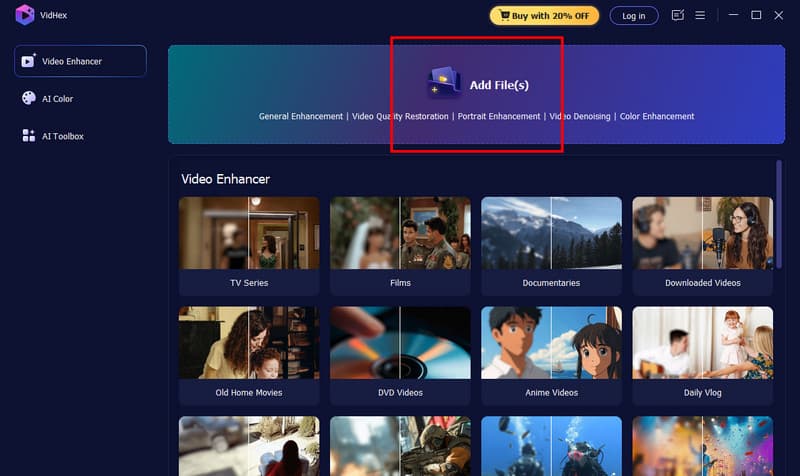
Step 2. Click the Add File button in the center of the interface and select the blurry videos you want to enhance.
Step 3. Then, choose the AI models on the right. We offer General Enhancement Model, Face Model, Anime Model, etc. And click Output Resolution to choose your preferred one.
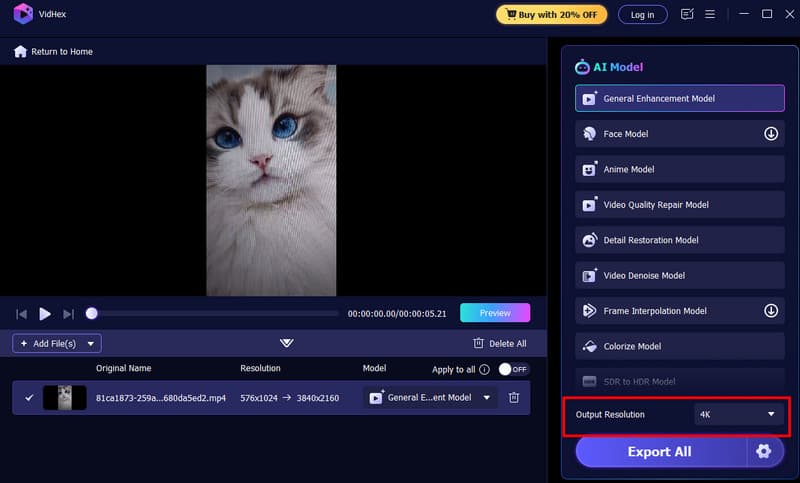
Step 4. Click the Preview button to see the comparison between the original and the enhanced version. If you are satisfied, select your output format and click Enhance All to save the high-quality file.
Part 5. FAQs of Enhancing Faces in Surveillance Videos
Q1: Can video enhancement fix a completely black video?
No. Video enhancement requires some data to exist. If a video is pitch black (0% light information), no software can "create" an image. However, if the video is just very dark, brightness optimization can reveal details that the human eye misses.
Q2: Is enhanced video admissible in court?
Generally, yes, provided the enhancement does not alter the fundamental truth of the footage. Clarifying noise and brightness is standard forensic practice. However, using deepfakes or AI that "invents" facial features is not admissible.
Q3: Why can’t I just zoom in on my video player?
Standard video players use "digital zoom," which simply enlarges the existing pixels, making the blockiness worse. Enhancement software uses "smart upscaling" to interpolate new pixels, keeping the edges sharp when you zoom in.
Q4: Can I enhance surveillance videos on my phone?
There are mobile apps available, but they lack the processing power of desktop software like Vidmore. Surveillance files are often large and complex; a desktop computer provides the necessary power to render heavy noise reduction and upscaling effectively.
Conclusion
Blurry surveillance footage is a common headache, but it does not have to be a dead end. Understanding that the blur is caused by compression and lighting helps us realize that the data is often still there – we just need to enhance faces in surveillance videos.
Whether you are trying to identify a trespasser or simply want to archive clear footage of your property, Vidmore VidHex offers the most robust and user-friendly path to clarity. By removing noise, upscaling resolution, and correcting lighting, you can turn a muddy gray smear into a recognizable face. Don't let low-quality technology compromise your safety; take control of your footage and see the truth clearly.