Best Methods on How to Upscale Anime to 4K Resolution
Want to learn how to upscale anime to 4K? Well, upscaling an anime to a 4K resolution is a demanding process for enjoying anime series and movies. It can make the content obtain a richer color, sharper details, and offer a more immersive viewing experience on modern displays. Plus, since some of the anime was originally uploaded in a lower resolution, the process of enhancing it involves improving textures, line art, and optimizing color depth. So, if you are looking for the best and effective way to upscale your favorite anime to 4K resolution, read this article. We are here to give you the best tutorial you can use for an effective anime-upscaling procedure. With that, read everything here and achieve your desired output.

PAGE CONTENT
Part 1. Why Upscale Anime to 4K
Do you wonder why you need to turn your anime into a 4K resolution? You can read the explanation below for more insights.
Enhanced Visual Clarity
Upscaling your anime video to 4K can sharpen the line art, background details, and textures, making the animation look crisper and immersive on modern displays. The best part here is that even older anime can be improved using the best anime upscaler.
Better Color and Contrast
When upscaling content, it always pairs with High Dynamic Range, also known as HDR, which enhances color depth and contrast. It makes vibrant anomer palettes pop more vividly and the subtle shading more noticeable, which can improve the overall viewing experience.
Future-Proofing for Modern Screens
Nowadays, some of the modern televisions, monitors, and tablets support 4K. Upscaling your anime ensures that you can play them on any platform with the best quality. Plus, you can avoid the pixelated and stretched look when using low-resolution content.
Part 2. How to Upscale Anime to 4K
Want the best anime upscaler? In that case, see all the information provided in this section.
1. Vidmore Video Enhancer
One of the best programs you can use to upscale your favorite anime to 4K is Vidmore Video Enhancer. Thanks to this software, you can instantly upscale your anime. It also has a fast upscaling process, making it more ideal and helpful for all users. What we like about this tool is that you can navigate all the features smoothly since it has a simple user interface. It is also powered by AI, ensuring that it gives you an accurate output after the process. The best part here is that Vidmore can also offer various video enhancement models. With this feature, you can enhance your videos based on your preferences. Thus, if you want an exceptional anime upscaler, look no further than Vidmore Video Enhancer.
More Features
- The video enhancer can offer a smooth and fast upscaling procedure.
- It can offer its Preview feature to see the result before the saving process.
- The program supports various output formats.
- It can provide numerous video enhancement models.
- It can handle different videos, such as documentaries, vlogs, films, and Monroe.
To use this anime AI upscaler, follow the detailed instructions below.
Step 1. Download and install Vidmore Video Enhancer on your computer. Then, launch it to start the anime-upscaling process.
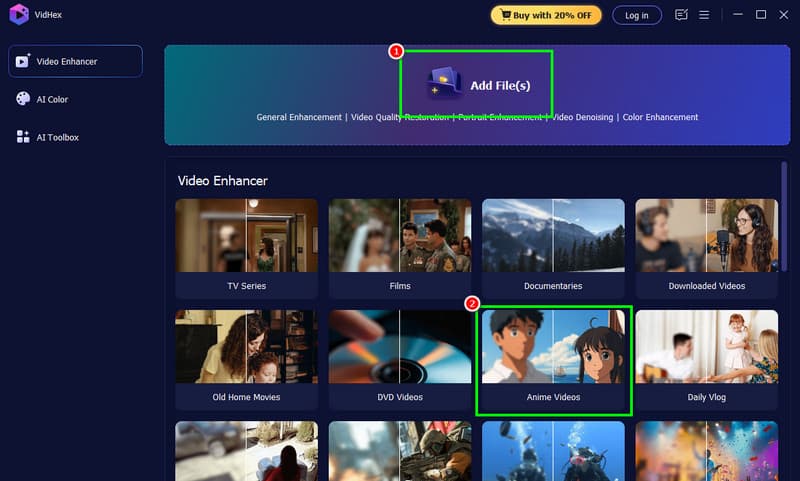
Step 2. From the software’s main layout, click the Add Files or Anime Videos option to insert the anime you want to upscale.
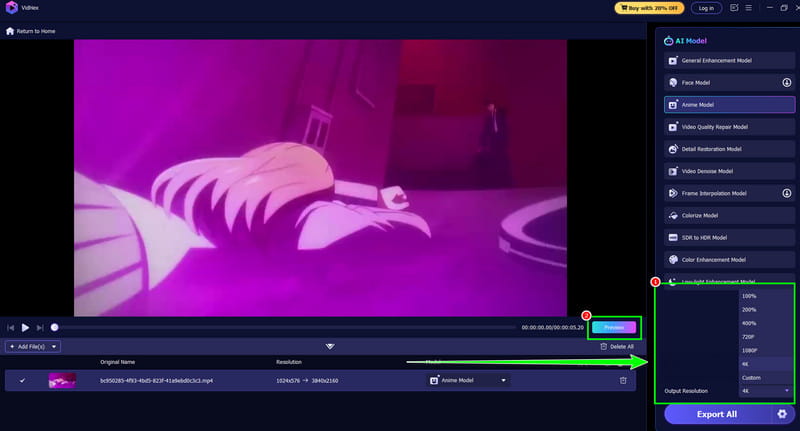
Step 3. You can proceed to the Output Resolution section and select the 4K option. You can also tap the Preview feature to check the possible result.
Step 4. For the final procedure, hit the Export Full Video button below. Once the process is complete, open the assigned folder and watch your enhanced 4K anime video.
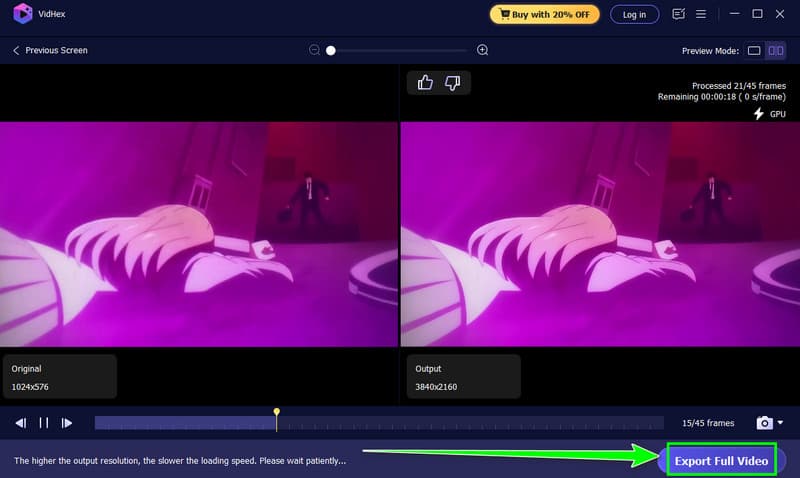
With this process, there is no doubt that upscaling your anime to 4K is easy. You can even enhance videos sent from iPhone, Android, and other platforms. Thus, always rely on this video upscaler for an excellent result.
2. UniFab Video Upscaler AI
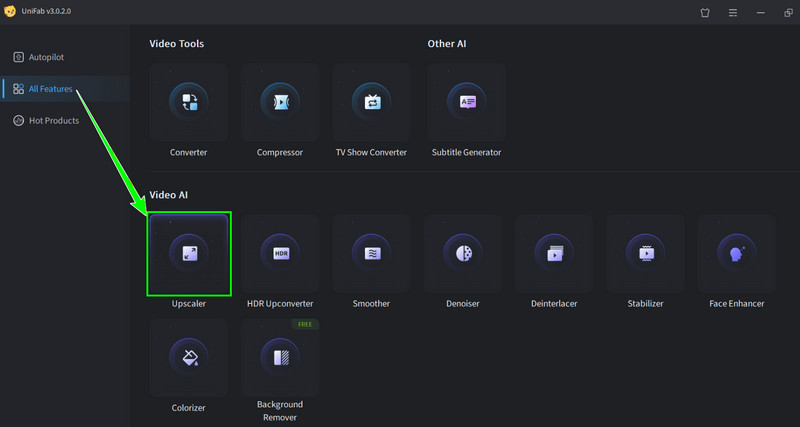
If you want to upscale anime videos or images to 4K, you can also try accessing UniFab Video Upscaler AI. With the help of this tool, you can ensure that you get the best resolution for your favorite anime video. The best part here is that the tool can effectively restore linework, optimize colors, and enrich textures. It can even upscale videos up to 8K, making it more ideal and powerful. It also supports various formats, such as MP4, MP4, MKV, AVI, and more. With that, if you need an excellent video upscaler, consider using this program.
More Features
- The software can provide a fast upscaling process.
- It supports numerous output formats.
- The video upscaler is available on both Mac and Windows.
Pros
- What we like about the program is that it has a comprehensive main layout.
- The features are easy to navigate.
- It can offer its free version.
Cons
- The program lacks editing functions to improve videos.
- The program is resource-intensive.
3. Anime4K
Anime4K is considered one of the best anime upscalers. It is because the tool is lightweight, efficient, and created to enhance the unique visual style of anime. Plus, compared with other upscalers, this tool uses shader-based algorithms that are capable of sharpening line art, lessening the blur, and enhancing the overall clarity in real time, which makes it ideal for better playback. In addition, this upscaler excels at preserving the crisp outlines and vibrant colors that define anime. It ensures that the upscaled output feels authentic rather than artificially altered. Because it is open-source and free to access, Anime4K is accessible to a wide audience, from casual viewers to enthusiasts who want more control over their playback quality. So, try this tool and get the output you need.
More Features
- Real-time upscaling optimized for 4K playback.
- Low GPU requirements make it accessible for mid-range systems
- Works with media players like MPV and supports shader-based enhancement.
- Focuses on line art sharpening and reducing blur in older anime releases.
Pros
- The tool is lightweight and fast.
- It is also free to use, making it ideal for all users.
- Its user interface is easy to navigate.
Cons
- The tool is not AI-powered.
- It has limited customization compared with other advanced tools.
You can also pay a visit: Best way improve video quality on VLC.
4. AVCLabs
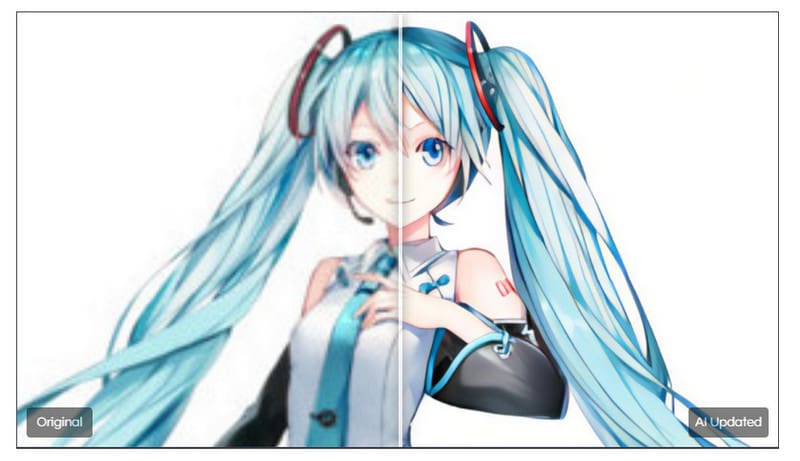
To make anime look 4K, you can also access AVCLabs. This software uses advanced AI to transform anime with improved resolution and restored details. It ensures that the original style remains intact, avoiding issues like distortion, blur, or pixelation. What we like here is that the enhancement procedure (such as sharpening, pixel upscaling, noise reduction, and color adjustment)is fully automated, removing the need for manual editing or technical skills. With a simple three-step process, users can achieve high-quality results quickly and effortlessly. Thus, if you want a simple and fast anime-upscaling process, it would be better to access AVCLabs on your computer.
More Features
- The software supports AI-driven technology to upscale anime.
- It also offers noise reduction and color enhancement features.
- The tool supports a batch processing feature.
- It works on Mac and Windows platforms.
Pros
- The tool can offer various helpful tools to create a better version of your anime videos.
- The main user interface of the anime upscaler is user-friendly.
- The good thing about the tool is that it can offer various resolution options.
Cons
- The program is resource-intensive, so you must have a high-spec computer.
- You must get the paid version to upscale your anime.
- There are times when the upscaling process is too slow.
You can also check: Effective methods for fixing out-of-focus video on Premiere Pro.
Part 3. FAQs about how to Upscale Anime to 4K
Is it possible to upscale anime?
Definitely, yes. There are various anime upscalers you can access to improve the resolution of your favorite anime videos. You can use Vidmore Video Enhancer, Topaz AI, Anime4K, and more.
What does upscaling anime to 4K mean?
Upscaling anime to 4K means you are transforming your low-resolution anime into a 4K resolution. With this process, you can effectively enhance the video's clarity, color depth, and sharpness for modern displays.
Can upscaling improve the quality of old anime?
Yes, but results depend on the source. AI-based upscalers can reduce noise, sharpen lines, and restore details. However, you must take note that they cannot recreate missing animation frames or redraw poor-quality sources.
Conclusion
Thanks to the best anime upscalers, you have learned how to upscale your anime up to 4K. With that, you can enjoy your video on any media player. Plus, if you want the best tool to upscale your anime and other videos, it is better to access Vidmore Video Upscaler. This software ensures that you get the best output for better video playback.