








How to Upscale Video in After Effects without Quality Loss
Want to learn how to upscale video in After Effects? Well, Adobe's program is among the best video editors you can rely on when it comes to upscaling videos. It ensures you get the best video output, resulting in better and more satisfying video playback. So, if you are interested in learning the ways to upscale your videos, see this guide and explore more.

PAGE CONTENT
Part 1. How to Upscale Video in After Effects
Do you want to upscale videos in After Effects? The good news is that the program can do so. After Effects is an app designed by Adobe; its main focus is to edit and enhance videos, ensuring that you can get a better version of your footage. Plus, its main interface is engaging, offering various features, tabs, sections, and timelines, making it the best editor for all users, especially professionals.
What’s more, it offers professional-grade options for enhancing videos. You can sharpen your clips, reduce video noise, and preserve video details. You can even save and export the video up to 4K. So, if you need an advanced video enhancer that can let you achieve the result you need, it would be ideal to access Adobe After Effects on your desktop.
More Features
Adobe After Effects can offer various built-in upscaling features you can access during the process. These are:
- Detail-Preserving Upscale Effects - this feature enhances the resolution while keeping the edges sharp.
- Scale and Transform Tools - These tools can let you adjust the video dimensions accurately.
- Sharpen Effects - This feature helps improve fine details after the enlargement process.
- Noise Reduction Tool - It is perfect for reducing artifacts and grain from the video, resulting in a crisp, cleaner output.
Beyond upscaling features, After Effects offers more than you might imagine. Other features you can access include:
- Basic Video Editing Tools - The software also lets you access various basic editing tools. You can crop video in After Effects, trim, flip, add text, insert effects, and more.
- Motion Tracking - This feature can apply effects to subjects or any moving elements in videos.
- Color Correcting and Grading - The video editor allows you to adjust the video tone, contrast, brightness, and saturation for cinematic output.
- Integrated with Premiere Pro and Photoshop - It can also be integrated with other Adobe apps, such as Premiere Pro and Photoshop.
To learn how to upscale video without losing quality in After Effects, you can follow the steps below.
Step 1. Download and install Adobe After Effects on your computer. Then, launch it and add the video you want to upscale.
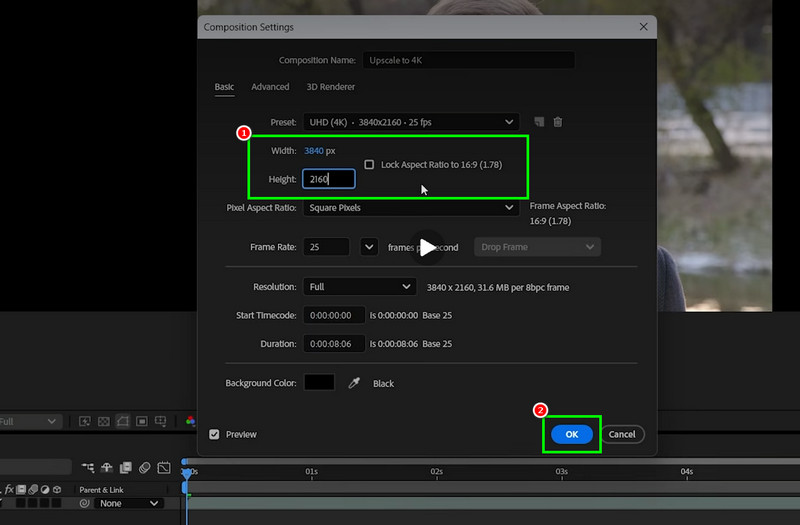
Step 2. Navigate to the Composition tab above and click Composition Settings. After that, you can start adjusting the Width and Height of the video. You can even adjust it to 4K. Then, click OK.
Step 3. You can also go to the Effects and Presets section from the right interface. Then, search for Detail-Preserving Upscale.
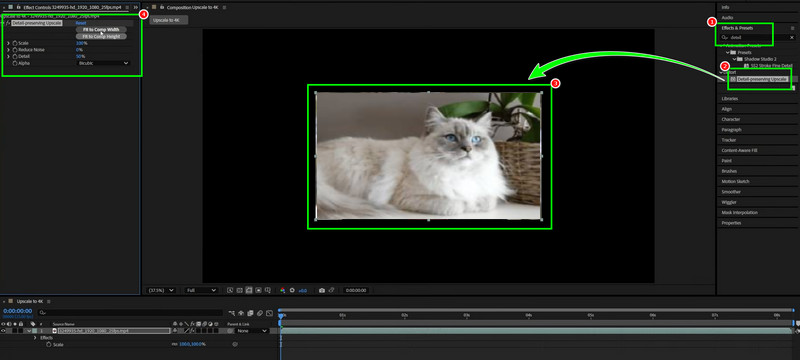
Click and drop it onto the video. Once done, go to the left interface and adjust the scale, noise reduction, detail, and more.
Step 4. Another way to upscale your video is to use the Sharpen tool from the Effects and Presets section. Then, click and drop it onto the video.
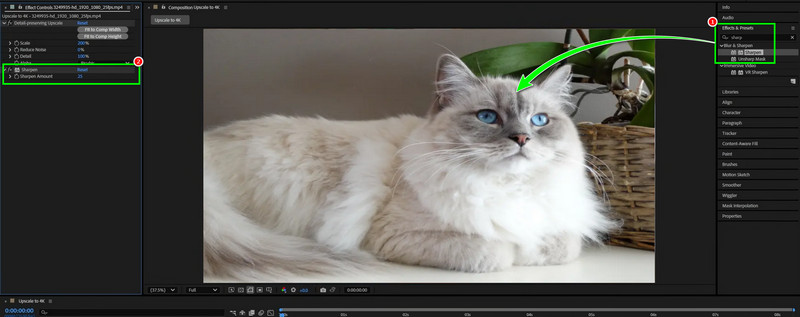
Once the Sharpen tab shows up in the left interface, start adjusting it. Once done, you can now export After Effects to MP4 or any video format you want.
Part 2. Best Alternative to After Effects for Upscaling Videos
After Effects is an ideal video enhancer since it can offer various ways to enhance and upscale your videos. However, we can’t ignore the fact that it is not suitable for non-professional users. So, if you need an easier method to upscale your videos, you can use all the upscalers we have here in this section.
1. Upscale Videos Using VidHex Video Enhancer
If you want a simple way to upscale your videos, you can access VidHex Video Enhancer. This program is ideal for beginners, thanks to its simple user interface. Plus, with its General Enhancement Model feature, you can upscale your videos effectively. You can even save the video up to 4K, ensuring satisfying playback. What makes the upscaler ideal is its AI-driven technology. This helps you upscale your videos with high accuracy. Thus, if you want to replace After Effects for an easier upscaling process, access Vidmore right away!
More Features
- It can offer various AI enhancement models, such as a video denoise model, anime model, colorize model, and more.
- The program offers a smooth, fast upscaling process.
- It can offer its Preview feature to check the enhanced videos.
- You can access the upscaler on Windows and Mac.
See the steps below and learn how to upscale your videos.
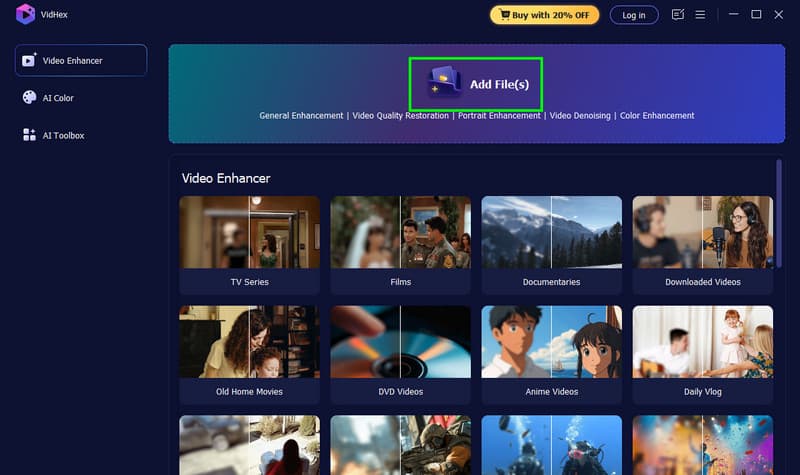
Step 1. Download and run VidHex Video Enhancer on your computer. You can click the buttons below to easily access the software.
Step 2. Add the video you want to upscale by clicking the Add Files button. You can also add more than one file.
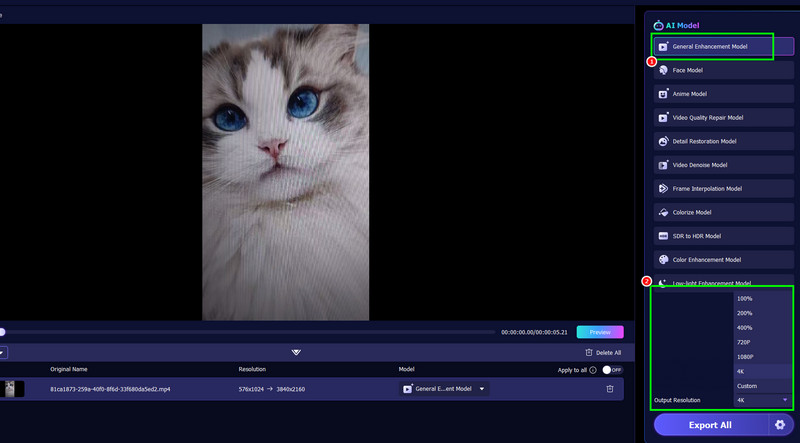
Step 3. Click the General Enhancement Model feature to start upscaling your videos. Then, proceed to the Output Resolution to choose your preferred video resolution.
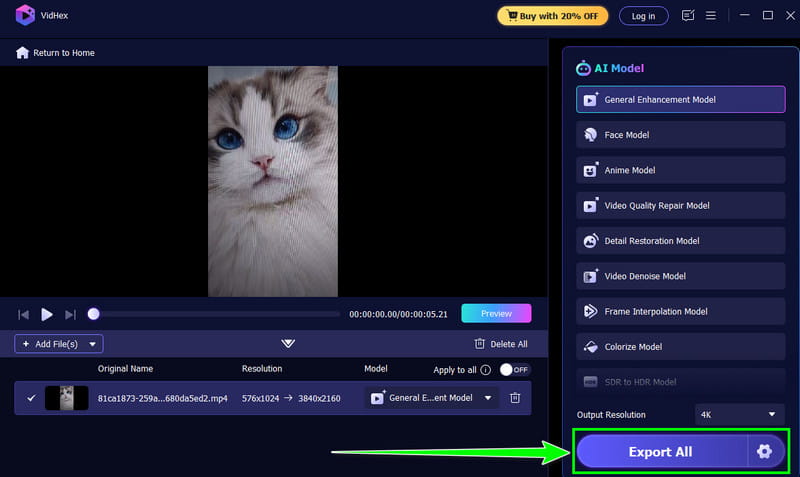
Step 4. Finally, click the Export All button below to start saving the upscaled version of your file.
2. Upscale Videos Using Topaz Video Enhancer
Topaz Video Enhance AI is also an ideal upscaler that can replace After Effects. With its AI-powered technology, it can help you upscale your videos. In addition, you can stabilize your footage, reduce grain, and adjust the frame rate. This program ensures that you can upscale and enhance your videos effectively and successfully.
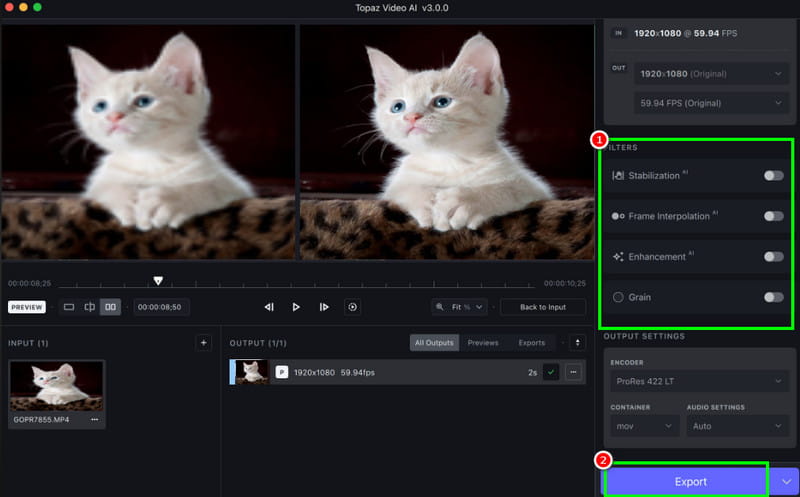
Step 1. Download Topaz Video Enhancer AI on your computer. Then, start adding the video you want to enhance.
Step 2. After that, go to the right-hand interface and click the Enhancement feature. The program will start upscaling your videos automatically. You can also stabilize and remove video grain if you want to.
Step 3. Lastly, click Export to save the upscaled video on your computer.
Part 3. FAQs about Upscaling Video in After Effects
Is After Effects free to use?
The program only offers a 7-day free trial version. After that, you have to get a subscription plan to access all the features without any limitations.
How can I upscale SD videos in After Effects?
After installing the editor, run it and add the video. Then, go to the Effects and Presets section and type Sharpen. Click and drop it onto the video, then adjust it based on your desired result.
Is it easy to upscale videos in After Effects?
For skilled users, After Effects might be simple to operate. However, for beginners, the program might be too much since it has a complicated user interface.
Conclusion
To successfully upscale videos in After Effects, you can use all the methods in this guide. You can upscale videos using the Composition Settings, Detail-Preserving Upscale, and Sharpen feature. Plus, if you want an easier way to upscale your videos, you can use VidHex Video Enhancer. With its comprehensive layout, you can effectively upscale videos without any hassle, making it the right video upscaler for both beginners and professionals.