What is Vmake Video Enhancer: A Comprehensive Review
Vmake Video Enhancer is a web-based tool you can rely on to effectively enhance your videos. With this tool, there is no doubt that you can get a better version of your file. Are you interested in learning more about this video enhancer? Worry no more! This review will give you all the details you need about the tool. It includes its definition, core features, limitations, pricing plans, and more. After that, we will also introduce another tool that can be an excellent alternative to Vmake for a better video enhancement process. Thus, to learn everything about the discussion, start reading this honest review.

PAGE CONTENT
Part 1. An Overview of Vmake Video Enhancer
Vmake Video Enhancer is an AI-powered web-based tool that can turn your low-resolution and blurry videos into a high-quality version through an upscaling process. The tool can upscale your video up to 2K, 4K, and even 4K plus. The best part here is that it works directly on any browser without any installation, which is accessible to all creators, casual users, and marketers. Thus, when it comes to upscaling and enhancing videos, this tool is among the best options you can utilize.
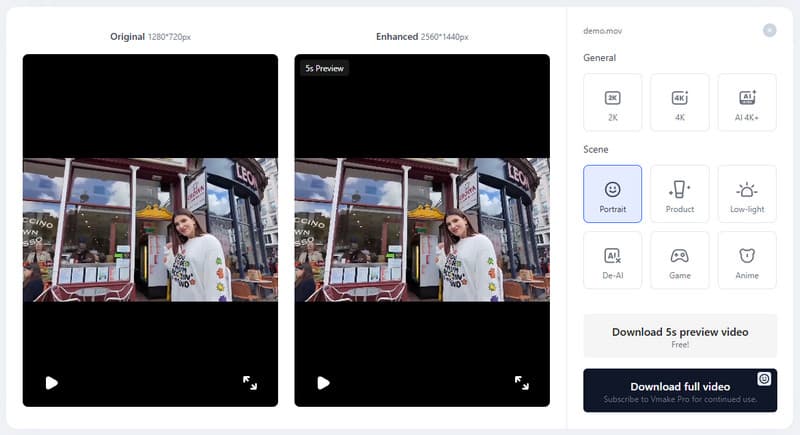
To learn more about the tool's capabilities, you can check all the information below, as we offer its key features.
Enhance Videos
The core feature of the tool is to enhance your videos into a higher-quality version, such as 2K, 4K, and 4K plus. The best part here is that it can automatically enhance your videos' clarity, color balance, and sharpness, resulting in a professional-grade output. What's more, you can enhance your videos instantly and easily, thanks to its comprehensive layout.
Video Quality Adjustments
The tool allows you to change the brightness of your video, the contrast, sharpness, and saturation. This feature is ideal if you want to enhance your video based on your preferred outcome. Plus, the tool can offer a Preview section, allowing you to view the result before the final saving process.
Reduce Video Noise
What we like about the tool is that it is capable of reducing the noise from the video. This feature is perfect if you want to get rid of the blur and grain of your file. It can even ensure that you get a better, sharper, and satisfying-to-view result after the process.
Support Various Video Formats
When it comes to compatibility, you won't encounter any issues since the tool can support various video formats, including MP4, AVI, 3GP, M4V, MOV, and more. With that, if you want to enhance your videos, feel free to access the tool.
AI Models of Vmake Video Enhancer
Some of the AI models of the tool are:
- • General Upscaling Models – these models allow you to upscale your videos up to 2K, 4K, and even 4K plus.
- • Portrait Model – this model enhances the facial features, skin tones, and fine details from the video. It can even reduce the blur and improve clarity from the close-up footage.
- • Product Model – this model is perfect for optimizing contrast, sharpness, and lighting. It is the ideal model for e-commerce videos and marketing campaigns.
- • Low-Light Model – you can use this model if you want to balance the shadows and highlights for natural visibility. You can even brighten the dark video while minimizing the noise.
- • Gaming Model – this model can enhance the fast motion sequences with smoother frame rendering. It can even reduce the pixelation and enhance the sharpness in gameplay.
- • Anime Model – it is a suitable model for dealing with anime videos. It can sharpen outlines and boost color saturation for a better viewing experience.
Part 2. Limitations of Vmake Video Enhancer
Vmake is an ideal tool for enhancing videos. However, there are also some limitations and drawbacks you might encounter. You can read the details below to get more insights.
- • When using the free version, you can only save and download the first five seconds of the video.
- • The video enhancement process is time-consuming.
- • The tool lacks some basic video editing functions, such as cropper, trimmer, filters, and more.
- • The pro version of the video enhancer is pricey.
- • The watermark is included when saving video on the free version.
Part 3. Pricing Plans of Vmake Video Enhancer
If you are interested in the pricing plan of Vmake, you can check the table below.
| Plan | Free | Plus | Pro |
| Pricing | $0.00 | $9.99 | $29.99 |
| Inclusions | ●50 credits ●Limited feature access. ●Watermark on the video | ●1,000 credits per month ●Use core tools up to 10 times daily ●Watermark Remover ●Video Upscaler ●AI Thumbnail Generator ●Video & Image Generation | ●4,500 credits per month ●Use core tools up to 60 times daily ●Watermark Remover ●Video Upscaler ●AI Thumbnail Generator ●Advanced Video & Image Generation |
Part 4. Best Alternative to Vmake Video Enhancer
Enhancing video on Vmake is perfect since the tool can give you the features you need. However, when using the free version, you will encounter various restrictions. With that, if you want to enhance and upscale your videos for free without any limitations, we suggest using Vidmore Video Enhancer as an alternative. This program allows you to enhance your video up to 400% better than the original version. It can even colorize your video, enhance the face, offer various AI models, and more. The good part here is that you can save your video in various video formats such as MP4, MKV, MOV, AVI, and more. Plus, since it is powered by AI, there is no doubt that it can give you an accurate result after the video enhancement process. Thus, if you need the best replacement for Vmake, feel free to operate Vidmore Video Enhancer.
Some of the AI models you can access when using the software are:
- • General Enhancement Model
- • Face Model
- • Anime Model
- • Video Quality Repair Model
- • Detail Restoration Model
- • Video Denoise Model
- • Frame Interpolation Model
- • Coloorize Model
- • SDR too HDR Model
- • Color Enhancement Model
- • Low-Light Enhancement Model
To learn how to enhance video using this software, use the steps below.
Step 1. Download Vidmore Video Enhancer on your computer. Then, launch it to begin enhancing your videos.
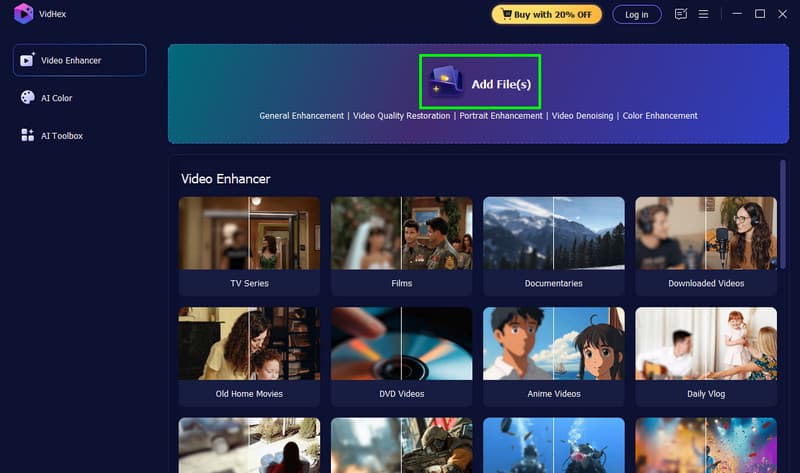
Step 2. After you ruin the program, click the Add Files button to add the video from your computer.
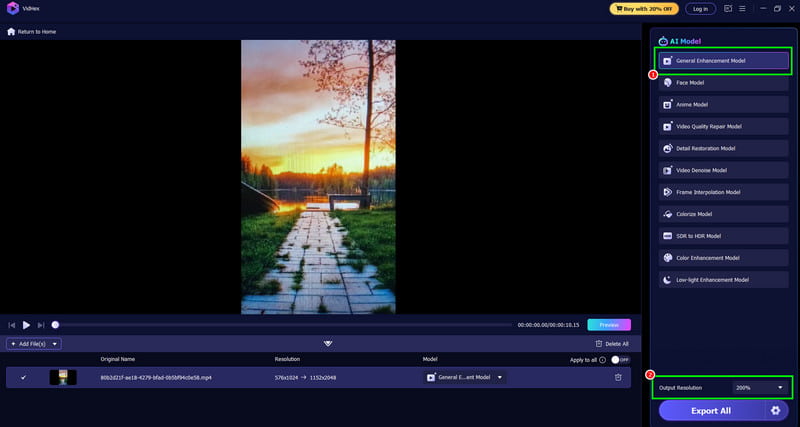
Step 3. Click the General Enhancement Model from the right interface. You can also proceed to the Output Resolution section to choose your preferred resolution.
Step 4. Finally, click the Export All button to save the enhanced version of your video on your computer.
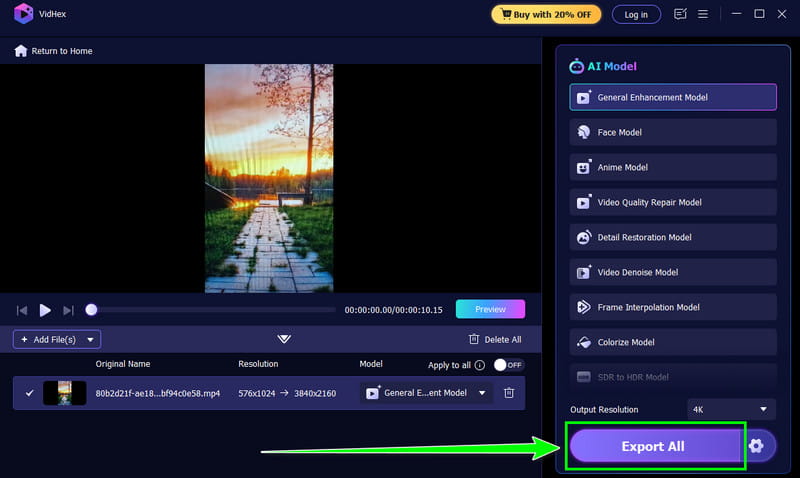
With this method, you have discovered that this program is an excellent alternative to Vmake. It can even offer various features without any limitations. Thus, if you want to enhance and upscale video with AI, feel free to utilize Vidmore Video Enhancer.
Part 5. A Comparison Table of the Best Video Enhancers
To get more insights about the two video enhancers, you can check the comparison table provided in this section.
| Vidmore Video Enhancer vs. Vmake Video Enhancer | VS | Vmake Video Enhancer |
| ●General Enhancement Model ●Face Model ●Anime Model ●Video Quality Repair Model ●Detail Restoration Model ●Video Denoise Model ●Frame Interpolation Model ●Colorize Model ●SDR to HDR Model ●Color Enhancement Model ●Low-Light Enhancement Model | AI Models | ●Portrait ●Product ●Low-Light ●Gaming ●Anime ●AI 4K+ |
| Upscale video up to 4K. | Resolution | Upscales to HD, 2K, 4K, and advanced AI 4K+. |
| Yes | Offers Batch Processing | Yes, with limitations. |
| Fast | Speed | Slow |
| Access more features in the paid version. | Cons | ●It requires a fast internet connection. ●The free version inserts a watermark on the video. ●Lacks basic video editing functions. |
Final Verdict
Vmake Video Enhancer is an excellent AI-powered tool that can help you enhance and upscale your videos. It can even offer various AI models, allowing you to obtain the result you prefer. However, we can't ignore the fact that its free version has various limitations, making it unfortunate for some users. Thus, if you are looking for a better video enhancer, we suggest using Vidmore Video Enhancer. This program can provide all the features without any limitations, making it superior to Vmake. It also has a fast video enhancement procedure, allowing you to obtain the result in just a few seconds. Thus, if you need an astounding video enhancer, this program is the best choice.