What is AirVid Quality Enhancer: Complete Review and Guide
AirVid is an excellent app for your mobile that enhances the quality of your videos and images. It can even offer a superb, straightforward user interface, making it an ideal tool for all users. The good part is that you can access more features when using the app. If you want to learn more about AirVid, it's better to read this review. You will also learn more about its benefits, limitations, pricing plans, and more. After that, we will also offer you an excellent alternative to enhance your videos further. Thus, if you want to start to discover everything about the topic, instantly read this article.

PAGE CONTENT
Part 1. Features and Benefits of AirVid
AirVid app AI-powered online and mobile tool designed to enhance video quality by improving resolution, reducing noise and blur, stabilizing footage, and improving colour and detail. With its capabilities, you can make old, low-quality, or shaky videos look more precise and more polished. In addition, operates primarily through a user-friendly web platform and mobile apps, using deep learning models to analyze and reconstruct video frames for a better viewing experience, often with a free tier for testing and subscription plans for full HD/4K output. Now, If you want to learn more about the tool's key features, check the information below.
Enhance Video Quality
The core feature of the tool is to enhance the quality of your media file. What makes it ideal is that it is powered by artificial intelligence (AI. With that, you can ensure that you can obtain the result you need. In addition, the tool can automatically improve the video, making it more reliable.
Noise Reducer
Another great feature you can access is its noise reducer. With this feature, you can reduce video noise, resulting in a better, smoother output. Plus, this feature can reduce image noise, making it a better tool for all users.
Color Correction
What we like about the AirVid app is that it can automatically correct and enhance the colour of your video. This feature is perfect if you want to improve and get a better version of your clip.
Offer a Simple User Interface
The video enhancer can offer a neat and simple user interface. With a perfect layout, even a non-professional user can improve videos without encountering any difficulties.
Key Benefits
There are also various benefits you can get when using the AirVid app, like:
• You can instantly restore and modernise your old family videos.
• You can achieve a high-definition, polished look for professional projects without any advanced skills.
• You can save more time since the tool leverages AI to speed up the process.
• Its free version allows you to improve your videos, which is also perfect for testing its capabilities.
Part 2. How to Use AirVid
After learning all the capabilities of the AirVid Quality Enhancer, you can now proceed to learning how to use it to enhance videos effectively. Follow the simple instructions below and start improving your videos.
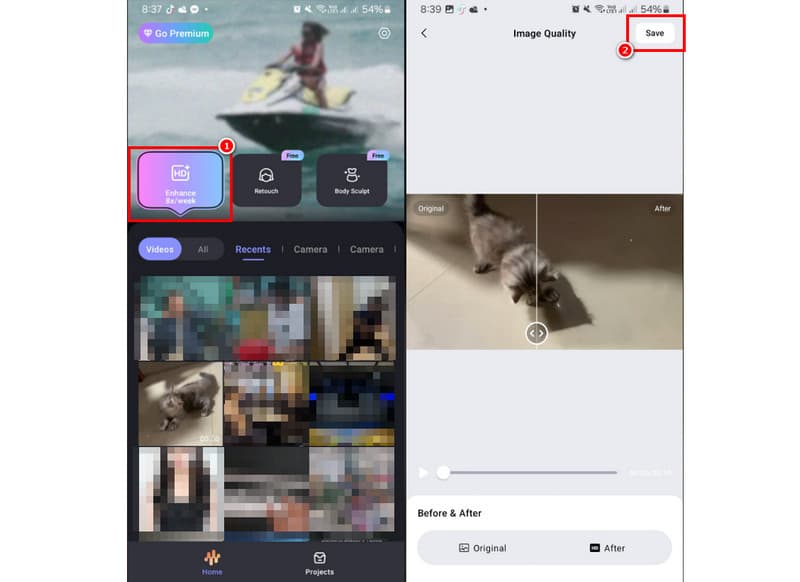
Step 1. Download AirVid APK on your device. After that, install it to start the video-enhancing process.
Step 2. After you open the tool, go to Enhance > Video, then select the video you want to improve. Once done, the tool will automatically enhance the video.
Step 3. Once the result appears, tap the Save button above to start saving the enhanced video to your device. Once done, you can watch your video on your iOS and Android video players.
With this method, you can effectively enhance the quality of your video. It can even offer a simple layout to make the procedure easier. With that, rely on this tool for a better video enhancement process.
Part 3. Limitations of AirVid
Even though the tool is reliable, there are still some drawbacks you might encounter, such as:
• The tool's free version can only support 720p resolution.
• When using the free trial, you can get a video with a watermark. To remove the watermark from the video, get its paid version.
• It lacks some of the editing functions.
• Its subscription plan is pricey.
Part 4. Pricing of AirVid
As we have mentioned, the AirVid platform is not 100% free. With that, if you want to access all its features, you'll need the Premium version. The tool's price starts at $5.00 per month. Also, if you plan to get the annual plan, it costs $15.00. After subscribing to the paid version, you can use all features without any restrictions.
Part 5. Best Alternative to AirVid
Are you looking for a desktop video enhancer with many features to deliver the best results? In that case, we recommend using Vidmore Video Enhancer. This program is perfect if you want to enhance your videos with the best quality. It lets you upscale your videos to 1080p and even 4K, making it the best enhancer. What we like here is the simple, clean layout. You can even select your preferred enhancement option to achieve the desired output. Plus, you can adjust various parameters, such as sample rate, video encoder, bitrate, and more. You can even save your videos to multiple formats, including MP4, MKV, WMV, MOV, and more. With that, if you need the best alternative to AirVid, look no further than Vidmore Video Enhancer.
More Features
• The software can offer its AI-powered technology to facilitate a smooth enhancement process.
• It can restore old videos.
• The program can optimize the brightness and contrast.
• It is available on both Windows and Mac.
Use the steps below to start enhancing your videos using this platform.
Step 1. Download Vidmore Video Enhancer on your computer. After that, install it to start enhancing your videos.
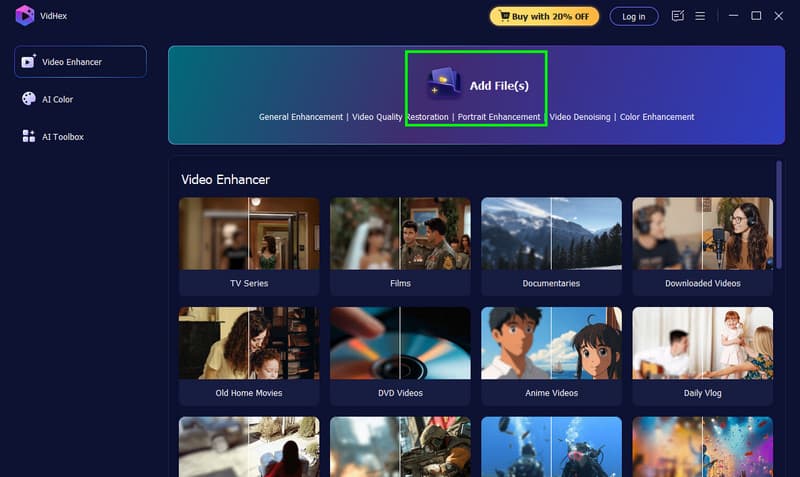
Step 2. After you open the software, add the video you want to enhance by clicking the Add Files button.
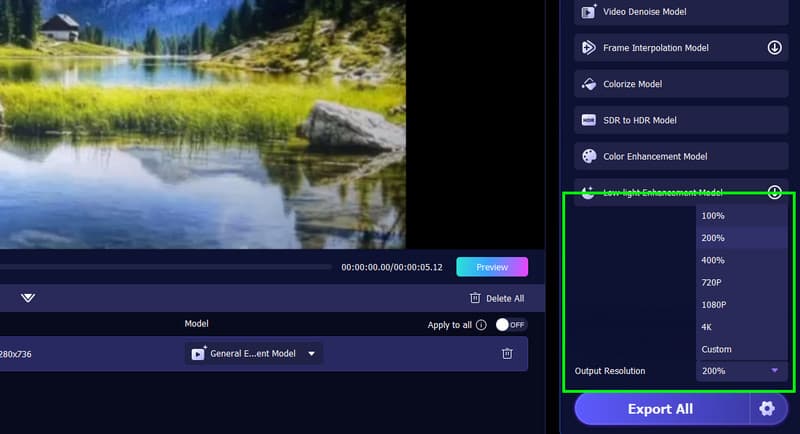
Step 3. Go to the Output Resolution section and select your preferred video resolution.
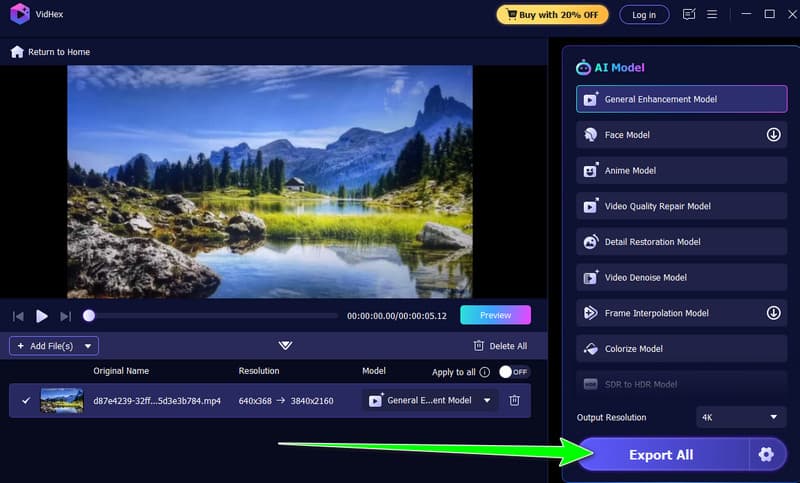
Step 4. After that, start hitting the Export option to begin saving your enhanced video. Once done, start watching the video on your multimedia player.
Pros:
- The program can upscale the video using AI for better results.
- You can navigate all functions easily.
- The program's main interface is comprehensive.
- You can enhance various types of videos, including anime, vlogs, and documentaries.
Cons:
- If you want to access all the features, use its paid version.
Part 6. FAQs about AirVid Review
Is AirVid safe?
Absolutely, yes. This video and image enhancer can ensure that it is safe to access. It can also secure your data, making it a reliable tool.
Can AirVid upscale video up to 4K?
Definitely, yes. You can use AirVid and enhance your video up to 4K resolution. However, to do that, you have to subscribe to its plan. With its Premium plan, you can ensure the best video quality.
Why choose the AirVid Quality Enhancer?
This tool is perfect if you want to upscale your videos using your phone. It is also ideal for beginners, thanks to its simplicity. Thus, choose this tool for a better result.
Conclusion
Thanks to this AirVid review, you have learned about its features, benefits, and pricing plans. You even have an idea of how to use it for enhancing your videos. However, in its free version, you can only improve the video quality to 720p, which is not very satisfying. With that, if you need an excellent alternative for video enhancement, feel free to try Vidmore Video Enhancer. This software can help you upscale your videos for up to 4K, making it a remarkable video enhancer.