
Simple LTX Studio Review: Features and Best Alternative
LTX Studio is known as an effective partner for content creators and producers who wish to add flair and accuracy to their video projects. It can help you enhance your videos for a better viewing experience. In this review, we will offer all the information you need about the tool. We included its features, limitations, pricing plans, and methods to enhance your video. Thus, read here and get more insights about the discussion.

PAGE CONTENT
Part 1. Detailed Overview of LTX Studio
LTX Studio AI is an ideal tool you can access on your browser that can help you generate and enhance videos. With this tool, you can ensure that you can get a better version of your footage, resulting in better video playback. The best part here is that dealing with your videos is simple, thanks to its intuitive user interface. If you want to know more about the tool, you can check its features below.
Video Upscaler
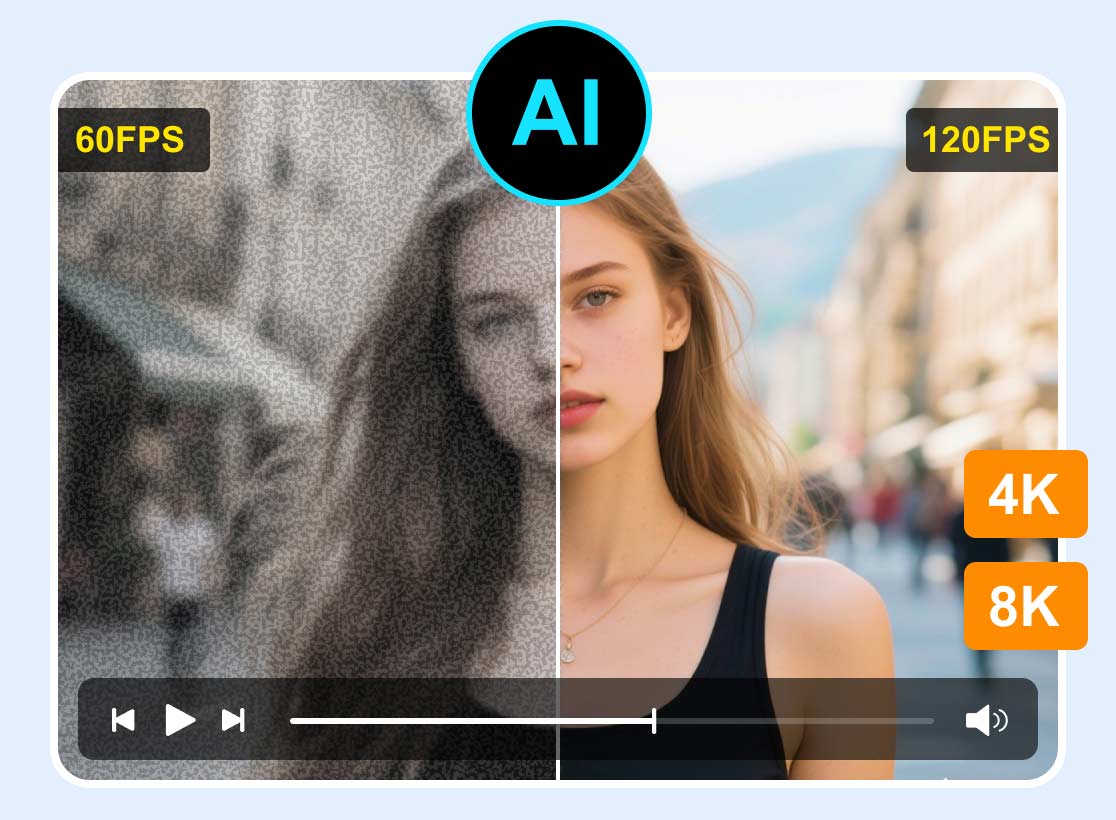
One of the key features of LTX Studio is Video Upscaler. This feature allows you to insert your video and generate/enhance it to better video quality, such as 1080p, and even 4K. What we like here is that the process of enhancing the videos is simple, making it ideal for all users.
Generative AI Workspace
The video enhancer and generator can offer a dedicated workspace where users can generate visuals and video through prompts, image references, or a mix of both. With this feature, creators can quickly explore ideas without needing extensive manual editing.
AI Elements (Objects, Characters, Locations)
By utilizing AI-generated objects, characters, and locations, content creators may keep scenarios cohesive. The feature ensures that recurrent photos stay the same. This feature is perfect for storytelling, advertising campaigns, and multi-scene productions.
AI Audio Integration
What makes the tool powerful is that it can offer AI audio integration. You can support synchronized audio enhancements, including AI-generated music and text-to-speech voiceovers. This feature ensures that you can get better audio that you can sync with your video.
Generate Media
Another good thing LTX Studio can offer is its capability to generate media. You can generate a video, turn text into an image, generate a video from audio, and more. This feature is perfect for users or professional creators who want to visualize their ideas and create videos manually.
Collaboration
Besides generating and enhancing media, LTX Studio can also support collaboration. This way, you can share projects, manage assets, track progress, and streamline feedback. This makes it ideal and easier for the team to stay aligned during production.
Limitations of LTX Studio
LTX Studio AI is an exceptional tool that can help you deal with your media files. You can even generate videos, audio, images, and more. The best part here is that it can offer all the necessary features. However, you must learn that there are also some limitations of the tool that you must be aware of. Read here and explore the tool’s drawbacks.
- • The tool cannot perform frame-accurate sync, multi-tracking editing, and color grading.
- • For professional finishing, you still need to rely on some professional-grade editors, like DaVinci Resolve and Adobe Premiere.
- • There is a limited length when generating a video (3 to 20 seconds).
- • Longer videos must be stitched together in the timeline.
- • If you want to use the overall feature, getting the paid version is ideal.
- • The tool requires registration to start the generation and enhancement process.
Part 2. Pricing Plans of LTX Studio
Is LTX Studio AI free? Well, the tool is not free to use. You have to access credits or use its subscription plan to use its overall features. So, if you are planning to get the tool’s paid version, you can check the pricing plans in this section.
| Subscription | Free | Lite | Standard | Pro |
| Pricing | Free | $12.00 | $28.00 | $100.00 |
| Inclusions | ●800 Credits ●Image and video generation ●LTX-2, LTX-2.3 video models ●Z-image image model ●Advanced camera controls ●Blank Storyboards ●Audio-to-Video generation ●SDR to HDR video enhancement ●Flows, node-based automation ●Video-to-Video Control ●Personal use license | ●Everything in the Free version ●8,000 Credits ●Image and video upscales ●Editing tools ●LTX-2 4K resolution ●No watermarking | ●Everything in the Lite version ●28,000 credits ●Nano Banana 2 and Pro image models ●FLUX.2 Pro image model ●Veo 2 video model ●Kling 2.6 Pro video model ●Kling 3.0 Pro video model ●Seedance 2.0 video generation models ●ChatGPT Images 2.0 model ●Save and create consistent Elements ●Flows, advanced node-based automation ●AI Storyboards ●Pitch Decks ●Purchase additional Credits ●Commercial use license | ●Everything in the Standard version ●110,000 credits ●Veo 3.1, Veo 3.1 Fast, Veo 3.1 Lite generation models ●Maximum quality & control ●3 collaborators per project ●On-demand credit top-ups |
Part 3. How to Use LTX Studio to Enhance Video
Do you want to use LTX Studio to enhance your video? Then, you can check the simple method we have provided in this section.
Step 1. Go to your browser and access LTX Studio. Then, you can start creating your account.
Step 2. After that, the primary interface will load on your screen. Select the Gen Space feature.
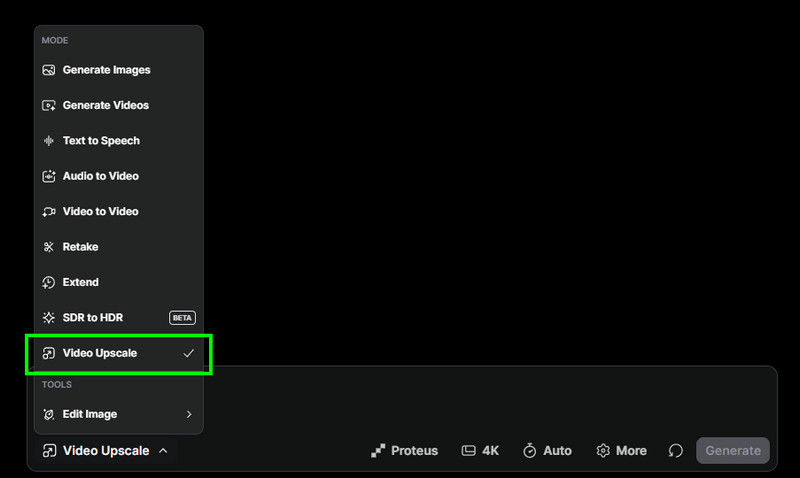
Step 3. Then, click the arrow button below and select the Video Upscale feature. Then, start adding the video by clicking the Add Video File button.
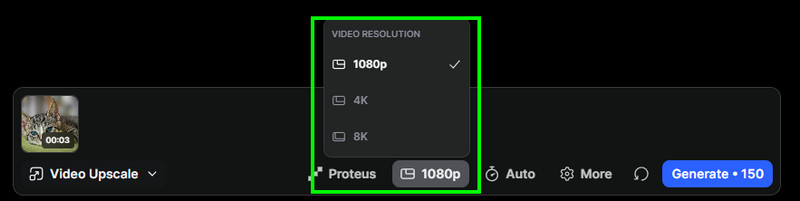
Step 4. Then, you can start selecting your preferred quality. You can enhance the video up to 1080p, 4K, and 8K. You can also go to the Settings section to adjust the compression, noise, grain, and more.
Step 5. You can start hitting the Generate button below to start enhancing the video. Once done, save it on your computer to start watching it on your media player.

Part 4. Great Alternative to LTX Studio
LTX Studio AI is effective when it comes to enhancing videos. However, it requires you to create an account and obtain some credits to enhance your videos. So, if you are looking for a better replacement for the tool, feel free to access Vidmore Video Enhancer. With this video enhancer, you can enhance your video based on your preferences. What we like here is that it is powered by artificial intelligence. It can even offer various AI enhancement models you can use. Some of them are Face Model, Anime Model, Colorize Model, Video Denoise Model, and more.
What’s more, this video enhancer is capable of giving you a comprehensive layout, making it suitable for both skilled and non-professional users. You can even save the video with the best quality for up to 4K. Thus, if you need the best alternative to LTX Studio for enhancing videos successfully, look no further than Vidmore Video Enhancer.
More Features
- • The program can save the video to various formats, including MP4, MKV, MOV, WEBM, and more.
- • It can offer a smooth export process.
- • The software is powered by AI, ensuring that it gives you an accurate result.
- • The video enhancer supports different video types, such as anime, vlog, documentaries, DVD videos, and more.
- • It is free to access on both Windows and Mac computers.
If you want to start enhancing your videos, you can follow the simple instructions below.
Step 1. First, you have to download Vidmore Video Enhancer on your computer. After the installation, launch it to start the video enhancement process.
Step 2. From the tool’s interface, tap the Add Files button above to start adding the video you want to insert from your computer. Since it supports batch processing, you can add multiple videos at once.
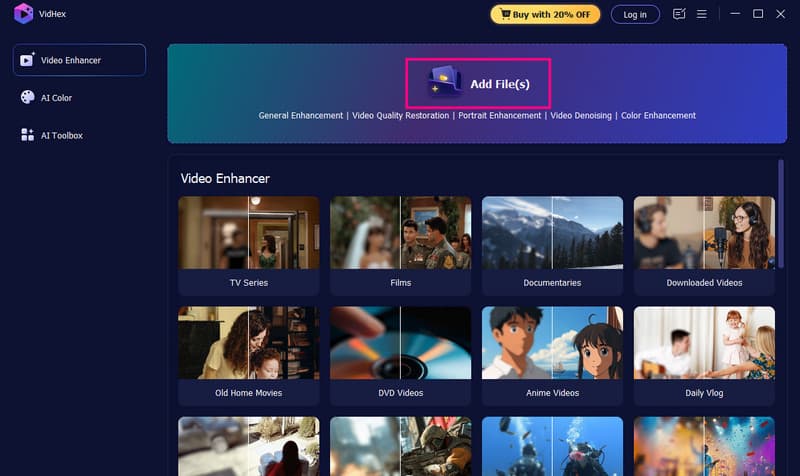
Step 3. Then, you can choose your preferred AI model. You can tap the General Enhancement Model to enhance the overall appearance of your video.
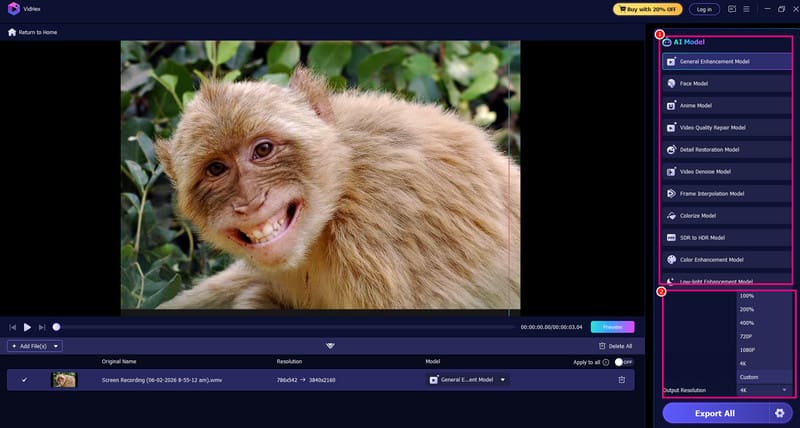
You can also go to the Output Resolution section to select your preferred quality/resolution.
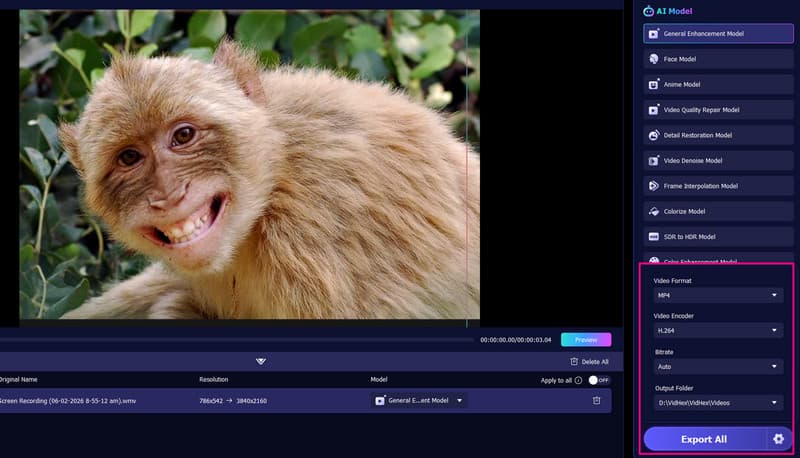
Step 4. Now, proceed to the Settings section and choose your ideal format, encoder, and bitrate. Lastly, hit the Export button to begin saving your video.
Part 5. Final Verdict
LTX Studio is an ideal tool that you can access in your browser. Thai tools can offer various features, such as generating video, images, and audio via prompts, turning text to speech, and enhancing your videos. With this tool, you can ensure that you can get the result you need, leading to better playback. However, you also learned that this tool is not free to access. You have to get the paid version to generate and enhance videos effectively.
Conclusion
After learning everything about LTX Studio, you can tell that it is among the helpful tools you can use to enhance videos on your browser. You even explored its features, letting you know about its capabilities. Plus, if you want the best alternative to the tool, try using Vidmore Video Enhancer. This program can give you all the features you need to smoothly enhance your videos, making it a superior tool to LTX Studio.