Immersity AI Review: Features, Price, Pros, & Cons
Since its debut, 3D visual technology has captured the enthusiasm and admiration of countless audiences. Today, however, it is no longer an unattainable, high-end technology reserved for professionals. With ongoing advancements, creating immersive, dimensional, and interactive 3D content at home has become entirely possible - especially with the help of a professional 2D-to-3D converter. Immersity AI is one option worth considering.
Why is that?
This Immersity AI review will provide the answers. The article takes an in-depth look at its features, performance, advantages, disadvantages, pricing, and other essential details. A step-by-step usage guide is also included to give you a clearer understanding of how the platform works. With this comprehensive overview, you can make a well-informed decision about whether it is the right 3D creation tool for your needs.

PAGE CONTENT
Part 1. Overview: Immersity AI
Let's first examine the concept behind Immersity AI itself.
Immersity AI (Leiapix Converter) is a 2D-to-3D model converter. It employs cutting-edge AI algorithms to simulate perception, imparting a three-dimensional sense to originally flat graphics. Developed by Leia Inc., this tool currently operates primarily as an online service.
Labeling its core function merely as a converter feels somewhat vague. Let's examine the specific services it provides throughout the conversion process:
Main Features
- • 2D to 3D Conversion: Immersity AI employs advanced depth mapping technology. AI generates complex depth maps from 2D images, ultimately producing 3D visuals or even animations.
- • Precise Parameter Control: Immersity AI offers depth map editing, allowing users to fine-tune final results by adjusting image depth, transparency, and more.
- • 3D Animation Generation: Immersity AI offers multiple animation presets. Users can also customize motion controls, focus selection, amplitude, and more to create their own animations.
- • Custom Visual Effects: Immersity AI provides advanced settings. Users can set motion intensity and optimize depth to find the most suitable motion effects.
Pros
- Intuitive interface with easily accessible adjustment settings, suitable for users of all skill levels.
- Super flexible customization options ensure precise control.
- Easy downloading and saving.
- Produces genuinely high-quality 3D effects.
Cons
- Exporting can be slow due to typically large 3D file sizes.
- Free version users face significant limitations.
- Highly dependent on internet quality.
Part 2. Pricing Plans of Immersity AI
From the previous section, you may have noticed a key point: Immersity AI imposes numerous restrictions on free users.
Considering whether a subscription is worth it?
In this section, we've compiled the three paid plans currently offered by Immersity AI, along with the respective benefits each unlocks for your reference.
• Trial: $3.99 for One Time
After subscribing, you'll receive 120 credits and output videos without watermarks. This plan is ideal for beginners looking to try it out.
• Basic: $9.99/Month
Each month, you'll receive 550 credits and can output videos in 720p HD quality. You'll also unlock commercial usage rights.
• Pro: $19.99/Month
You'll receive 1200 credits monthly. Videos can now be exported in 1080p quality. Commercial use of your work is fully permitted.
• Bonus
You may also opt for a one-time payment of $15 to receive 750 credits with no expiration date.
Part 3. How to Use Immersity AI
Everything you've seen so far demonstrates the capabilities offered by Immersity AI. But since we're reviewing it, how could we skip examining its workspace and actual creative process?
Take a look at the screenshots and steps mentioned in this section (using 2D-to-3D conversion as an example) to intuitively experience its user-friendliness.
Here's how to use Immersity AI to convert 2D to 3D.
Step 1. First, locate the official Immersity AI website via your browser. Alternatively, search for Immersity AI.
Step 2. Click Continue to Workspace on the homepage to access the main interface. You may be prompted to register and log in during this process.
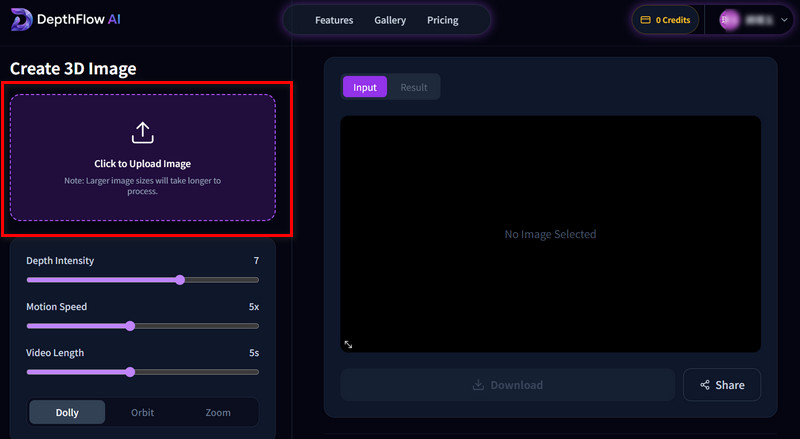
Step 3. Now, click Click to Upload Image to upload your prepared 2D image.
Step 4. Adjust settings for Depth Intensity, Motion Speed, and Video Length.
Then click Generate 3D Image.
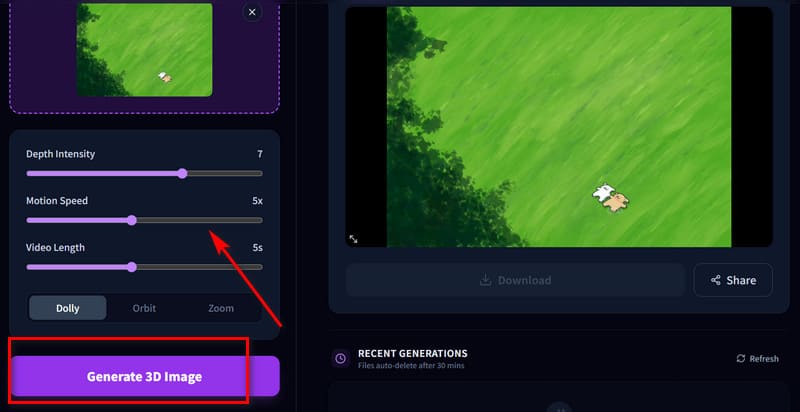
Step 5. After generation completes, preview the result in the window. If satisfied, click Download to save it.
Part 4. Best Immersity AI Alternative
It's undeniable that Immersity AI delivers outstanding performance in 3D creation. However, its complete lack of a free trial and frequent struggles with large files may leave you hesitant.
This guide therefore presents its best alternative: Vidmore Video Converter.
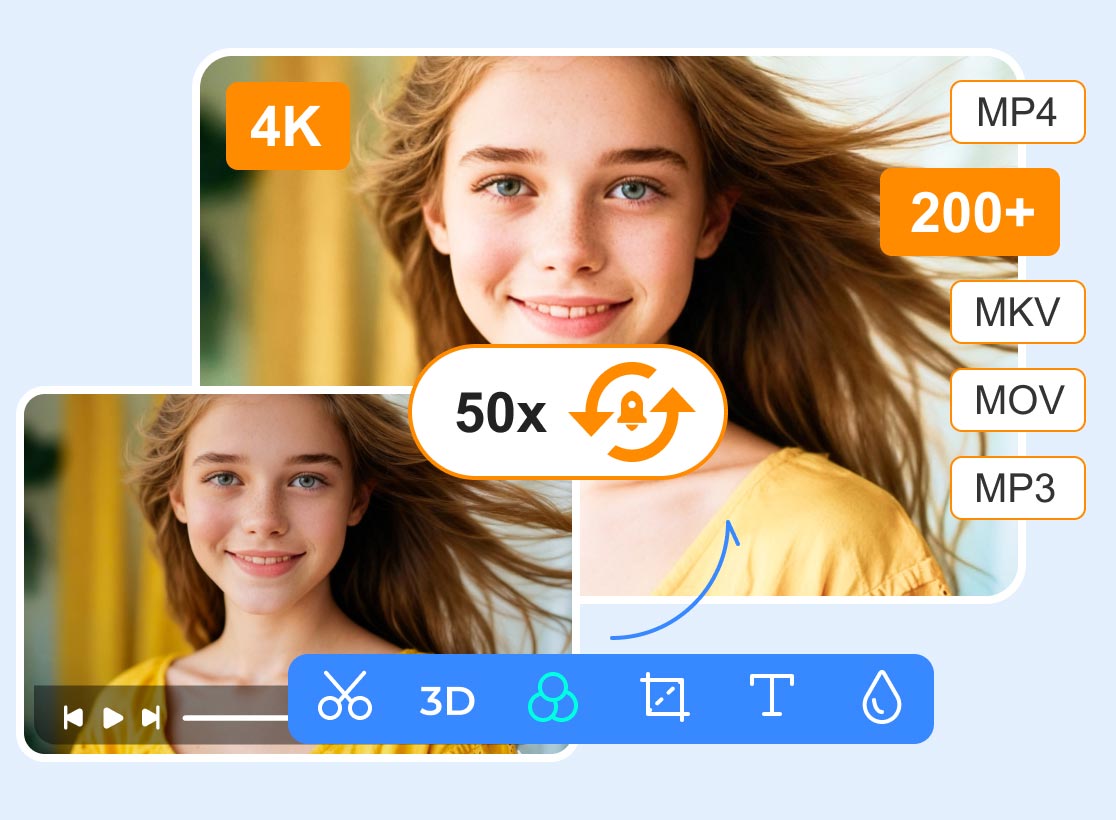
Compared to Immersity AI, Vidmore Video Converter is primarily desktop-based, meaning it's largely unaffected by internet speeds since all operations occur locally. Moreover, Vidmore Video Converter is a versatile video processing tool that includes 3D video creation. It offers detailed customization options, allowing users to preview conversion results intuitively. Additionally, its toolkit encompasses all common functions: video editing, quality enhancement, file size compression, and more.
Main Features
- Convert 2D to 3D and create professional-grade videos.
- Essential functions like video trimming, cropping, splitting, merging, and rotation.
- Supports file size compression or video quality enhancement.
- Convert videos, audio, images, and more into any popular format.
- Create complete videos using video clips, images, preset filters, themes, and background music.
Here's how to convert 2D to 3D with Vidmore Video Converter.
Step 1. Download Vidmore Video Converter from the official website to your computer. Launch it and switch to Toolbox mode.
Under the Toolbox directory, locate 3D Maker and click to start using it.
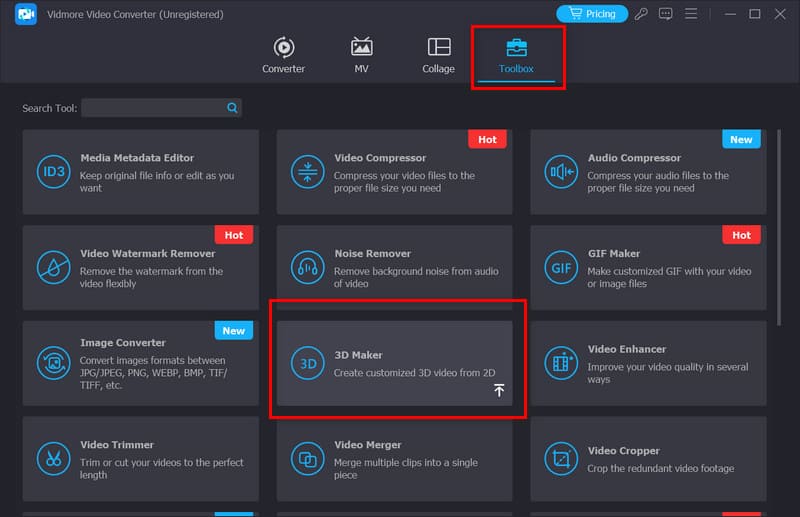
Click + to add your original 2D file.
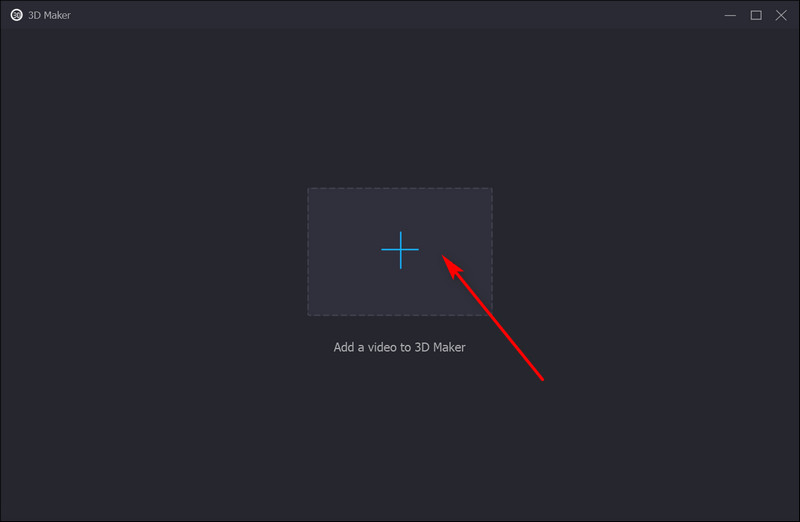
Step 2. After the video uploads, preview it and adjust parameters like Anaglyph, Split Screen, Depth, Format, and Quality as needed.
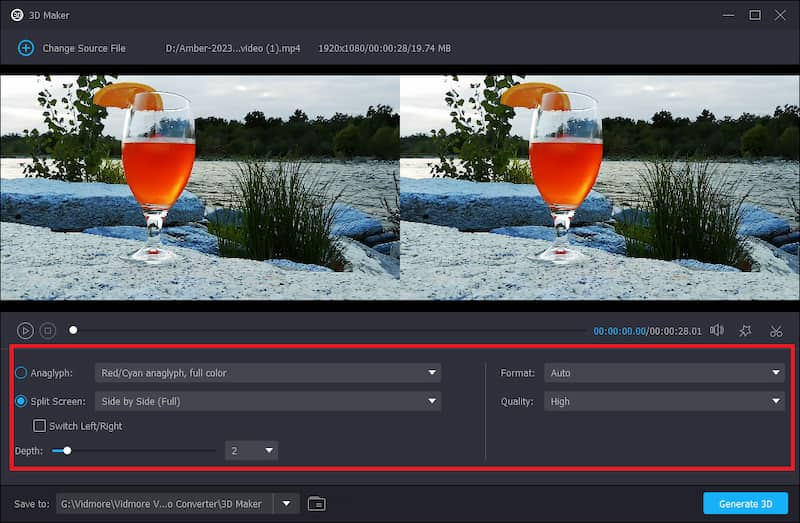
Step 3. Finally, click Generate 3D.
Part 5. FAQs of Immersity AI Review
Can Immersity AI convert 2D to 3D?
Absolutely. Immersity AI's core functionality is converting 2D to 3D effects. It employs cutting-edge AI to simulate depth perception, ensuring the final output delivers true 3D stereoscopic visuals. You can even add motion and special effects to create Immersity AI depth animations.
Is Immersity AI free?
No. The platform itself does not offer a free trial plan. If you wish to try it, you might consider its Trail plan, which grants 120 credits for a one-time payment of $3.99.
Is Immersity AI good for beginners?
Yes. Its interface and workflow are highly beginner-friendly. The tutorial is thorough, and all parameters and buttons are intuitively placed. However, creating 3D animations may require some time to master the application of motion and dynamic effects.
Conclusion
After reviewing Immersity AI, you should now have a clear understanding of its fundamental capabilities. This software specializes in converting 2D to 3D and excels at creating 3D animations. While its operation isn't overly complex, new users may need time to familiarize themselves with certain parameter settings.
Since Immersity AI is an online tool, launching it is very convenient. However, note that the platform does not offer a free trial; you may need to purchase a Trail plan to use it normally.
If you're looking for a tool that's equally professional yet more stable, we highly recommend trying Vidmore Video Converter.