
Proven and Tested HEVC to MP4 Converters Online for You
Users encounter the trouble of having high-quality HEVC (H.264 video files that deliver exceptional compression efficiency but are not widely supported by some devices, editors, and media players. With this compatibility issue, video playback and editing might be frustrating. Well, the best solution for that is to convert your video file to a better and more supported format, like MP4. Thankfully, this article will introduce various online HEVC to MP4 converters. You will also learn about their pros, cons, best for, and more. Without anything, read here and get more information about the best converters.

PAGE CONTENT
Part 1. Why We Need an HEVC to MP4 Converter
Although HEVC (H.265) is a potent video compression standard that reduces file sizes without compromising quality, its drawback is restricted device, editor, and player compatibility. The older H.264 MP4 format, which is still the industry standard for fluid playback and editing, is still used by many systems. Because it bridges the gap by converting high-efficiency H.265 files into widely supported MP4s while maintaining as much quality as feasible, a HEVC to MP4 converter is crucial. This guarantees that users can easily watch their videos on PCs, smartphones, or editing applications, and other platforms.
Part 2. How We Test and Review
Before introducing the best converter, we test and review them in many ways. With that, we can ensure that all the converters are helpful and effective.
- Compatibility Check - We test whether the converter can handle various HEVC files and output them correctly into H.264 MP4.
- Output Quality - We also ensure that the converters can produce a sharp visual, accurate color, and synchronized audio.
- Conversion Speed - All of the tools can give you a fast conversion speed, allowing you to get the result in just a few seconds.
- Ease of Use - We ensure that the layout of each converter is comprehensive, making them suitable for all types of users.
Part 3. Quick Comparison of the Best HEVC to MP4 Converters
If you want to take a peek at the best online HEVC to MP4 converters, you can check the table below.
| HEVC to MP4 Converters | Vidmore Free Video Converter Online | CloudConvert | FreeConvert | Convertio | Flexclip |
| Conversion Speed | Fast | Fast | Standard | Fast | Fast |
| Max Resolution | Up to 4K | Up to 4K | Up to HD | Up to 4K | Up to 1080p |
| Ease of Use | Comprehensive | Comprehensive | Comprehensive | Comprehensive | Comprehensive |
| Price | Free | • Free • Price starts at $18.00 | • Free • The subscription starts at $12.99 | • Free • The subscription starts at $9.99 | • Free • The subscription starts at $11.99 |
Part 4. Top 5 HEVC to MP4 Online Converters
If you want to start exploring the best online HEVC to MP4 converter, you can read all the information in this section.
1. Vidmore Free Video Converter Online
Best for: Ideal for a simple and smooth conversion process.
Rating: 4.5 / 5
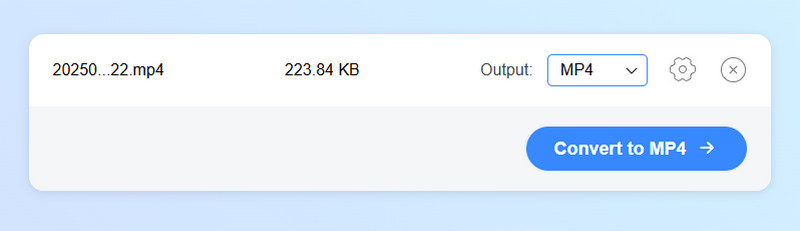
One of the most reliable online HEVC to MP4 converters you can access on your browser is Vidmore Free Video Converter Online. This tool is ideal if you want a fast and smooth conversion process since it can offer its simple user interface. The best part here is that it can save your video with the best quality, resulting in better video playback. You can even adjust various parameters, such as encore, resolution, frame rate, bitrate, and more.
Pros
- The tool can give you a fast conversion process.
- It is accessible to all web platforms.
- The tool can support numerous output formats, including AVI, MKV, WMV, MOV, FLV, etc.
Cons
- You must have a stable Wi-Fi or data connection to get a smooth performance.
2. CloudConvert

Best for: Perfect for users who want an instant conversion procedure.
Rating: 4 / 5
CloudConvert is among the best online-based converters you can access if you want an effective method to convert your HEVC file to MP4. It can even give you a simple process, making it perfect for non-professional users. In addition, you can also use this tool to convert more files. You can transcode TS to MP4, MKV to FLV, WMV, to AVI, MP4 to AVI, and more. What makes it ideal is that it won't show any ads on the screen, so expect a neat layout during the process.
Pros
- Utilizing the converter is simple.
- It can give you a high-quality video for better playback.
- It can support multiple formats, such as MP4, AVI, FLV, MOV, M4V, etc.
Cons
- It lacks basic editing tools to improve the video.
- The free version has various limitations.
3. FreeConvert
Best for: Helpful for converting files from various platforms.
Rating: 3.5 / 5
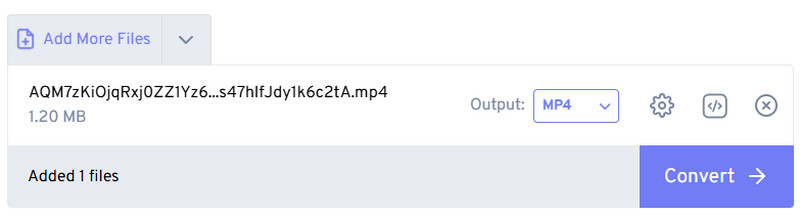
Do you want to convert your HEVC files to MP4 for better video playback and compatibility? Look no further than FreeConvert. This tool is ideal since it ensures an effective conversion process. The good thing about this tool is that you can resize the video, rotate it, change the aspect ratio, and more. Thus, if you need a reliable and free online HEVC to MP4 converter, use the tool right away.
Pros
- The layout of the tool is comprehensive.
- It can be integrated with Email.
- The tools adjust various necessary parameters.
Cons
- Disturbing ads are everywhere.
- The conversion speed/process depends on the internet connection.
4. Convertio
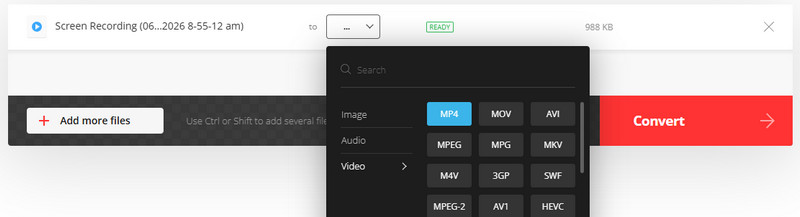
Best for: Ideal for users who need a simple conversion process.
Rating: 4.5 / 5
When it comes to simplicity, there is no doubt that Convertio is the best converter you can use to transcode HEVC to MP4. With its comprehensive layout, you can deal with your files instantly. You can even save/keep the converted file on other platforms, like Google Drive and Dropbox. Plus, you can convert more files if you want to. You can change WMV to MP4, AVI to FLV, MOV to MP4, and more.
Pros
- It can support a batch conversion feature.
- The UI of the tool is neat and understandable.
Cons
- To access the tool's full features, access its paid version.
5. FlexClip

Best for: Convert file with the best quality.
Rating: 4.5 / 5
Do you want to convert your HEVC to MP4 and get the best quality? Then, you can try using FlexClip. This tool allows you to save the converted file with 1080p resolution. With that, you can watch your video satisfactorily. Aside from that, the tool won't show any annoying ads on your screen, so that you can convert your files smoothly.
Pros
- The tool can give you a smooth and fast conversion process.
- The saving process is fast.
Cons
- The tool can only support MP4 as the output format.
Part 5. FAQs about Online HEVC to MP4 Converter
Do online converters reduce the original quality?
Actually, not. Most of the converters online can preserve the quality of your file. Some of them can even increase the quality for better playback.
Are online converters free to use?
Almost all of the online converters can offer a free version. That way, you can convert your files without spending a penny.
What is the best converter I can use to convert HEVC to MP4?
If you need the best converter, we suggest using Vidmore Free Video Converter Online. This converter ensures that you can get the result you need with a satisfying quality, making it powerful and ideal for all users.
Conclusion
With these online HEVC to MP4 converters, you can ensure that you can convert your media files for better compatibility and smooth playback. With that, always try these converters and see which is best for you. Plus, if you want a smooth and fast conversion process, feel free to access Vidmore Free Video Converter Online. This tool can give you the best result after the process, making it the top choice as a converter.