Simple Ways to Convert TRP to MP4 File Format [2026]
Do you have your video that was saved as TRP and can't play on some media players? It is a common problem, and many users worry about losing quality during conversion. Since TRP is perfect for direct recording from broadcast streams but not widely compatible, converting it to MP4 can improve playback without significant quality loss. In this guide, we will teach you how to convert TRP to MP4 format for better compatibility while preserving as much original quality as possible. You will also learn about the TRP file and why maintaining quality matters. Read on to find out more.

PAGE CONTENT
Part 1. What is TRP Format
The TRP format is a proprietary container format developed primarily for use in digital television, specifically for recording broadcast streams from set-top boxes or digital video recorders (DVRs). Its main function is similar to some common formats like MPEG-2 Transport Stream (TS). It is because it is designed to store multiplexed audio, video, and data streams transmitted via satellite, cable, or terrestrial broadcasts. The format is optimized for real-time recording and playback, often without extensive re-encoding, which helps keep and preserve the original broadcast quality.
Part 2. Why and When to Convert TRP to MP4
There are various reasons why you have to transform your TRP file into an MP4 format. To get more insights about why and when to convert your video file, see all the details below.
• You can change the TRP to MP4 if you want a smooth video playback. MP4 is more supported by other video players, leading to a better viewing experience.
• You can change the TRP to MP4 if you want to edit the videos, since some video editing software doesn't support TRP.
• Convert TRP to MP4 to save space on your storage. MP4 contains a modern codec (HEVC), which can significantly reduce the file size.
• For future-proofing, MP4 is an ideal format since the TRP format is slightly becoming obsolete.
• Turn TRP to MP4 if you want efficient streaming and sharing. The MP4 format is suitable for streaming online and uploading to various platforms, like YouTube, Vimeo, and more.
Part 3. Online Method to Convert TRP to MP4
If you are looking for a better TRP to MP4 converter, we prefer using Vidmore Free Video Converter Online. It is an online-based tool that can help you transcode your files effectively. What we like about this converter is its fast conversion process. You can also smoothly convert videos, thanks to its neat and simple user interface. Plus, it supports various output formats. Besides MP4, you can also convert your TRP files to MKV, MOV, AVI, WMV, FLV, and more formats. Thus, to check its capability, follow the instructions below to convert TRP to MP4 online.
Step 1. Visit Vidmore Free Video Converter Online on your website. Then, click the Start Converting Video button to add the TRP file you want to convert.

Step 2. For the next process, proceed to the Output section and select the MP4 format.
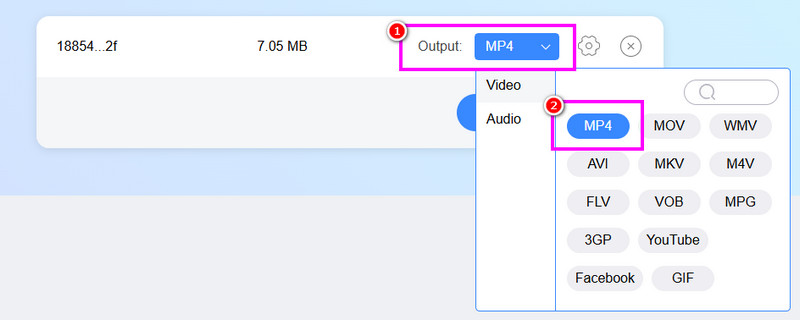
Step 3. Finally, click the Convert to MP4 button to start the TRP to MP4 conversion process. Once done, start saving the converted file.

With this method, you can effectively convert your TRP files without encountering any problems. Thus, use this online tool for an effective conversion process.
Part 4. Convert TRP to MP4 on Desktop
Do you want to convert your TRP files into MP4 on your desktop? In that case, you can check this section as we offer the best methods you can follow for converting TRP to MP4 offline.
Method 1. Convert TRP to MP4 Using Vidmore Video Converter
Vidmore Video Converter is an excellent program that can assist you in transcoding your TRP to MP4 format. It can even offer a fast conversion speed of up to 50× faster compared with other converters. What makes it powerful is that it can offer its batch conversion feature. This feature allows you to insert more than one video file. With that, no matter how many files you want to convert, you can still save a lot of time. Plus, you can choose your desired quality, such as 720p, 1080p, and even 4K. It can also support more output formats, like WMV, MKV, M4V, AVI, FLV, VOB, and more. Therefore, always consider using this software for a smooth conversion process.
More Features
• The converter can offer a smooth Export process.
• It can support various video qualities for better video playback.
• The software can offer various editing functions to improve the video.
See the steps below and start converting TRP to MP4 for free.
Step 1. Download Vidmore Video Converter on your computer. After that, run it to start the TRP to MP4 conversion procedure.
Step 2. Go to the Converter feature and select Add Files to insert the TRP file. You can insert multiple files if you want to.

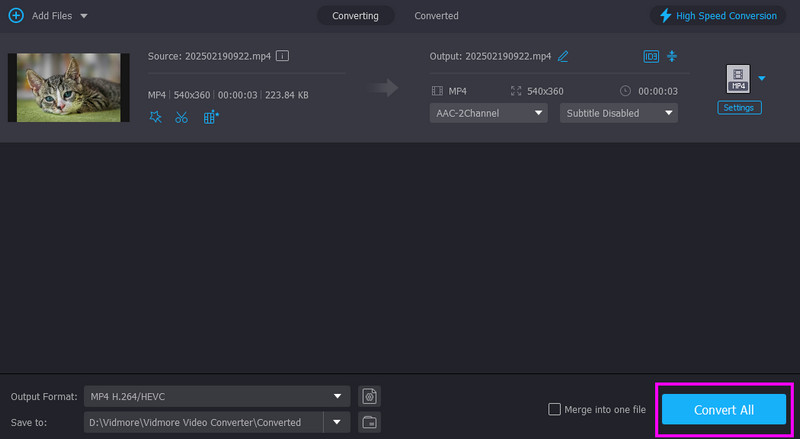
Step 3. From the Output Format section, you can select the MP4 format. Then, click your preferred video quality.
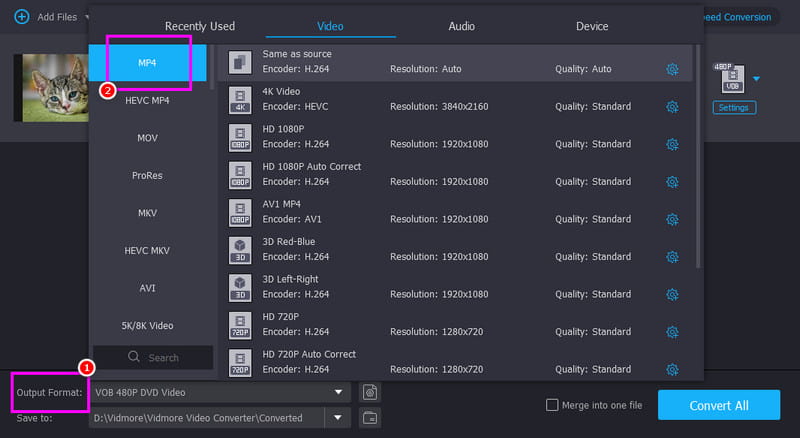
Step 4. For the last step, hit the Convert All button below to begin the conversion process.
Method 2. Convert TRP to MP4 Using VLC
If you are looking for another desktop-based converter, you can use VLC Media Player. It is not just your everyday media player. This program can offer its converter feature that lets you change your TRP file into MP4 format. What we like about this software is its simple conversion process. In just a few taps, you can obtain the result you need. You can also access some basic editing functions to improve your videos. With that, if you want an effective video converter and editor, look no further than VLC. Use the steps below and learn how to convert your TRP to MP4 format.
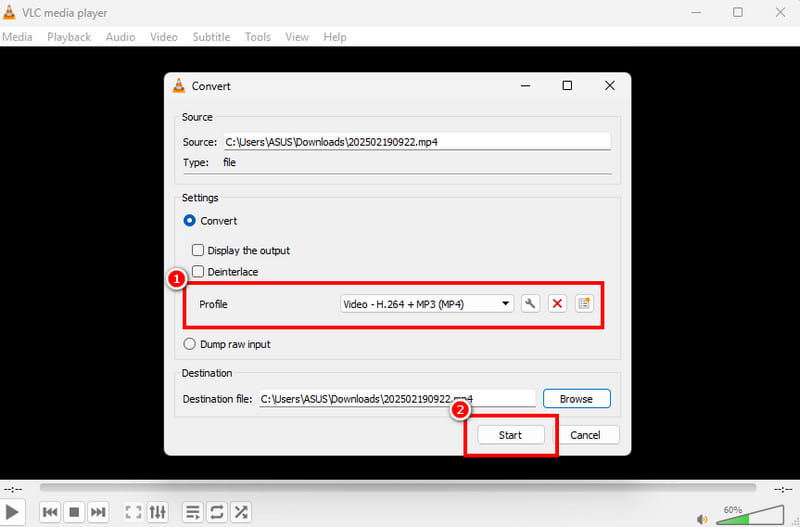
Step 1. Download and launch VLC on your desktop. Then, from the Media section, click the Convert / Save option.
Step 2. Tap the Add function to insert the TRP file. Then, click the Convert / Save button below.
Step 3. Finally, click the MP4 format from the Profile section. Once done, click Start to begin the TRP to MP4 conversion process.
Part 5. FAQs about TRP to MP4
Is MP4 better than TRP?
There is no doubt that MP4 is way better than TRP. It is because MP4 can be played on almost all media players and can offer a better video quality.
Is it easy to convert TRP to MP4?
It depends on the video converter you use. If you are a beginner, then access a simple video converter, like Vidmore Video Converter. With that, you can transcode files without any struggle.
Which file converters are safe?
There are various converters you can use to convert files without encountering any harm to your device or file. Some of them are Vidmore Video Converter, VLC, Convertio, and more. Try these tools and get your desired result.
Conclusion
If you want to convert TRP to MP4, check all the methods we have provided in this article. With that, you can achieve the result you need after the conversion process. Also, if you want the best video converter, it would be better to access both Vidmore Free Video Converter and Vidmore Video Converter. These converters ensure that you can effectively convert TRP to MP4 with a satisfying quality.