What is Let's Enhance: Is it Worth the Hype [Review]
Let's Enhance is an excellent tool that can help you enhance and upscale your images. With this tool, you can produce a high-quality photo for a better viewing experience. The good part is that you can access more features when using this tool. If you want to learn more about this photo enhancer, it's best to check out this review. We will include all of its features, pros, cons, and performance. After that, we will also introduce another tool that you can access to improve your images. Without further ado, read this review and learn more about the discussion.

PAGE CONTENT
Part 1. What is Let's Enhance
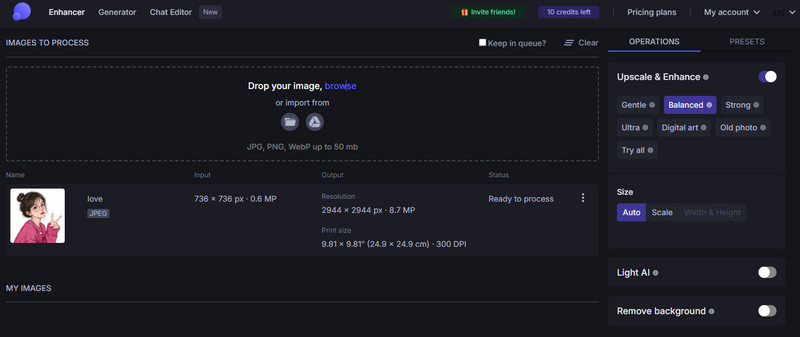
Let's Enhance IO is a cloud-based, AI-powered photo editor designed to significantly improve the quality of digital images. Its main function is to upscale images, increasing their resolution and pixel count without the blurriness or loss of detail that typically occurs with traditional resizing methods. Plus, by leveraging sophisticated machine learning models trained on millions of photographs, the platform can smoothly analyze a low-resolution image, reconstruct missing details, and produce a sharp, high-definition version suitable for professional design work, large-format printing, or e-commerce.
Features of Let's Enhance
There are various features that you can access when using the tool. To discover all of them, read all the information below.
AI Image Upscaler
The core feature of the tool is to enhance and upscale the image with the support of AI-driven technology. It helps you to get the best version of your photo for a satisfying viewing experience. The good part here is that you can increase its quality for up to 4K. Plus, upscaling the photo is simple, making it an ideal tool for both skilled and non-professional users.
Remove Background
Another capability of this tool is to remove the background from an image. It is an ideal feature if you want to get your photo with a transparent background. In addition, this feature lets you change the background of your photo based on your preferences.
Color Enhancer
Another way to improve your images is to use the tool's Color Enhancer feature. With this feature, AI can automatically enhance the image's color and sharpness. With this feature, you can ensure that the final result will be astounding and satisfying to view.
Support Various Image Formats
Let's Enhance IO can also support various formats. In terms of input format, you can upload images in JPG, PNG, or WebP format. On the other hand, you can save the photo as a JPG or PNG. With this feature, you can ensure that you save your photo and prevent any compatibility issues.
Supports Batch Processing
What makes the tool powerful is its support for batch processing. This feature is ideal if you want to deal with more than one image. It can assist you in upsizing images while saving a lot of time. The best part is that increasing the photo's resolution is fast, making it convenient for all users.
With these features, you can now ensure that the tool is among the best image upscalers and enhancers to achieve your desired results. Thus, consider using this tool when dealing with your images.
Part 2. Detailed Review of Let's Enhance
Photo Enhancement Process
Enhancing your photos is simple when using this tool. It can guide you in improving your images and achieving the best quality for a better experience. The good part here is that the tool can even let you remove the background, adjust the color, tone, and choose your preferred output format. You can even choose your preferred model for enhancing the photos, such as balance, old photo, strong, ultra, and more. With that, you can ensure that you can get the outcome you need after the image upscaling process. Thus, if you want to check the tool's capability for enhancing your images, you can use the instructions below.
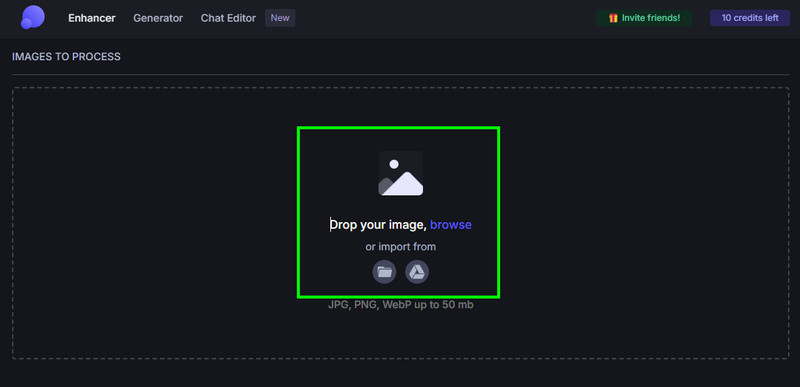
Step 1. Go to your browser and proceed to the main website of Let's Enhance. After that, click the Browse option to start uploading the image you want to upscale.
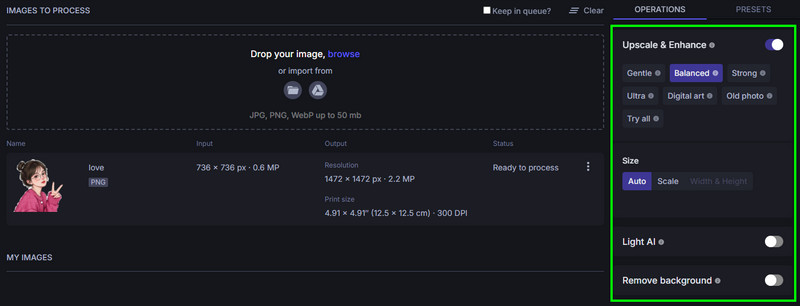
Step 2. From the right interface, you can now choose your preferred upscaling model/option. You can also eliminate the image background if you want to.
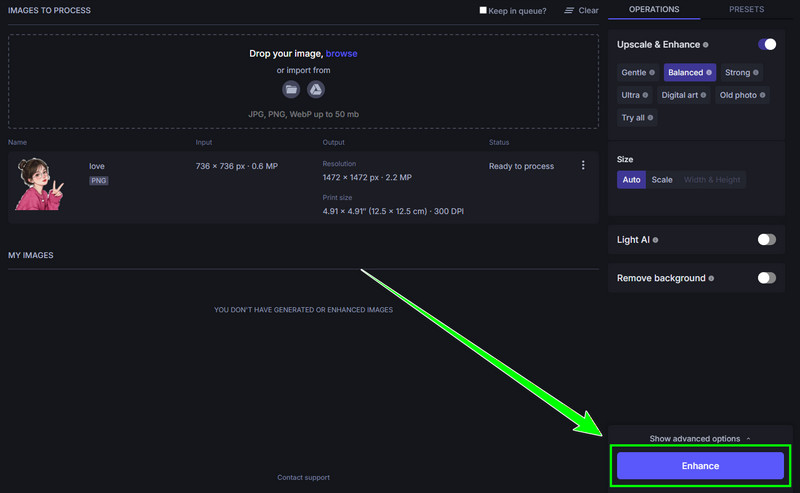
Step 3. Then, click the Enhance button below to start the image-enhancing process. After a few seconds, the result will appear on your screen.
Step 4. Finally, tap the drop-down button to start downloading and saving the enhanced image on your computer.
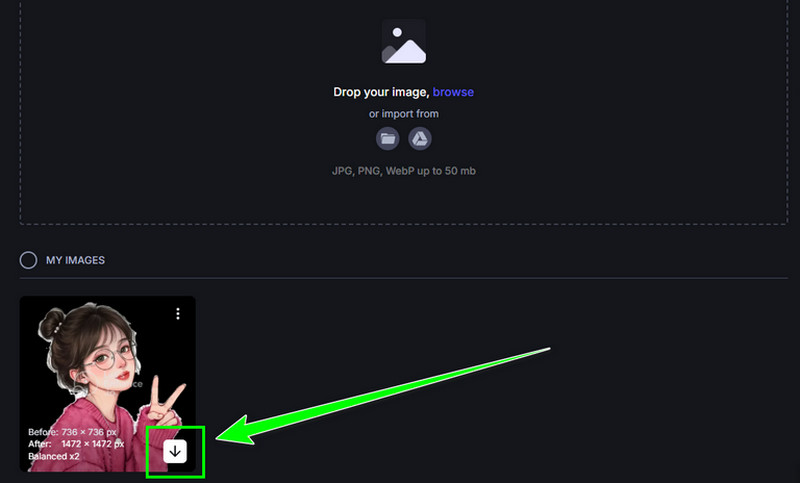
Photo Enhancement Performance
The photo enhancement performance of Let'sEnhance is defined by its powerful, AI-driven capabilities. The tool reliably transforms low-quality photos into high-resolution, professional-grade assets. In addition to that, it excels at upscaling images by up to 16x without the typical pixelation, using trained models to intelligently reconstruct sharp details and textures. Beyond resolution, its performance includes automatically correcting colors and lighting for vibrancy, effectively reducing digital noise and grain, and specifically sharpening blurry or soft-focus areas, resulting in a clear, detailed, and visually polished final image.
Pricing for Photo Enhancement
The tool allows you to enhance a photo for free since it provides a credit. However, if you want to enhance numerous photos, you have to purchase more credits. If you are interested in learning about the prices, you can check the table below.
| Plans | Starter | Pro | Max |
| Prices | $9.00 | $24.00 | $34.00 |
| Inclusions | • Save up to 600 unused credits. • Unused credits roll over. • Upscale up to 256 megapixels • Unlimited storage for 3 months • Input photo up to 64 megapixels or 50MB • Generate AI art • Remove backgrounds • Priority enhancement • Chat support • Early access to new features | • Save up to 1800 unused credits. • Unused credits roll over. • Upscale up to 350 megapixels • Unlimited storage for 6 months • Input photo up to 64 megapixels or 50MB • Generate AI art • Remove backgrounds • Priority enhancement • Chat support • Early access to new features | • Save up to 3000 unused credits. • Unused credits roll over. • Upscale up to 512 megapixels • Unlimited storage for 6 months • Input photo up to 64 megapixels or 50MB • Generate AI art • Remove backgrounds • Priority enhancement • Chat support • Early access to new features • Downgrade, Upgrade, or Cancel anytime |
Advantages of Let's Enhance
- The tool is simple to use, thanks to its simple layout.
- It can deal with multiple images at once.
- The tool can produce a professional-grade image output.
- It is accessible to all web platforms.
- The software supports an AI-powered technology for smooth image enhancement.
Drawbacks of Let's Enhance
- There are times when the enhancement process is slow, especially when the internet connection is poor.
- To enhance more images, you have to purchase credits.
Part 3. Best Let's Enhance Alternative
Let's Enhance is an amazing tool for enhancing and upscaling images. However, it is not 100% free. There are also times when the process takes a long time. If you are looking for the best alternative, we recommend using Vidmore Free Image Upscaler Online. With this tool, you can instantly upscale your images, thanks to its fast procedure. Plus, its layout is more comprehensive, making it an ideal tool for all users. What makes it more powerful is that you can upscale the photo 8× better than the original quality. You can also handle numerous images simultaneously, allowing you to save them without spending much time. Thus, we can conclude that this tool is better at enhancing photos instantly and smoothly.
More Features
- The tool can provide an exceptional image quality after the process.
- It is 100% free to use.
- It can offer a fast image enhancement method.
- The tool can secure your data.
To start enhancing your images, see the steps below.
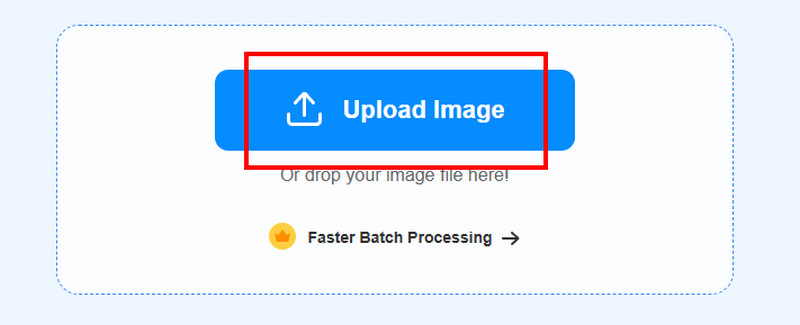
Step 1. Visit the main website of Vidmore Free Image Upscaler Online. After that, hit the Upload Image button to insert the photo you want to upscale.
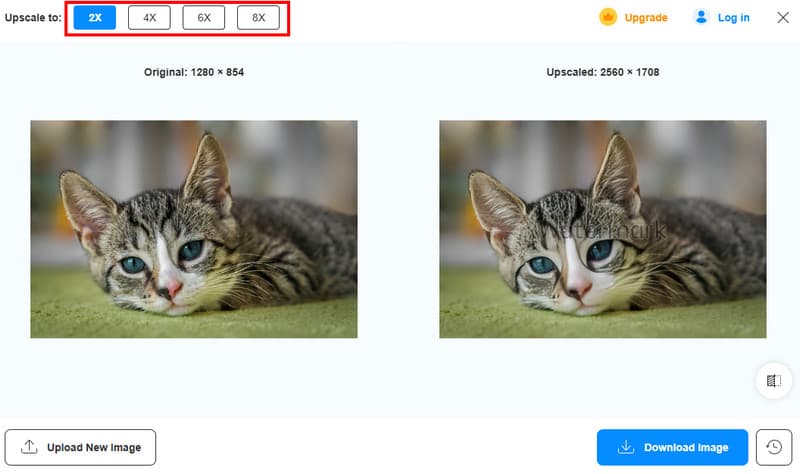
Step 2. After that, go to the Upscale to option and start upscaling your photo up to 2×, 4×, 6×, and 8×.
Step 3. After the process, click the Download Image button below to save the photo on your device.
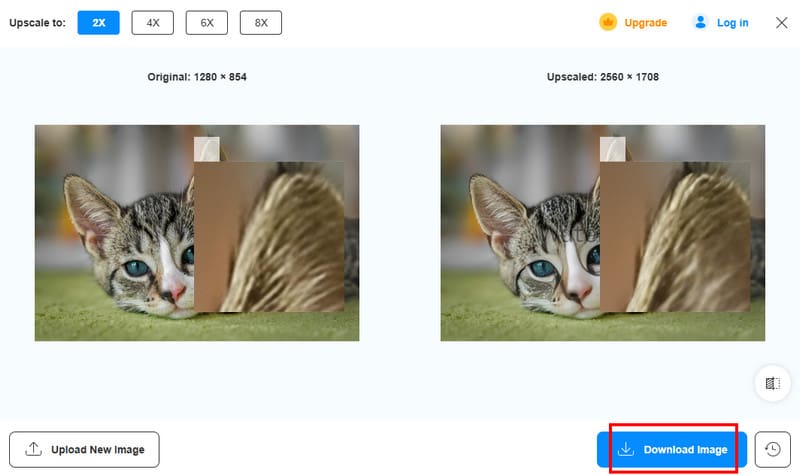
After using this Let's Enhance alternative, you can now see that the tool is superior because it provides better results without costing a penny. Thus, consider using this tool to get the result you desire.
Part 4. FAQs about Let's Enhance Review
Is Let's Enhance safe to use?
Absolutely, yes. The tool is safe to use and ensures that your data won't be shared with others without your permission.
Is enhancing a photo simple?
It depends on the tool you use. If you want a simple method for improving and enhancing your images, you must access a comprehensive tool, like Vidmore Free Image Upscaler Online. With this tool, you can get your desired output without any difficulties.
Why use the Let's Enhance tool?
You have to use this tool if your main objective is to increase the resolution of your images. With this tool, you can make your photos sharper and detailed, resulting in a better viewing experience.
Conclusion
With this detailed Let's Enhance review, you have discovered its features, pros, cons, performance, and other important parameters. You also learned how to use it for enhancing images. In addition to that, if you are searching for the best free alternative to improve your images, we suggest using Vidmore Free Image Upscaler Online. This tool is perfect since it can upscale your images 8 times better, making it a powerful photo enhancer.