LoiLo Game Recorder: An Excellent Free Game Capture Tool
Are you looking for an excellent game recorder? Then you can use the LoiLoo Game Recorder. Indeed, this recorder is an excellent tool you can rely on to capture your games and computer screen. It can even offer various features that you can access, giving you a satisfying experience. So, if you want to get more insights about the LoiLo Game Recorder, we are here to guide you. Read this honest review to learn more about the tool, including its features, pricing plans, user guide, limitations, and more. You will also discover the best alternative for an effective game recording process.

PAGE CONTENT
Part 1. Introduction to LoiLo Game Recorder
LoiLo Game Recorder is a free screen/gameplay recorder that lets you capture your games and other content on your screen. With this tool, you can keep a record of everything, including webinars, meetings, tutorial videos, and more. What we like here is that accessing the tool is simple. It can even give a comprehensive layout, ideal for all types of users. The best part is that it offers a range of features. If you want to learn more about the tool's capabilities, see the information below.
Capture Screen
The core feature of the software is screen capture. With this recorder, you can record everything. You can record webinars, gameplay, documentaries, tutorials, meetings, and more. What we like about this program is that it makes recording your screen straightforward.
Support HD Quality
When recording your screen, you can capture it in excellent 1080p video quality. It is perfect if you want excellent output and a satisfying viewing experience. You can also select higher video quality options, such as 480p and 720p. Additionally, you can also choose your preferred fps. You can set the frame rate up to 60 fps.
Record Audio
Besides recording the screen, you can use this software to record audio. With this feature, you can access both the video and audio of the content. It can also handle microphones, which is perfect for gamers and content creators.
Basic Editing Tools
After recording your screen, you can use the tool's basic editing functions to improve it. You can proceed to the Edit section and use various tools, such as pen, blur, cutter, and more. You can even modify the brightness and contrast of the video. With this feature, you can enhance your video before final saving.
Part 2. How to Use LoiLo Game Recorder
After learning all the recorder's features, you might wonder how to use it to record your screen. Well, the good thing about LoiLo Game Recorder is that it can offer a simple recording process. With that, if you want to begin recording your gameplay and any content, you can use the provided instructions for this section.
Step 1. The first step is to download the Loilo Game Recorder to your computer. After installation, launch it to start recording.
Step 2. After you open the main interface, click the three dots at the top to select the screen you want to record.
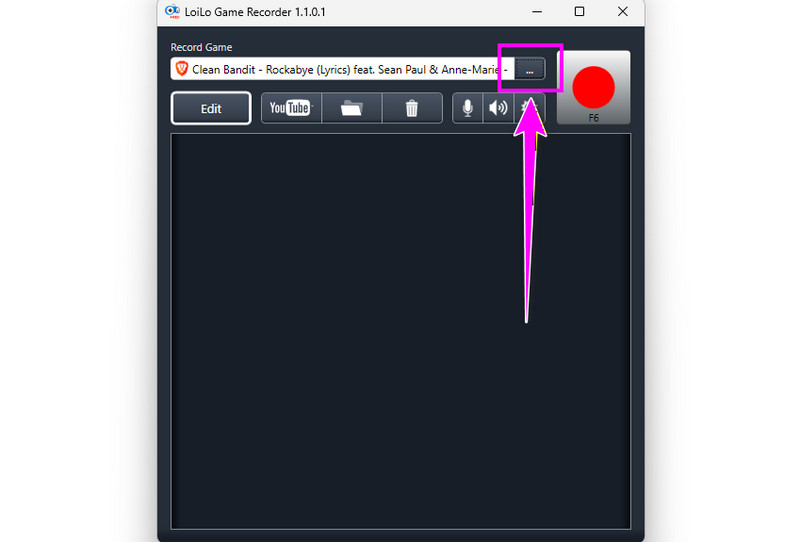
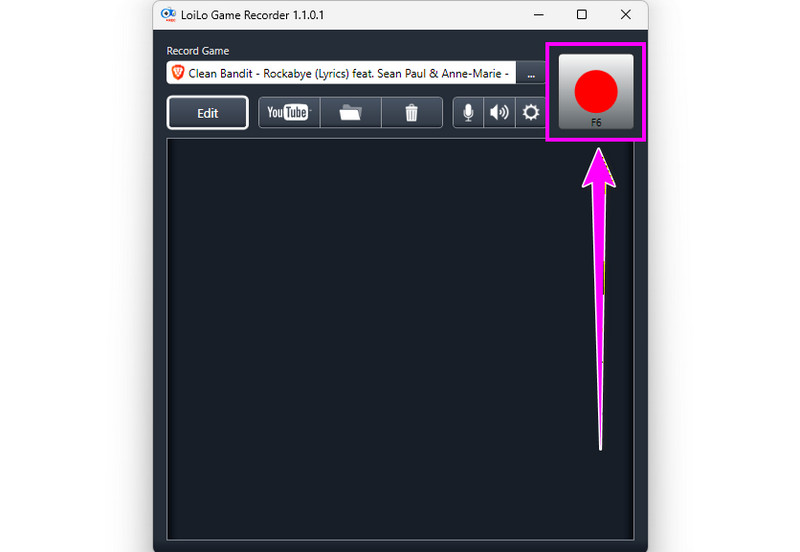
Step 3. Once done, you can begin recording your screen by clicking the Red button in the top menu. To finish the recording process, tap the Stop button.
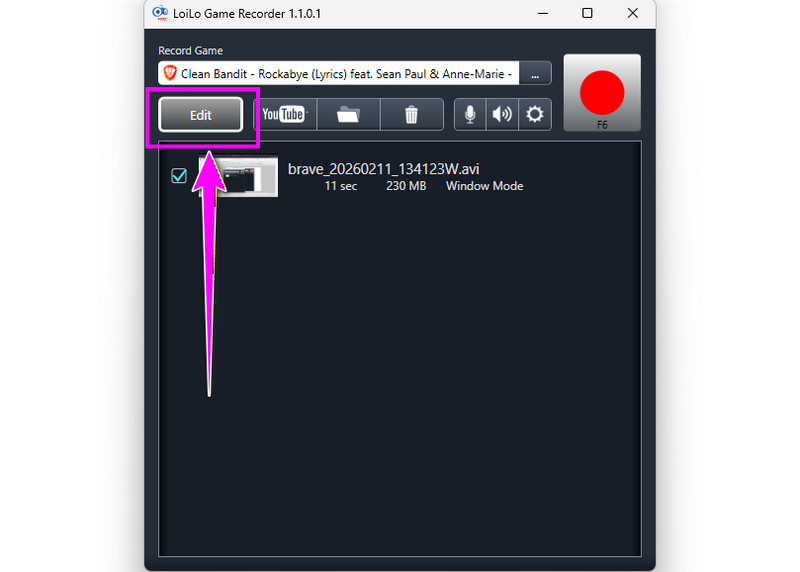
Step 4. To enhance your video, click Edit. Then, another interface will appear on your main screen.
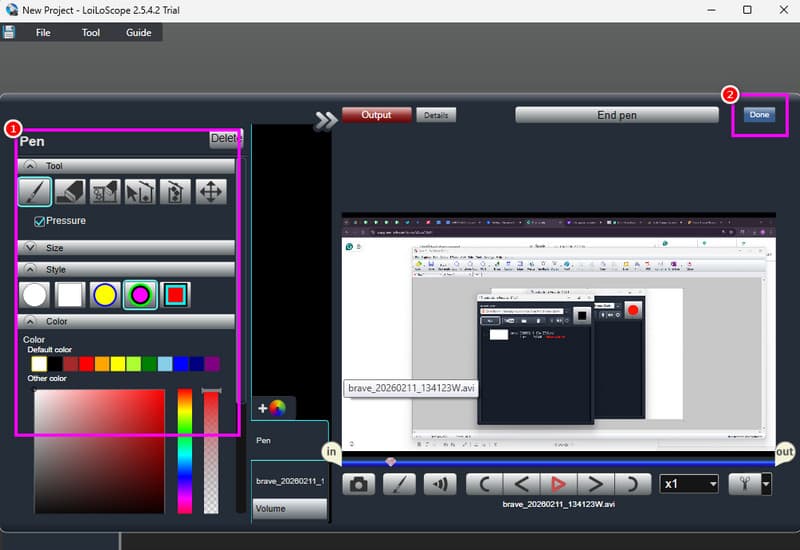
Step 5. You can now edit your video. You can use the Pen tool to attach an element to your video. You can also cut the video, blur, and more. After editing, tap the Done button above.
Step 6. Finally, click the File button above and hit the Save Project button. Once done, you can now watch the captured video on your desktop.
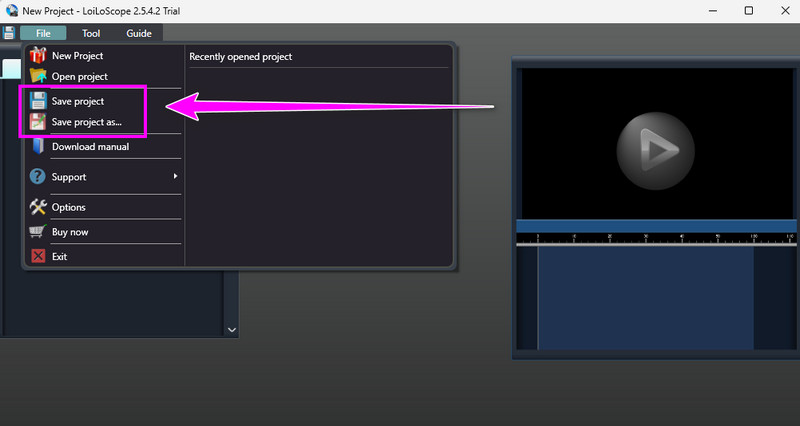
Thanks to this process, you can ensure that recording your gameplay and screen is possible. The best part here is that it has all the features you need. It can even offer a simple user interface for a smooth process. Thus, if you want an effective screen and game recorder, consider using this program.
Part 3. Pricing Plans of LoiLo Game Recorder
What is the price of the LoiLo Game Recorder? Well, the good news here is that the software is free to use. It means that you can record your gameplay and your screen without spending a penny. You can use it easily because of its comprehensive layout. So, if you are searching for a free screen and gameplay recorder, look no further than LoiLo Gameplay Recorder.
Part 4. Limitations of LoiLo Game Recorder
Even though the recorder is reliable and ideal, we can't ignore the fact that there are some drawbacks you might encounter when using it. To discover its disadvantages, read all the information below.
Compatibility
The recorder is only available on Windows computers. If you want to record your gameplay or screen on a Mac, it is strongly recommended that you use a different program.
Lack Basic and Advanced Editing Tools
The program only records your screen. Plus, it can only offer a few tools, such as a pen, blur, cutter, and brightness and contrast controls. If you want to add effects, insert subtitles, or apply filters, it's a sad fact, but this program can't do any of those.
No Webcam
What we don't like about the recorder is that it doesn't offer a webcam. With this drawback, there is no doubt that you can't insert your face when recording your gameplay or making an instructional video.
No 4K Resolution
As mentioned above, you can record your gameplay and screen for up to 1080p. However, if you are looking for a higher resolution for better video playback, the software can't provide it. This program doesn't support 4K, which is disappointing to some users, especially gamers.
Part 5. Best Alternative for LoiLo Game Recorder
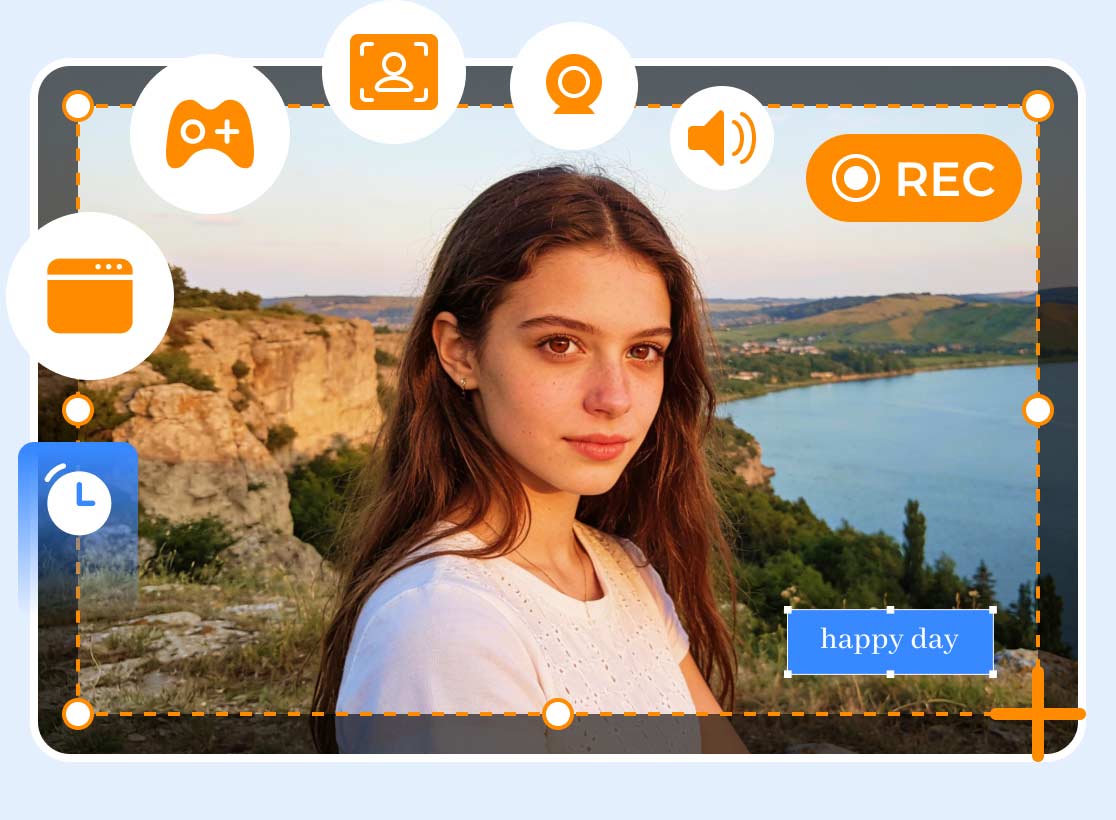
After discovering all the drawbacks of LoiLo, you might wonder if there is a better alternative for recording your gameplay. Well, the good news here is that you can access Vidmore Screen Recorder. This program is superior to LoiLo because it provides all the features you need without limitations. The best part is that you can access the Webcam feature, which is ideal if you want to include your face in the recording. Plus, it can offer more editing features that can improve your recorded screen. You can use the cropper, splitter, trimmer, filters, effects, and more. You can also save your final output in various formats, including MP4, MKV, M4V, MOV, AVI, FLV, and more. In addition, you can even record your video up to 4K, resulting in better video playback. Thus, if you want a better recorder than LoiLo, it would be best to utilize Vidmore Screen Recorder.
More Features
- • It can record various content, such as gameplay, webinars, meetings, vlogs, and more.
- • It offers basic and advanced editing tools, including a cropper, playback speed adjuster, trimmer, filters, subtitles, and transitions.
- • The software includes a Snapshot feature for taking a screenshot during recording.
- • The recorder is available on both Mac and Windows.
Step 1. Download Vidmore Screen Recorder on your Mac or Windows. You can use the buttons below to easily access the recorder.
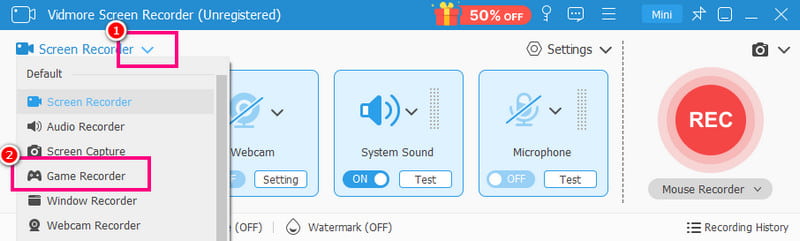
Step 2. After you launch the main interface, click the drop-down option and select the Game Recorder feature. After that, you can start preparing your game on your screen.
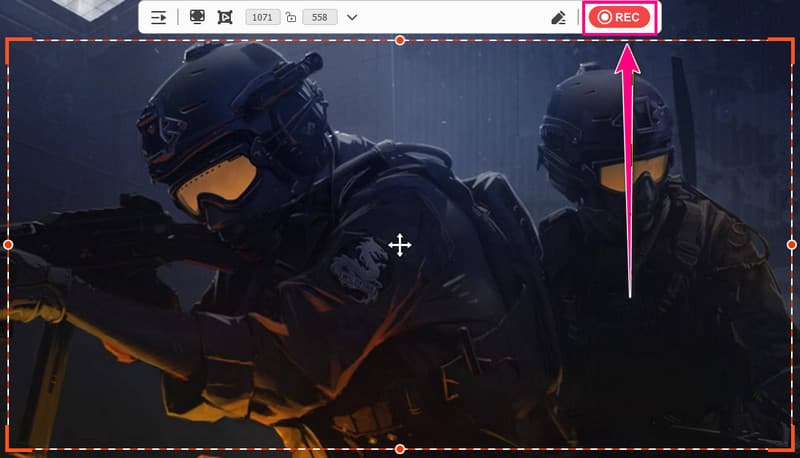
Step 3. Once you are done setting everything up, you can start hitting the REC button. Then, after recording, tap the Stop button.
Step 4. Hit the Export button below to start saving your recorded gameplay on your computer.
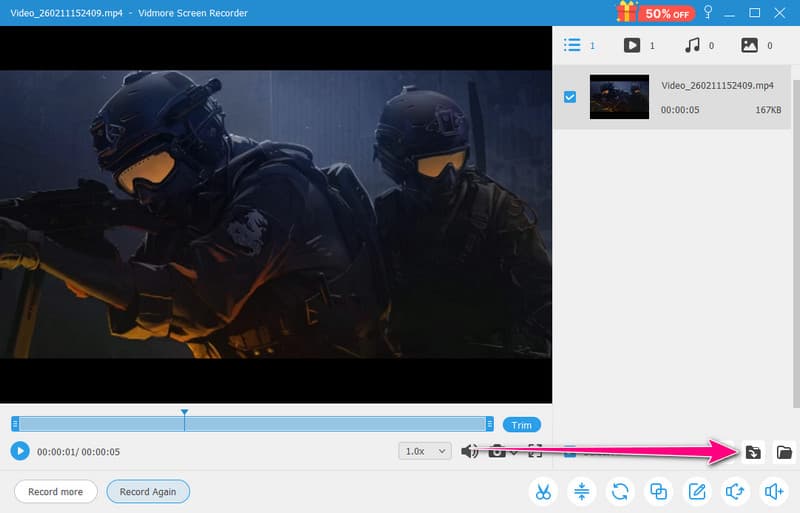
After using this method, we can tell that Vidmore Screen Recorder is far better than the LoiLo Game Recorder. It can even offer features you can't find on the LoiLo platform. The best part here is that you can also record your screen for free, making it accessible to all users. Thus, if you are looking for a reliable screen and gameplay recorder, use the program right away.
Part 6. Final Verdict
After reading the detailed review of LoiLo, we can conclude that the program is ideal for simple recording. It can even offer basic editing functions to enhance your final output. However, you might encounter various drawbacks during the process. There is no webcam; it lacks various editing functions, its resolution tops out at 1080p, and more. Thus, if you want to produce an exceptional video after recording, this platform isn't the best option.
Conclusion
LoiLo Game Recorder is an easy-to-use recording platform for Windows. With its recording capability, you can capture any content from your screen. Thanks to this honest review, you have gained more insight into the program. Plus, if you need a better screen and gameplay recorder that can offer everything, always choose Vidmore Screen Recorder. This program ensures you can capture professional-grade video, making it an ideal recorder.