







4 Strong Contenders for the Best Open-Source Video Editor
What is the best open-source video editor?
Most general users and social media creators don’t need a professional-grade, expensive video editor like DaVinci Resolve, Premiere Pro, or Final Cut Pro. Instead, free software is always the first choice. That’s why many people search for open-source tools. However, some still require modern, powerful hardware and come with steep learning curves.
This article gives you four top recommendations of free, open-source video editors available in 2026. Compare the information and choose the one that best fits your technical skills and patience with the learning curve.

PAGE CONTENT
Part 1. Quick Comparison Table of the 4 Best Open-Source Video Editors
To help you quickly find a free open-source video editor that really fits your editing needs, we give you a quick comparison table.
| Open-Source Video Editor | Ease of Use | Best For | Pros | Cons |
| Kdenlive | Moderate Timeline-based, requires some learning | Users who need solid multi-track editing and effects | Feature-rich multi-track editing | Steeper learning curve for beginners Less polished than commercial editors Occasional instability with complex timelines |
| Shotcut | Moderate Docked-panel layout takes getting used to | Users who need cross-platform stability | Cross-platform desktop editing, broad format support, 4K projects | Interface feels dated Performance lags on heavy projects Limited advanced color grading |
| OpenShot | Easy Drag-and-drop, built-in tutorials | Beginners who need quick edits | Simple quick cuts, casual projects | Can be unstable on large projects Limited advanced features |
| Blender | Difficult Steep learning curve | Users who need motion graphics, VFX, and compositing | VFX, compositing, 3D animation, professional pipelines | Overkill for basic editing Complex interface Not a traditional NLE |
Part 2. Detailed Review of the 4 Free, Open-Source Video Editors
We have tested Kdenlive, Shotcut, Blender, and OpenShot for 30 hours. You can check details about their features, performance, advantages, drawbacks, and more information below.
Top 1. Kdenlive – Professional Open-Source NLE
Kdenlive (KDE Non-Linear Video Editor) is a mature open-source video editor that has been around for years. It runs on Linux, Windows, macOS, and BSD. The interface is the most familiar to anyone coming from Premiere Pro or DaVinci Resolve. The multi-track workflow is smooth. Thanks to its open-source model, superb features, and zero cost, Kdenlive is widely used. It supports virtually every codec you will throw at it, including HEVC and ProRes.

As mentioned, if you are familiar with professional video editors like DaVinci Resolve or Final Cut Pro and want a free alternative, Kdenlive can be your first and ideal choice. You can get a familiar timeline workflow, excellent format support, and powerful functions.
However, it has stability issues. Compared to Blender, it lacks advanced features like color grading and generative AI tools. For many users, its interface and capabilities are overwhelming.
Top 2. Shotcut – The Most Popular Open-Source Editor
Shotcut is currently the most popular open-source video editor by GitHub stars. It also has a reputation for a weird interface. Its main advantage is broad format support and native timeline editing without requiring import. This free, open-source video editor can handle serious video work.

For a beginner who just needs to cut clips, add transitions, and export a clean video, Shotcut is the most reliable option for Windows we tested. However, its interface can feel dated and takes time to arrange. What’s more, the performance can struggle on heavy projects. It has no native proxy workflow for 4K footage.
Top 3. OpenShot – Simple, Best for Beginners
OpenShot is an easy-to-use video editor that is best for beginners. This free, open-source video editor offers a simple way to quickly edit videos through its drag-and-drop workflow. The built-in title editor and transition library (400+ transitions) are basic but functional. The current version includes improved GPU acceleration and experimental AI features.

OpenShot provides necessary editing functions to handle basic edits. It is very easy to learn. However, the problem is reliability. OpenShot (OpenShot 3.5.1 for Mac) crashed three times during my testing. It also struggled with 4K footage.
Top 4. Blender 5.2 LTS – Free, Open-Source 3D Creation Software
Blender is far more than a free, open-source video editor - it is a complete 3D creation suite. It is known for advanced 3D modeling, ultra-realistic rendering, VFX, and animation capabilities. Blender is not a dedicated, powerful tool with various editing features. However, it can be an ideal choice if you are doing motion graphics, compositing, or VFX-heavy work. You can easily animate text, composite green screen footage, and apply effects.

Blender only allows you to perform some basic cutting and splicing actions. Its built-in video sequence editor only offers limited export options. What’s more, the software requires a steep learning curve. It is perfect for accessing unmatched compositing and animation tools, but not recommended for pure video editing.
Part 3. Meet Various Editing Needs - Vidmore Video Converter
Besides open-source video editors, many feature-rich tools can help you edit, enhance, and convert footage. If you often need to convert videos, trim clips, or apply quick fixes like brightness adjustments or noise reduction, a dedicated video editor and converter tool like Vidmore Video Converter fills that gap.
Vidmore is not an open-source video editor. But it is worth mentioning because it solves problems that open-source editors do not address well. It supports over 200 formats and provides all the commonly used editing features. Besides, Vidmore is equipped with necessary adjustment options and advanced functions. The whole video editing, conversion, or enhancement process is straightforward.
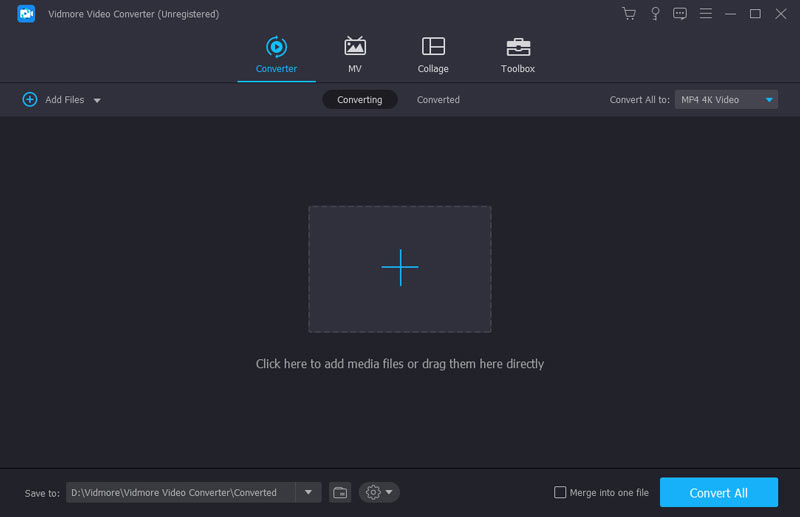
Step 1. Download and open Vidmore Video Converter on your computer. Add your video files for later editing. You can click the + icon or drag them directly into the window.
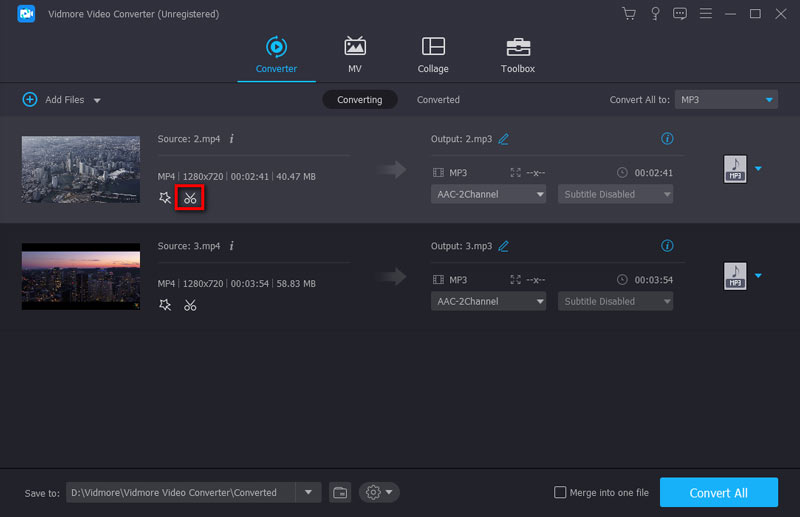
Step 2. Click the Edit button to access cropping, rotation, effects, and other tools. You can also click the Cut icon to freely trim or split your footage.
Step 3. Choose your desired output format and click Convert All to finish.
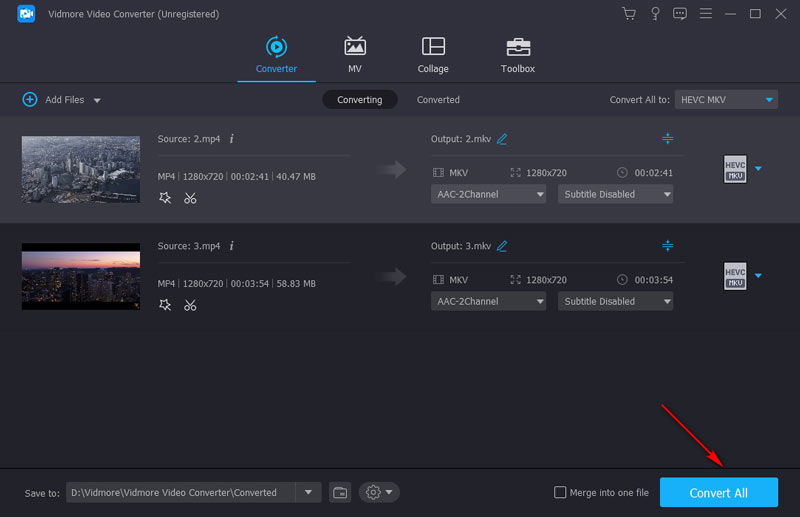
Compared with free, open-source video editors, Vidmore offers more commonly used editing functions. Moreover, it requires no complex setup or a steep learning curve. If you are a content creator who needs to handle basic edits, it can be a practical companion to your open-source tool.
You may also like:
How to Crop a Video on iMovie on iPhone and Mac
Part 4. FAQs about the Best Open-Source Video Editor
Question 1. What is the best open-source video editor to handle 4K footage?
If you often edit 4K video, Kdenlive is the best option among the four recommendations. However, you need a modern GPU and proxy files for smooth playback.
Question 2. Is it safe to download and use free, open-source video editors?
Yes, these open-source video editors are often safe to use as long as you download them from the official websites or trusted sources like GitHub or the Microsoft Store. You should avoid third-party download sites. You may download the open-source tool with bundled adware.
Question 3. What is the best open-source video editor for beginners?
For beginners, OpenShot is the best open-source video editor. It is primarily designed for simplicity. OpenShot offers a simple interface and strips away unnecessary complexity. As a new user, you won’t feel overwhelmed. It lets you start editing immediately without technical skills.
Conclusion
This post gives you the top 4 recommendations of free open-source video editors. Compared to professional-grade tools like DaVinci Resolve or Final Cut Pro, they still lag in stability, performance, and advanced features. If you only need basic edits, any of these tools will serve you well. However, if you want reliable 4K performance, consider the newly introduced Vidmore Video Converter.