Which One Is the Best Music Recording Software: 6 Options
Got inspiration and want to create and record a great song yourself?
Then you can't rely solely on your device's basic built-in recorder. To ensure easy editing later, handle audio details, and add post-production effects, you'll need professional-grade music recording software to assist you throughout the entire production process.
Fortunately, the market now offers numerous excellent products tailored to audio processing needs. Considering factors like overall compatibility, price, pros and cons, and comprehensive performance, this guide has curated six music recording software options suitable for different skill levels and preferences.
If you feel overwhelmed and unsure where to start in choosing the best fit for you, you can also refer to the selection criteria we provided earlier in the article.
We hope you find the perfect assistant here to help you create your best work.

PAGE CONTENT
Part 1. What to Consider When Choosing Music Recording Software
Diving straight into exploring numerous music recording programs might leave you feeling overwhelmed. While each one seems quite promising at first glance, this cursory approach risks obscuring your true needs and objectives. Therefore, before formally introducing the products, we encourage you to review this section first to understand the criteria you should apply when making your selection.
• Support for Required Audio Formats and Quality
The intended use of your recordings largely determines which audio format and quality you should choose.
If you're simply recording a short conversation or interview for posting on social media, short video platforms, or sharing with friends, the widely used MP3 format is sufficient. This means selecting a program that supports MP3 encoding.
If you aim to create music, songs, or podcasts with unparalleled sound quality, you'll need to add another requirement: choose a song recording program that supports the lossless WAV format. This ensures detailed reproduction and superior listening experience.
Additionally, if possible, opt for products that support 16-bit depth and 48kHz sampling rate recording. This allows your audience to enjoy near-professional music production quality.
• Audio Enhancement Capabilities
No matter how meticulous your preparation, recording sessions inevitably encounter imperfections like noise, pauses, or echoes. Before final release, thorough audio purification and quality enhancement are essential.
Therefore, we recommend selecting products that offer noise removal (preferably with automatic support) to save significant hassle.
• Audio Editing Capabilities
Manually manipulating audio files is cumbersome. The most efficient solution is to use top-rated music recording software that includes common editing features like trimming, merging, and adding sound effects.
• Supports multi-track recording
Creating music or podcasts often requires combining multiple tracks—such as other people's voices or different instruments. Therefore, it's essential to choose software that supports multi-track recording, which also facilitates post-production work.
| Software | Best For | Ease of Use | Price | Compatible Platforms |
| Vidmore Screen Recorder | Beginners and general users who want simple, flexible audio recording (system + mic) | Very easy, clean interface, beginner-friendly | Free trial, paid version available | Windows, macOS |
| Riverside | High-quality recordings for podcasts, interviews, conferences, and performances | Easy, but advanced features require learning | $15/month | Windows, macOS, iOS, Android |
| Audacity | Users needing free, powerful audio recording and manual editing | Steep learning curve | Free | Windows, macOS, Linux |
| Adobe Audition | Professional audio engineers and advanced post-production work | Complex, professional-level | $22.99/month | Windows, macOS |
| GarageBand | Beginner musicians and music creators using Apple devices | Intuitive and music-focused | Free | macOS |
| Reaper | Advanced users and music producers wanting deep customization | Requires time to master | $60 personal / $225 commercial | Windows, macOS, Linux |
Part 2. 6 Best Music Recording Software in 2026
The groundwork is laid, and now it's time to formally introduce you to these selected best music recording software options.
Vidmore Screen Recorder
Among all the contenders, Vidmore Screen Recorder stands out as the most user-friendly for all skill levels, featuring the clearest interface and most comprehensive functionality.
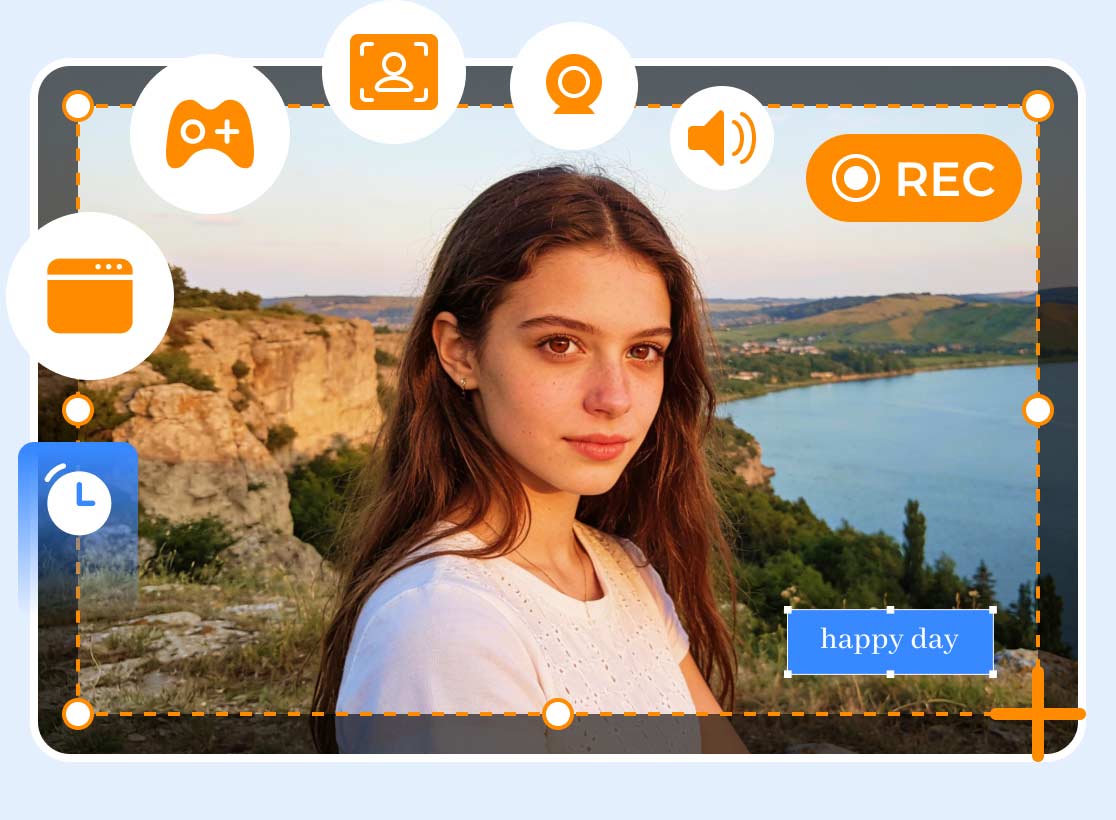
This audio and video recording software is compatible with both Windows and Mac systems. Its application homepage provides detailed recording instructions with prominent buttons, allowing even first-time users to get started immediately. Additionally, Vidmore Screen Recorder supports recording from multiple sources, including microphone and system audio, making it easy to capture sound in any scenario. It also offers basic audio editing features and supports keyboard shortcuts to control the recording process.
Main Features:
- • Capture audio from system and microphone sources.
- • Record video from desktop and webcam.
- • Customize recording quality, format, and encoding settings.
- • Schedule recordings with timed recording functionality.
- • Trim and edit captured audio and video files.
Below is a guide on how to use this excellent music recording software.
Step 1. Download and install Vidmore Screen Recorder on your computer.
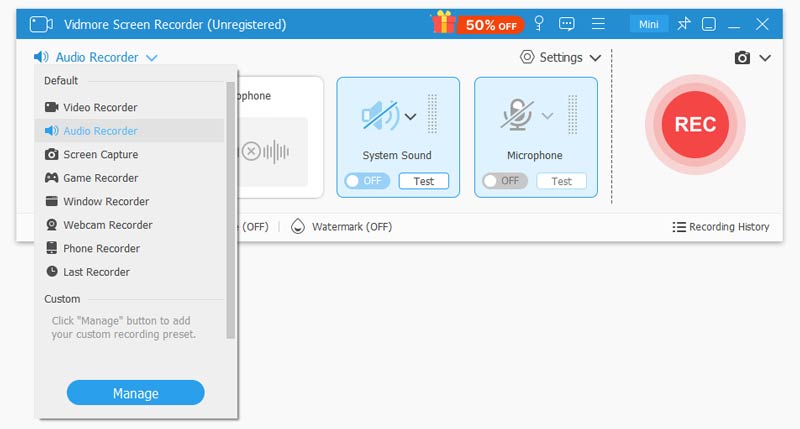
Launch it and enter the main interface. Expand the menu in the top-left corner, then select Audio Recorder.
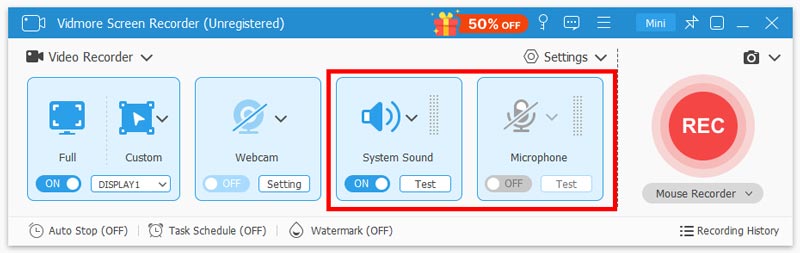
Step 2. On the interface, choose System Sound, Microphone Sound, or Both as the recording source.
Step 3. Click the red REC button on the right side of the page to start recording.
Riverside
Compatibility: Windows, macOS, iOS, Android
Price: $15 per month
If you want to add a touch of high quality to your recordings, we recommend Riverside.
This software is ideal for capturing important content where no detail can be lost—from everyday events like large conferences and speeches to more artistic endeavors, even including opera.
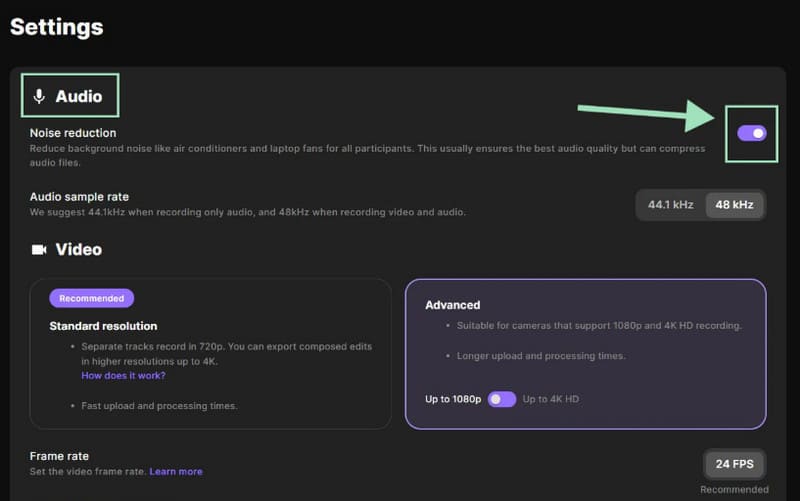
First, it incorporates the intelligent AI noise reduction technology mentioned earlier. It eliminates background noise and echoes during recording while automatically balancing volume levels, ensuring you receive professional-grade audio at up to 48kHz.
Additionally, its built-in editor is highly functional, supporting not only individual track processing but also audio editing via transcribed text.
Pros:
- High-quality audio recording with real-time noise reduction
- Mobile device compatibility
Cons:
- Many features require paid unlocking
Audacity
Compatibility: Windows, macOS, Linux
Price: Free
If you ask a seasoned music professional what the most classic free music recording software is, they'll undoubtedly answer: Audacity.
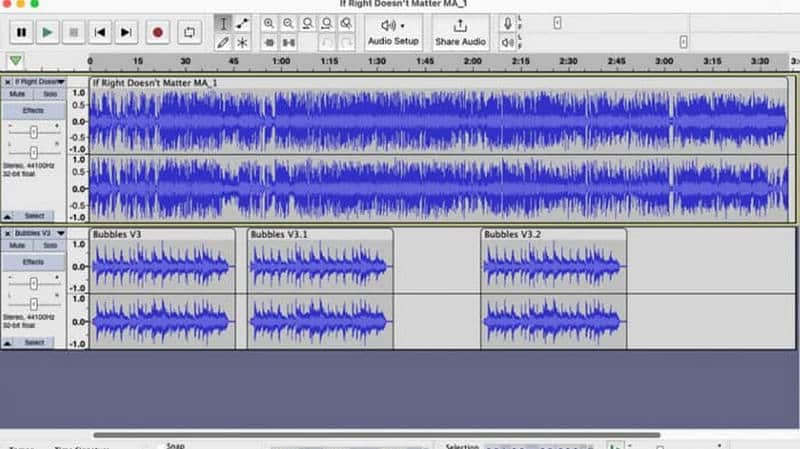
This product is practically regarded as the industry standard. First, it's completely open-source and free—a rare find—not to mention its exceptionally rich recording and audio editing capabilities. Here, you can unlock audio clipping, volume adjustment, noise reduction, merging, multi-track recording, stereo operations, and more. Plus, it fully supports mainstream formats like MP3 and WAV.
Another key feature of Audacity is that all operations rely on manual execution, which may take some time for beginners to adapt to.
Pros:
- Completely free and open-source.
- Includes an extensive array of audio editing functions.
- Supports visual frequency analysis for audio inspection.
Cons:
- Outdated interface with complex usage methods.
- Relies on manual operations with no automation features.
Adobe Audition
Compatibility: Windows, MacOS
Price: $22.99 per month
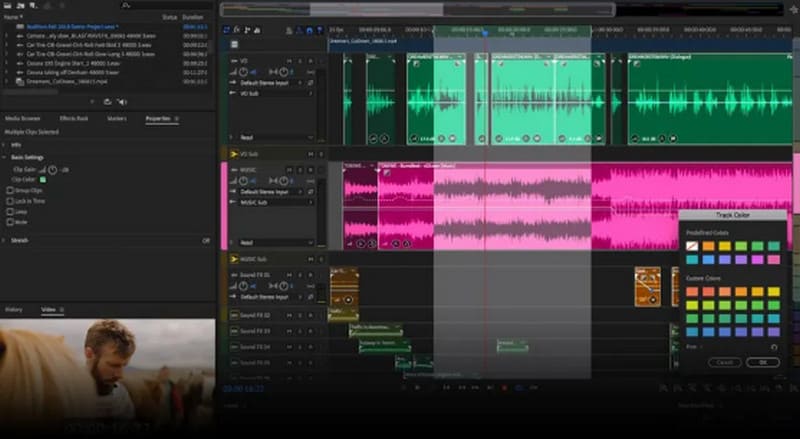
Adobe products have always been renowned for their professional, high-caliber standards. We're delighted that in the realm of audio editing, its offering Adobe Audition holds its own.
This MP3 recorder and editor delivers highly advanced audio enhancement, equalization, and noise reduction tools. Catering to different editing preferences, Audition provides two operating modes: Users accustomed to timeline-based editing can choose the first mode, working directly on the timeline and multiple tracks; Music enthusiasts who prefer a more intuitive view of audio spectrum and amplitude can opt for waveform editing. This allows you to clearly see frequencies and precisely address every noise and detail.
Moreover, this product inherits the typical strengths of Adobe software, seamlessly integrating with other editing tools to process audio from Premiere Pro or other Adobe applications.
Pros:
- Highly advanced editing capabilities.
- Multiple editing modes available.
- Seamless integration with other Adobe products.
Cons:
- Expensive subscription pricing.
- Complex user interface.
Garageband
Compatibility: MacOS
Price: Free
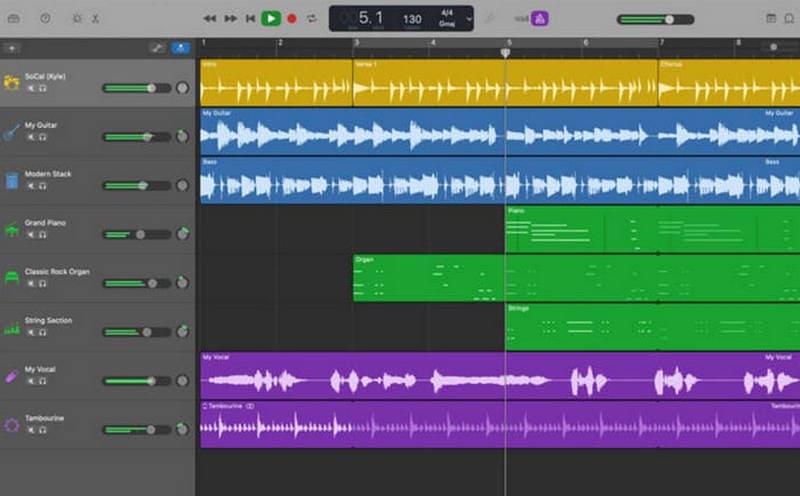
If you're a loyal Apple device user, there's one app you can count on for music creation: GarageBand.
GarageBand is incredibly musician-friendly. As a top-tier free audio and voice recording software, it offers a wide range of virtual instrument sounds—including piano, guitar, violin, drums, and more—along with numerous customization options waiting for you to explore. You can integrate these sounds into your music clips to create more vibrant and colorful effects, or create separate tracks to insert new vocals or other content.
In short, if you're a beginner music or accompaniment creator, choosing GarageBand is absolutely the right move.
Pros:
- Completely free.
- Features a wide range of built-in accompaniment styles and virtual instrument effects.
Cons:
- Only supports use on Apple devices.
Reaper
Compatibility: Windows, MacOS, Linux
Price: $60 for personal lifetime purchase; $225 for commercial purchase
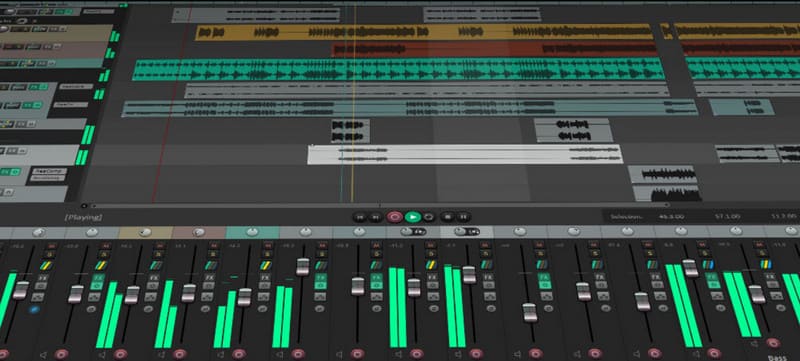
Users familiar with Reaper understand how sophisticated its features and editing capabilities are. Moreover, the cost of using this software is quite reasonable. Every new user also enjoys a 60-day free trial period before committing to a purchase.
Are Reaper's advantages limited to its price? Certainly not. This software is actually an outstanding Digital Audio Workstation (DAW), containing nearly everything a budding music producer needs. Once you adapt to its workflow, you'll be captivated by its rich and granular editing and customization capabilities.
Pros:
- Extremely powerful automated audio editing features.
- High level of customization for the user interface and settings.
- Generous 60-day free trial period.
Cons:
- User interface is not intuitive and requires a significant learning curve.
Pros:
Extremely powerful automated audio editing features.
High level of customization for the user interface and settings.
Generous 60-day free trial period.
Cons:
User interface is not intuitive and requires a significant learning curve.
Part 3. FAQs of Music Recording Software
What's the best software to record music?
If you're a beginner, Vidmore Screen Recorder is the best choice; if you prioritize sound quality and advanced audio production, we recommend Audacity, Riverside, or Adobe Audition.
What is the easiest music recording software to use?
The simplest music recording software for Windows and Mac is undoubtedly Vidmore Screen Recorder. Its interface is straightforward, with clear guidance and buttons, allowing beginners to get started immediately.
What equipment do I need to record my own music at home?
You'll need: a quiet space, a computer, a digital audio workstation (DAW), a microphone, headphones, and monitor speakers. These are the basic essentials.
Conclusion
This article introduces six music recording software options. Each has distinct features: some offer quick learning curves, others are open-source, free, and feature-rich, while others incorporate advanced audio enhancement and noise reduction technologies. Some integrate seamlessly with other software.
We've provided the pros and cons, compatible platforms, and pricing for all products. You can filter based on your preferences and habits to find the one you're most eager to try.