








How to Convert DAT to MP4 File: On Desktop & Online
The most common place you'll encounter DAT files is on VCDs, as DAT is often used to store and play videos on discs. However, its compatibility range is significantly narrower than that of conventional video formats.
If you want to watch DAT files using common players, or on phones and tablets, or if you need to edit, share, or upload them, you must convert DAT to MP4 format—one of the most widely compatible formats.
Don't worry about not being able to accomplish this task. There are now numerous format converters available that allow you to convert DAT files with a single click. This article will list three of the most reliable products: a desktop software, a free open‑source player, and an online format converter, complete with usage guides.Follow our steps, and you can easily handle the DAT videos you have on hand.

PAGE CONTENT
Part 1. What Are DAT Files
DAT files typically have the .dat extension. Strictly speaking, they are data files used to store information utilized by the systems and applications that created them, including video, images, text, or other configuration data.
As mentioned earlier, the DAT format is commonly used to store and play video content on VCD discs. These DAT files are typically encoded using MPEG‑1 or MPEG‑2 formats.
Common multimedia players can directly play DAT files from VCDs, but some other DAT files require specialized applications like RealPlayer or Windows Media Player to open.
Its compatibility seems rather limited. If you wish to extract video playable on any platform or mobile device, we recommend using a format converter to convert DAT file to MP4.
Part 2. Differences Between DAT And MP4
To help you better understand the significance of converting DAT to MP4, we'll first explain the differences between these two formats before guiding you through the process.
First, by definition, DAT is a data and video container typically used to store data from older VCDs and tapes; MP4, on the other hand, is a modern multimedia container format primarily used for online video and device recordings.
In terms of encoding methods, DAT employs older MPEG‑1 or MPEG‑2 standards, while MP4 utilizes more advanced H.264 and H.265 codecs.
This distinction results in DAT files having lower compression efficiency, larger file sizes, and generally lower video clarity. Conversely, MP4 achieves extremely high compression efficiency, enabling higher video quality in smaller file sizes.
Another significant difference lies in compatibility. DAT exhibits poor platform and device compatibility; files in this format typically cannot be played or shared on common browsers and mobile devices. MP4, however, reigns supreme in video format compatibility. It is specifically optimized for network transmission and works seamlessly with virtually any media player, browser, device, and video editing software.
Therefore, whether you aim to preserve your video files more effectively or facilitate video editing, we recommend converting DAT files to MP4.
Part 3. Best Way to Convert DAT Files to MP4
First up is the most perfect desktop software for video format conversion: Vidmore Video Converter.
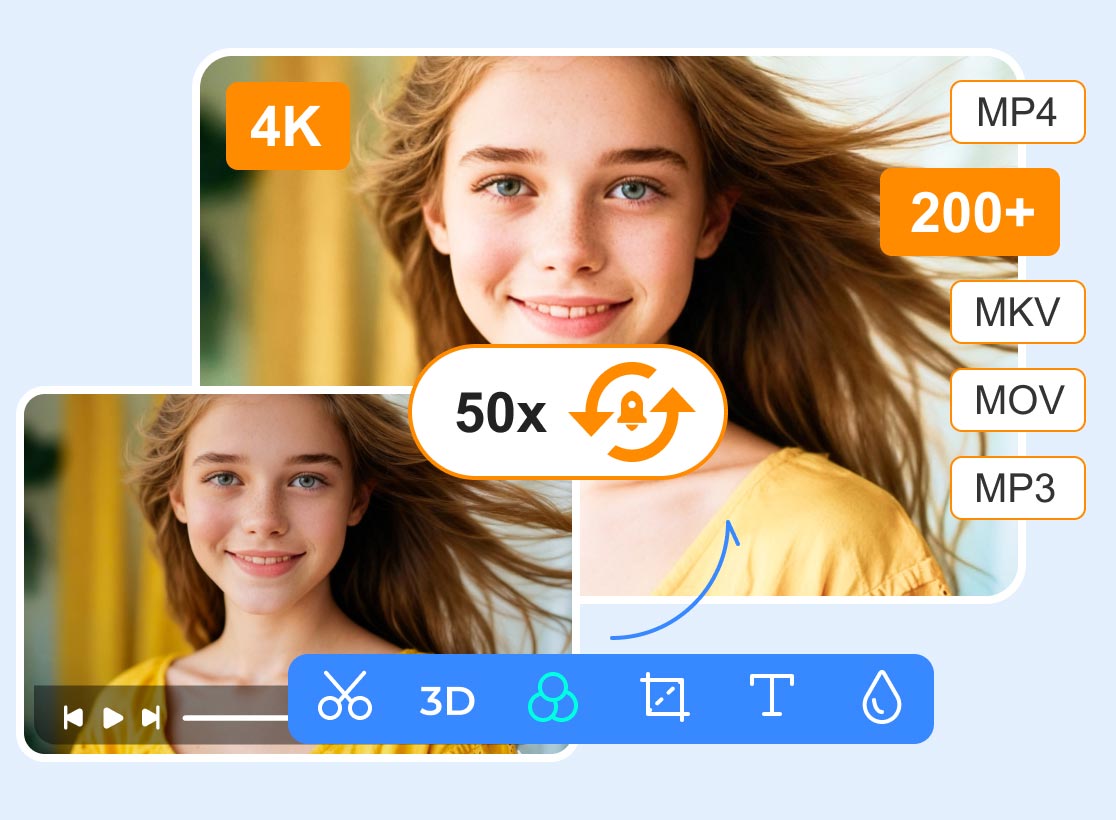
Vidmore Video Converter supports conversion between over 200 formats (covering nearly every format you'll encounter). Enhanced with hardware acceleration technology, its conversion speed now reaches up to 50X faster.
But I've never converted videos before—does this require any special steps?
Vidmore Video Converter assures you it's not. Its steps are incredibly simple, and once you open the interface, you'll find detailed beginner guides with all buttons clearly labeled. You'll complete the conversion in just 3 steps.
Additionally, Vidmore Video Converter comes equipped with common video editing features like trimming, cropping, enhancing, and compressing. Here, you can enjoy a one‑stop video processing service.
Here's how to convert a DAT file to MP4 using Vidmore Video Converter.
Step 1. Download Vidmore Video Converter from the official website to your device.After launching the program, click the Add Files button to upload your DAT file.
Step 2. Once the file is successfully uploaded, click the format icon on the right side of the item. You'll see an expanded format menu. Select Video > MP4.
Step 3. Choose the desired save location for the converted file. Then click Convert All.
Part 4. Convert DAT Files to MP4 via VLC (Free but Slow)
There's a player that can handle the job for you: VLC Media Player. It supports nearly all audio and video formats and can perform basic video conversion tasks. Additionally, you'll find fundamental editing features like trimming within its interface.
However, its format conversion interface isn't the traditional (preview) page. Instead, the entire process is completed through text options.
Of course, it's worth noting that VLC Media Player is completely free and open‑source, working seamlessly on Windows, macOS, or Linux systems.
Here's how to use this DAT to MP4 converter:
Step 1. Ensure the latest version of VLC Media Player is installed on your computer.
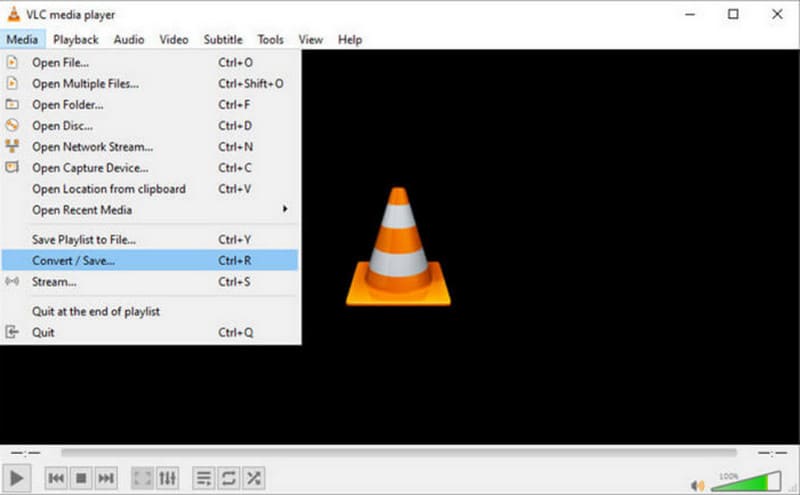
Step 2. Open the program, then navigate to the top menu and select Media, followed by Convert/Save.
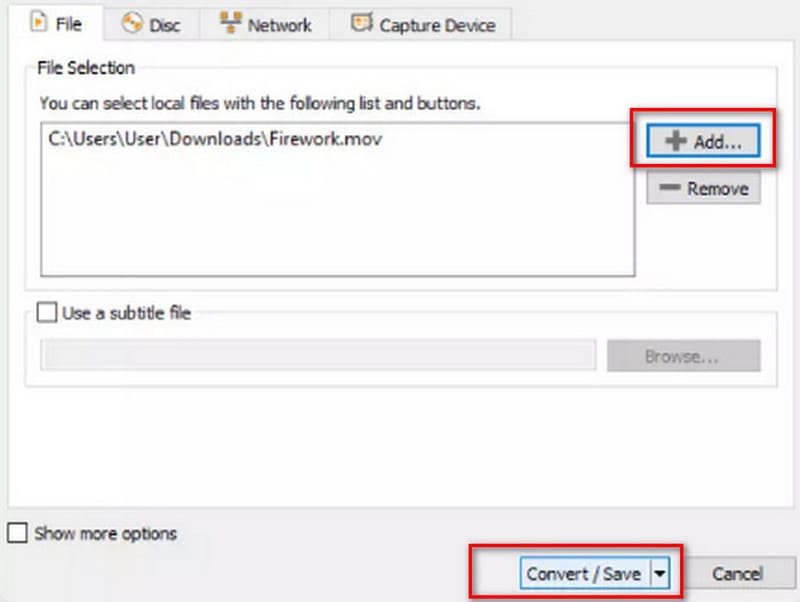
Step 3. When the new dialog box appears, switch to the File tab and click Add to browse for the H.264 file you wish to convert.After selecting the file, click Convert/Save at the bottom.
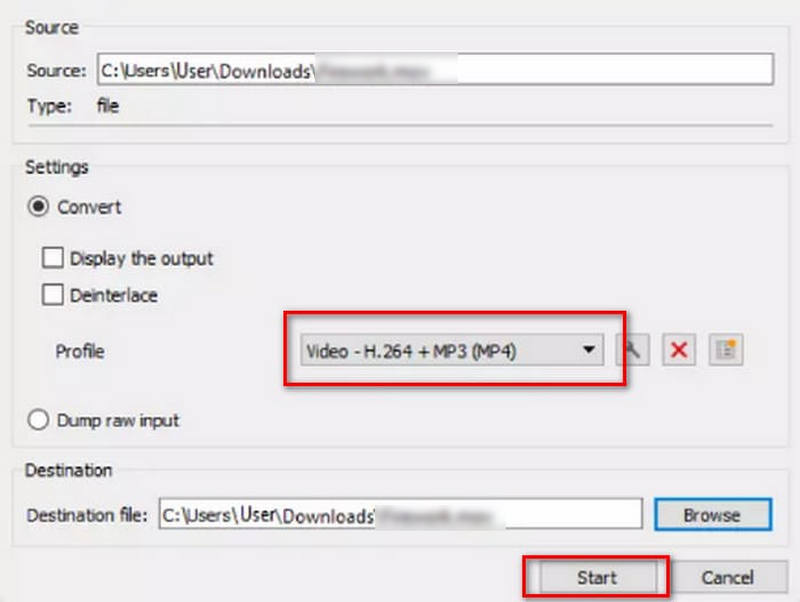
Step 4. In the conversion settings, locate the Profile dropdown menu.Select the option labeled Video–H.264 + MP3 (MP4).
Step 5. Choose a folder where you want to save the converted video file.Once everything is set, press Start.
Limitations
• The user interface guidance is unclear.
Part 5. Convert DAT Files to MP4 Online
If you prefer not to download third‑party software onto your computer, converting files directly in the cloud is also a great option.
One excellent online converter worth trying is FreeConvert File Converter.
Its interface is clean and ad‑free, featuring only prominent upload and convert buttons.
What's even more impressive is that it works seamlessly in mobile browsers.
Here's how to convert DAT to MP4 using FreeConvert:
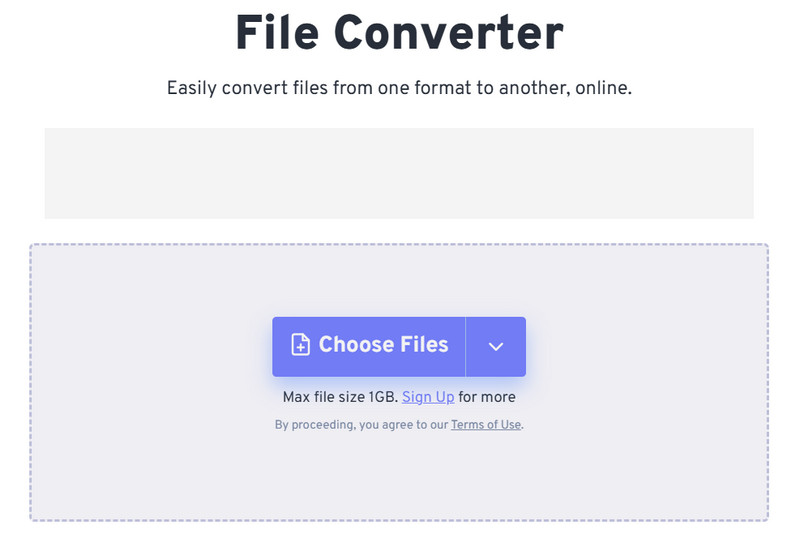
Step 1. Visit the official FreeConvert File Converter website.Click Choose Files on the page to upload your DAT file.
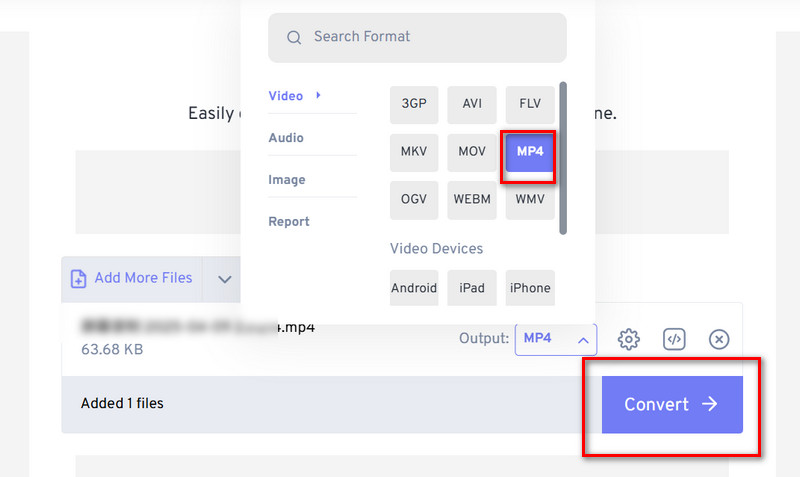
Step 2. Expand the menu next to Output. Select MP4 as the output format.
Tips: FreeConvert also serves as a simple online video cutter, allowing you to trim clips by specifying the start and end timestamps.
Step 3. Click the Convert button to start the conversion.
Limitations
- • Does not support previewing the converted video.
- • Has a 1GB video size limit.
Part 6. FAQs of Converting DAT to MP4
Is there a great DAT to MP4 converter for Android?To convert DAT to MP4 on Android, there are many useful converters like DAT Read: DAT to MP4 Converter, Video Converter by Inverse AI, or VidSoftLab Video Converter. You can try one of them and directly convert DAT to MP4 on your Android device.
Can VLC convert DAT to MP4?Yes, VLC Media Player supports the DAT format and offers basic conversion capabilities. You can confidently use it for this task.
How to open a .dat video file?DAT files from VCDs can be opened with common video players. Some restricted files may require professional video players, like Vidmore Player, RealPlayer, or Windows Media Player for playback.
Conclusion
Whether you seek the most professional, comprehensive DAT to MP4 conversion, prefer free open‑source solutions, or want to complete the task effortlessly in the cloud, this guide offers suitable converters for you (each even comes with detailed usage steps).to prevent confusion between DAT and MP4 concepts, this guide begins with definitions and a comparison analysis, ensuring you establish a solid theoretical foundation.