

How to Convert MKV to MOV Format for Free: 4 Easy Ways
Converting MKV to MOV for free is necessary for users who need smoother video playback. It can even let you edit your videos on various devices and software, especially on macOS. Though MKV files are versatile, they can sometimes cause issues with certain editors and players. So, if you are looking for an effective method to convert your MKV to MOV, proceed to this tutorial. We'll teach you how to convert your files on your desktop and browser for free.

PAGE CONTENT
Part 1. MKV vs. MOV: Comparison
If you want to get more insights about the two formats, you can check all the information in this section.
What is MKV?
MKV is an open-source multimedia container format that can hold video, subtitles, audio, and metadata in a single file. The good thing about this format is that it can support multiple codecs and tracks, making it suitable for TV shows and movies.
What is MOV?
MOV is a container format developed by Apple. It is primarily designed for QuickTime. It supports high-quality audio and video, optimized for playback and editing on macOS and iOS. The only drawback here is that it is less convenient on non-Apple platforms.
| MKV | vs. | MOV |
| Matroska (open standard) | Developer | Apple (QuickTime container) |
| Supports multiple codecs, highly flexible. | Compression | Optimized for Apple codecs, efficient but less flexible. |
| Widely supported on Windows, Linux, Android; limited on macOS/iOS. | Compatibility | Best supported on macOS, iOS, and Apple software; moderate cross‑platform. |
| Can be larger due to multiple streams and subtitles. | File Size | Generally smaller, optimized for the Apple ecosystem. |
| Excellent, supports lossless and high‑quality video/audio. | Quality Retention | High quality, but codec choice may limit flexibility. |
| Ideal for storing movies, TV shows, and multi‑track content. | Use Case | Preferred for video editing and playback in Apple environments. |
Part 2. 4 Best Methods to Convert MKV to MOV
Want to change MKV to MOV for free? Then, you can follow all the provided methods in this section.
Method 1. Convert MKV to MOV Using Vidmore Video Converter
If you need the most reliable converter, you can use Vidmore Video Converter. This desktop-based converter ensures that you can transcode your MKV files to MOV easily and effectively. The best part here is that it can offer a simple user interface and a fast conversion speed, up to 50× faster. Additionally, you can access its batch conversion feature to convert multiple MKV files, allowing you to save more time during the conversion process. It can also support various video formats, including MP4, WMV, AVI, FLV, VOB, TS, and more. With that, we can tell that Vidmore is among the most ideal converters you can use on your Mac and Windows computers.
More Features
• The converter can save the video with the best quality for up to 4K.
• It can offer basic and advanced video editing tools, such as cropper, trimmer, metadata editor, filters, effects, and more.
• It can convert other media files, such as audio and image.
To convert MKV to MOV for free, you can follow the simple instructions below.
Step 1. Download and install Vidmore Video Converter on your Mac or Windows. Then, run it to start the MKV to MOV conversion procedure.
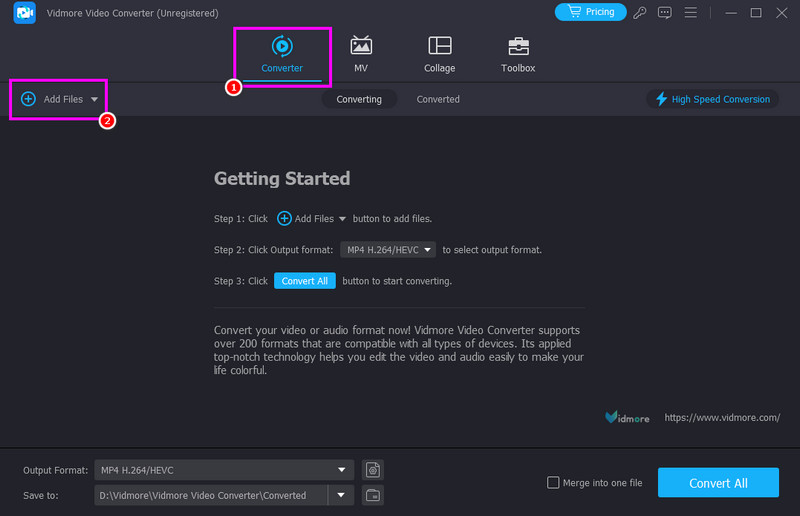
Step 2. From the primary interface, go to the Converter and hit the Add Files button to start adding the MKV file you want to convert.
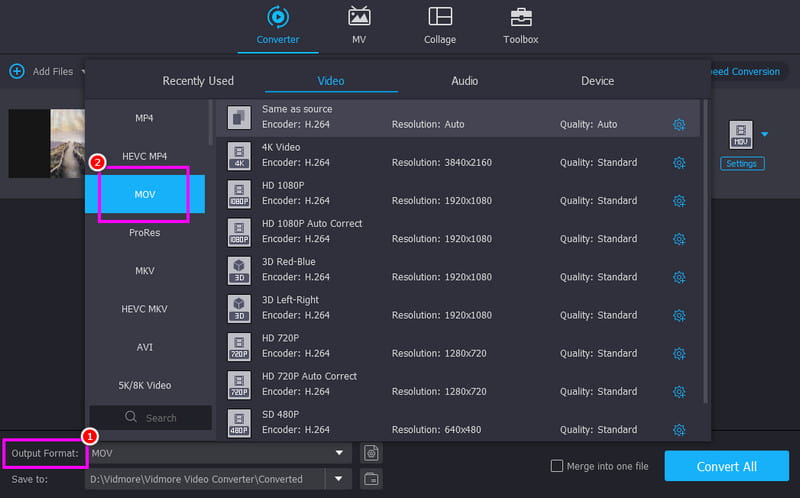
Step 3. Navigate to the Output Format section below and choose the MOV format. You can also pick your desired video quality.
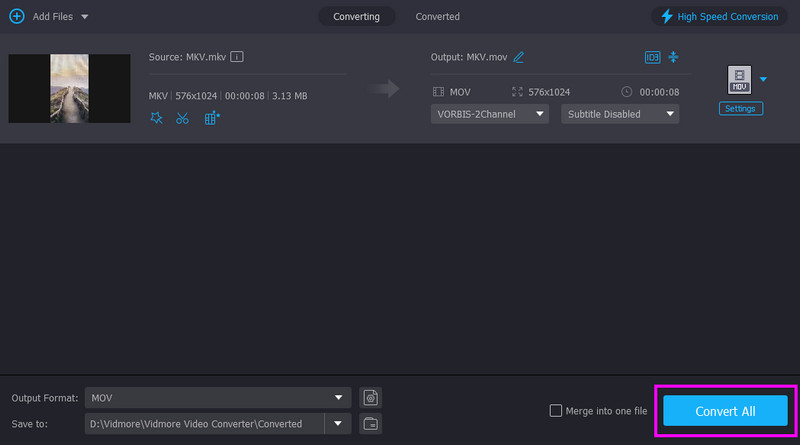
Step 4. To start the MKV to MOV conversion process, tap the Convert All button below.
Method 2. Change MKV to MOV Using Zamzar
Do you want to convert MKV to MOV online? In that case, you can try using Zamzar. This web-based converter allows you to transcode your files easily, thanks to its straightforward layout. The standout feature of this online converter is its simplicity. It is perfect for a one-off conversion when you don't want to clutter your hard drive with new software. You can even use this tool to convert other formats, such as HEVC to MP4, MKV to FLV, AVI to MP4, and more. It also lets you upload your files from various platforms, such as Google Drive, Dropbox, OneDrive, etc.
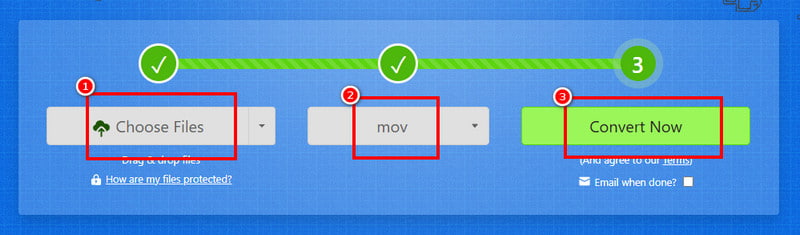
Step 1. Access Zamzar on your browser. After that, hit the Choose File to start uploading your MKV file.
Step 2. Then, tap the dropdown button to select MOV as your output format. Once done, hit Convert to begin turning MKV to MOV.
Step 3. Finally, click Download to start saving the MOV file on your device.
Drawbacks
- • The tool requires a fast and stable internet connection to perform well.
- • To access the overall feature, you have to use its paid version.
Method 3. Convert MKV to MOV Using Shutter Encoder
Shutter Encoder is a powerful, free video conversion tool, making it an excellent choice for converting MKV to MOV with high quality retention. It supports a wide range of codecs and offers advanced options like deinterlacing, batch conversion, and metadata handling, which are especially useful for professional workflows. Its versatility and precision make it a favorite among editors who need reliable conversions without cost. It can even convert more formats, including M4V to MP4, WMV to AVI, MOV to MP4, etc. With that, we can tell that this converter is reliable for all users.
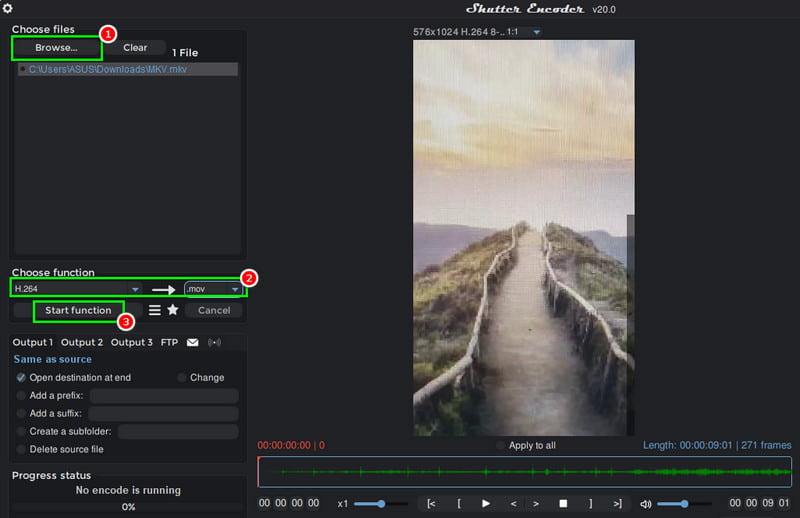
Step 1. First, download Shutter Encoder on your desktop and run it to begin the process.
Step 2. Then, hit Browse to add the MKV file from your computer. After that, go to the Choose Function and select H.264 and .mov.
Step 3. Finally, tap the Start Function to begin converting MKV to MOV format.
Drawbacks
- • The tool has a steep learning curve.
- • There are some occasional bugs or codec compatibility issues.
Method 4. Turn MKV to MOV Using FFmpeg
Another free MKV to MOV converter you can use on your computer is FFmpeg. It is a powerful, open‑source multimedia framework. The tool is widely recognized for its ability to handle virtually any video or audio format, making it an excellent choice for converting MKV to MOV. Plus, it offers precise control over codecs, compression, and metadata, ensuring high‑quality output tailored to your needs. Like other converters, it can also transcode other formats, including WMV to MP4, AVI to FLV, MOV to MKV, and more. Because it's command‑line based, FFmpeg is lightweight, fast, and highly customizable, ideal for both casual users and professionals who want reliable conversions without cost.
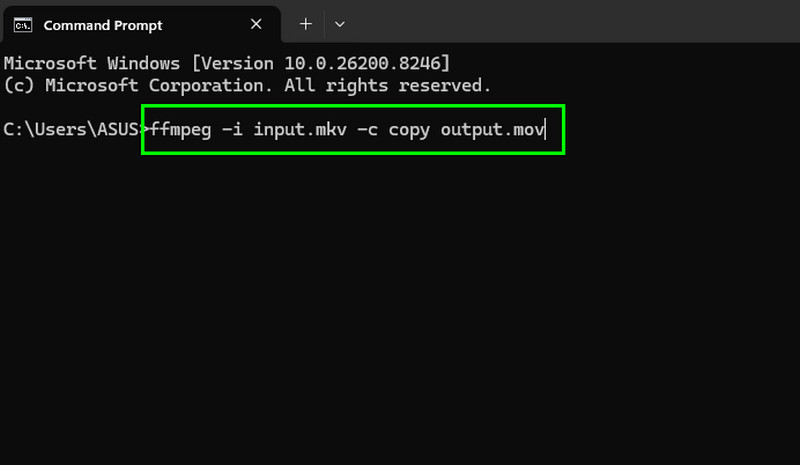
Step 1. Download and set up FFmpeg on your desktop. After that, launch CMD to start the process.
Step 2. Then, insert/type the command. The command is ffmpeg -i input.mkv -c copy output.mov.
Step 3. Finally, press the Enter key to start the conversion process. Once done, you can check the converted file in your computer folder.
Drawbacks
- • While powerful, the lack of a visual interface can be intimidating for beginners.
- • There is no graphical interface by default.
- • Advanced options can be overwhelming.
Part 3. The Ultimate Professional Video Converter
With more features and benefits than standard internet applications, Vidmore Video Converter stands out as a professional-grade option for converting MKV to MOV and numerous other formats. The converter offers unlimited conversions directly on your PC with quicker processing driven by hardware acceleration. Vidmore uses your computer's GPU to do the heavy lifting, meaning a 2GB movie converts in seconds rather than minutes. It also includes AI upscaling, metadata editing, and compression, as well as video editing tools like trim, crop, watermark, and effects.
Advantages of Vidmore Video Converter
- • It has a faster conversion speed.
- • Your files never leave your device, ensuring total privacy.
- • It can offer various editing tools for better video improvement.
- • Converting multiple files at once is easy and smooth.
Part 4. FAQs about MKV to MOV Free
Are online MKV to MOV converters safe?
It depends on the tools you use. If you want a safe converter, you can use Convertio, CloudConvert, Zamzar, and CloudConvert. These tools ensure that you can get the result you want without worrying about your privacy and security.
Do MOV files play better on Apple devices than MKV?
Absolutely. Since MOV is Apple's native format, you'll notice much less strain on your CPU during playback and editing.
What is the most reliable MKV to MOV converter?
If you want a reliable and powerful converter, it would be nice to access Vidmore Video Converter. This program ensures that you can achieve the result you need with a better video quality, and faster conversion speed, making it ideal for all users.
Conclusion
If you want to convert MKV to MOV for free, there is no doubt that all of the methods mentioned above are the most effective ones. Thus, choose your preferred converter and start the MKV to MOV conversion process. Additionally, if you want a powerful converter that can give you an instant conversion speed, look no further than Vidmore Video Converter. This converter can give you a smooth and fast conversion speed, various editing features, and satisfying video quality, making it a go-to converter for users.